6 Myths About Dunning Emails That Cost You Customers

Most SaaS founders treat dunning emails as an afterthought. A failed payment triggers an automated message, the customer either updates their card or they don't, and life goes on. Except it doesn't. The beliefs baked into that casual approach are quietly bleeding your business dry.
Dunning email myths persist because they sound reasonable on the surface. “Just send a reminder” feels like enough. “Don't bother people too much” seems polite. But when you look at the data, these assumptions don't hold up. They lead to recovery rates 30-50% lower than what's achievable with a well-designed dunning strategy.
Let's break down the six most common dunning email myths and replace them with what actually works.
Myth 1: One Reminder Email Is Enough
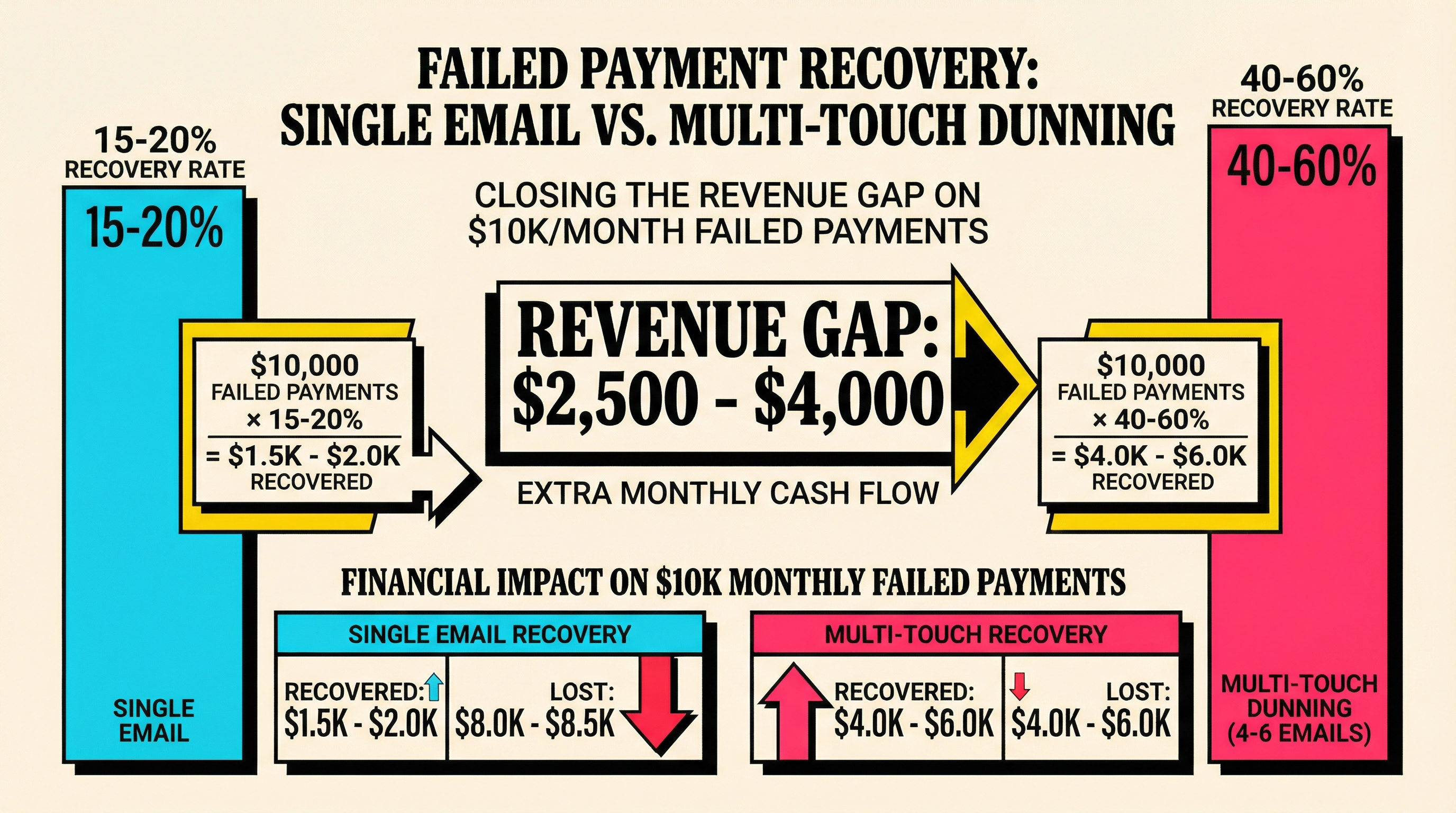
This is the most expensive myth in SaaS billing. A single “your payment failed” email recovers roughly 15-20% of failed payments. That sounds okay until you realize a proper multi-touch sequence recovers 40-60%.
The math is straightforward. If you have $10,000 in monthly failed payments and send one email, you recover $1,500-$2,000. A four-to-six email sequence over 14 days? You're looking at $4,000-$6,000 recovered. That's $2,000-$4,000 per month left on the table from a single missing email.
Why does this happen? Failed payments aren't always the customer's fault. Cards expire. Banks flag legitimate transactions. Temporary holds clear after a few days. Your first email might land while the issue is still unresolved. The second or third email catches the customer after the problem has fixed itself, or after they've had time to act.
What to do instead: Build a sequence of 4-6 emails spread across 14-21 days. The first email should go out within hours of the failure. Space subsequent emails at days 3, 7, 10, and 14. Each email should have a slightly different angle: the first is informational, the middle ones add urgency, and the final one warns about service interruption.
If you're not sure what your current recovery rate looks like, running a churn audit on your Stripe account can surface exactly how much revenue you're losing to incomplete dunning flows.
Myth 2: Dunning Emails Should Sound Urgent and Alarming
Some founders write dunning emails like collection notices. “URGENT: Your payment has failed! Update your card immediately or lose access!” They assume fear motivates action.
It doesn't. At least, not the action you want.
Aggressive dunning emails trigger one of two responses: the customer feels annoyed and considers canceling (even if they were going to update their card), or they ignore the email entirely because it reads like spam. Either way, you lose.
Research from subscription billing platforms consistently shows that friendly, helpful dunning emails outperform aggressive ones by 10-25% in recovery rates. The reason is simple: most failed payments are involuntary. The customer didn't choose to stop paying. Their card expired, their bank flagged the transaction, or they hit a temporary spending limit. They're not dodging you. They need help.
What to do instead: Write dunning emails the way you'd message a friend whose card bounced at dinner. “Hey, looks like your payment didn't go through. Here's a quick link to update your card.” Keep it short, friendly, and action-oriented. Save the urgency for the final email in your sequence, and even then, frame it as “we don't want you to lose access” rather than “PAY NOW OR ELSE.”
The tone should match what you'd expect from a product you love. Think about how you'd feel getting a dunning email from your favorite tool. That's the bar.
Myth 3: Timing Doesn't Matter, Just Send It When It Fails
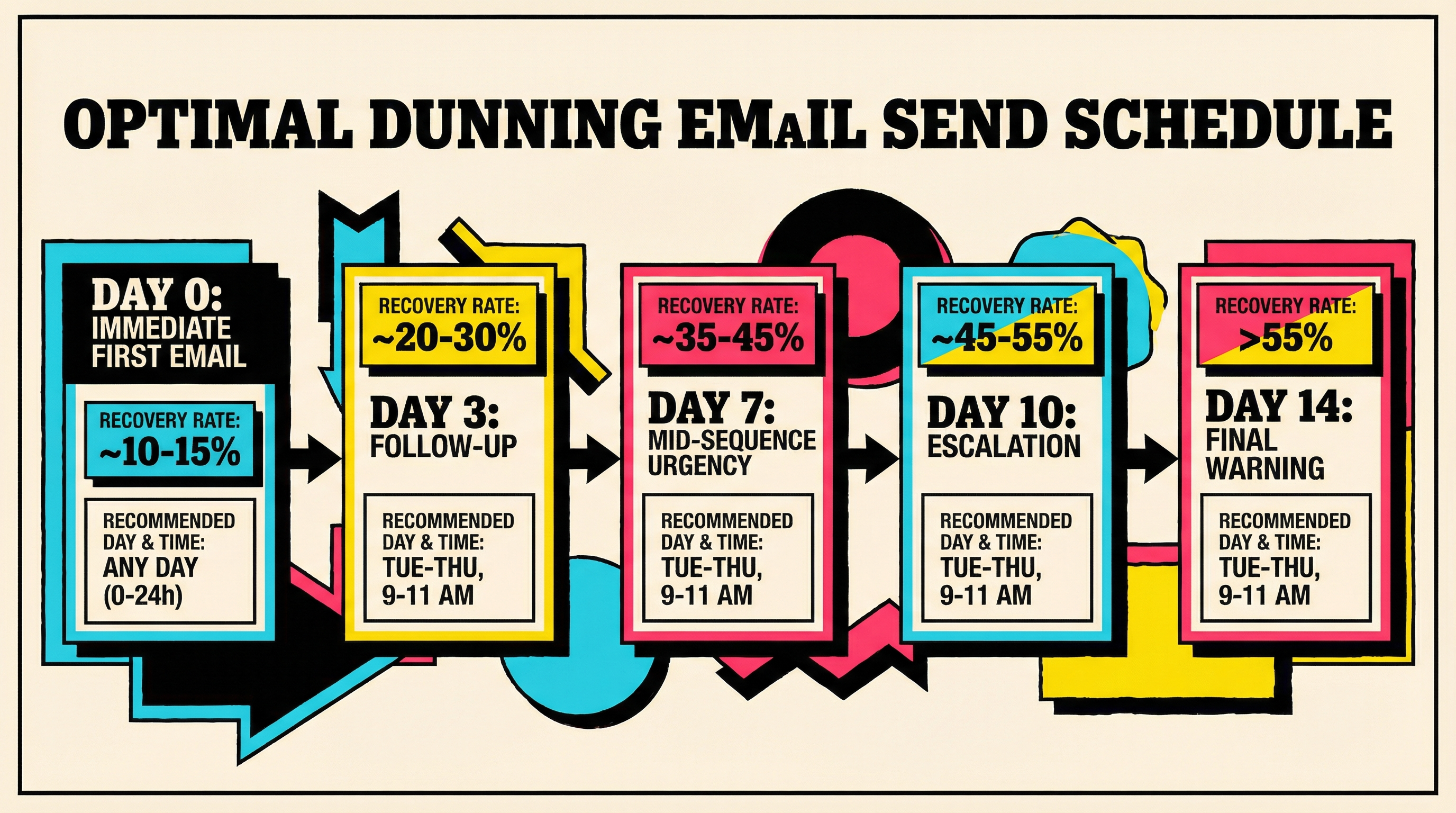
Many SaaS teams fire off a dunning email the moment Stripe reports a failed charge and call it done. The timing of that first email is fine. The problem is what comes after: nothing, or everything bunched together.
Timing affects dunning email performance in two critical ways.
First, the day of the week matters. Emails sent Tuesday through Thursday see 15-20% higher open rates than weekend emails. If your billing cycle causes most failures on a Sunday, your first automated email is landing in a graveyard. Consider delaying non-critical follow-ups to hit inboxes during the work week.
Second, the spacing between emails matters more than most founders think. Too close together (daily emails) feels aggressive and trains customers to ignore you. Too far apart (weekly) gives customers time to forget and churn. The sweet spot for most SaaS products is 3-4 days between touches.
There's also the time-of-day factor. Dunning emails sent between 9-11 AM in the customer's local timezone see significantly better engagement. An email at 3 AM? It's buried under everything else by morning.
What to do instead: Map your dunning sequence to both calendar timing and the customer's timezone. If your billing tool supports timezone-aware sending, use it. If not, default to sending follow-ups at 10 AM UTC on weekdays. Space your emails 3-4 days apart, with the first one going out immediately (speed matters for that first touch) and subsequent ones optimized for engagement windows.
Myth 4: The Same Email Works for Every Customer
Sending identical dunning emails to a $9/month solo user and a $999/month enterprise account is one of the most common mistakes in SaaS billing. The stakes are completely different, and the messaging should reflect that.
A $9/month customer who churns is a papercut. A $999/month customer who churns is a wound. Yet most dunning systems treat them identically: same template, same sequence, same level of effort.
Beyond pricing tiers, consider these segmentation opportunities:
- Customer tenure. A customer who's been with you for two years deserves a different tone than someone in their first month. Long-term customers are more likely to update their card if you remind them of the value they've gotten. New customers might need reassurance that updating is safe and easy.
- Plan type. Annual customers whose renewal payment fails need more urgent, personalized outreach than monthly subscribers. The revenue at risk is 12x higher.
- Payment history. A customer whose first-ever payment failed is a different situation from someone who's had three consecutive failures. The first might be a card issue; the third might be an intentional soft cancel.
- Failure reason. Stripe's decline codes tell you exactly why a payment failed. An expired card needs a different message (“your card on file expired, here's how to update”) than insufficient funds (where a gentler, less specific approach respects the customer's privacy).
What to do instead: At minimum, create two dunning tracks: one for high-value customers (personalized, possibly with a human touch for enterprise accounts) and one for standard accounts. If you can segment by failure reason, even better. A customer with an expired card just needs a clear “update your card” CTA. A customer with a “do not honor” decline needs a softer message acknowledging the issue might be on their bank's end.
Myth 5: Dunning Is Only About Email
Email is the default dunning channel, and it should be your primary one. But treating it as your only channel is leaving recovery on the table.
The average professional receives 120+ emails per day. Your dunning email is competing with newsletters, promotions, team threads, and spam. Open rates for transactional emails hover around 40-50%, which means half your customers might never see your recovery message.
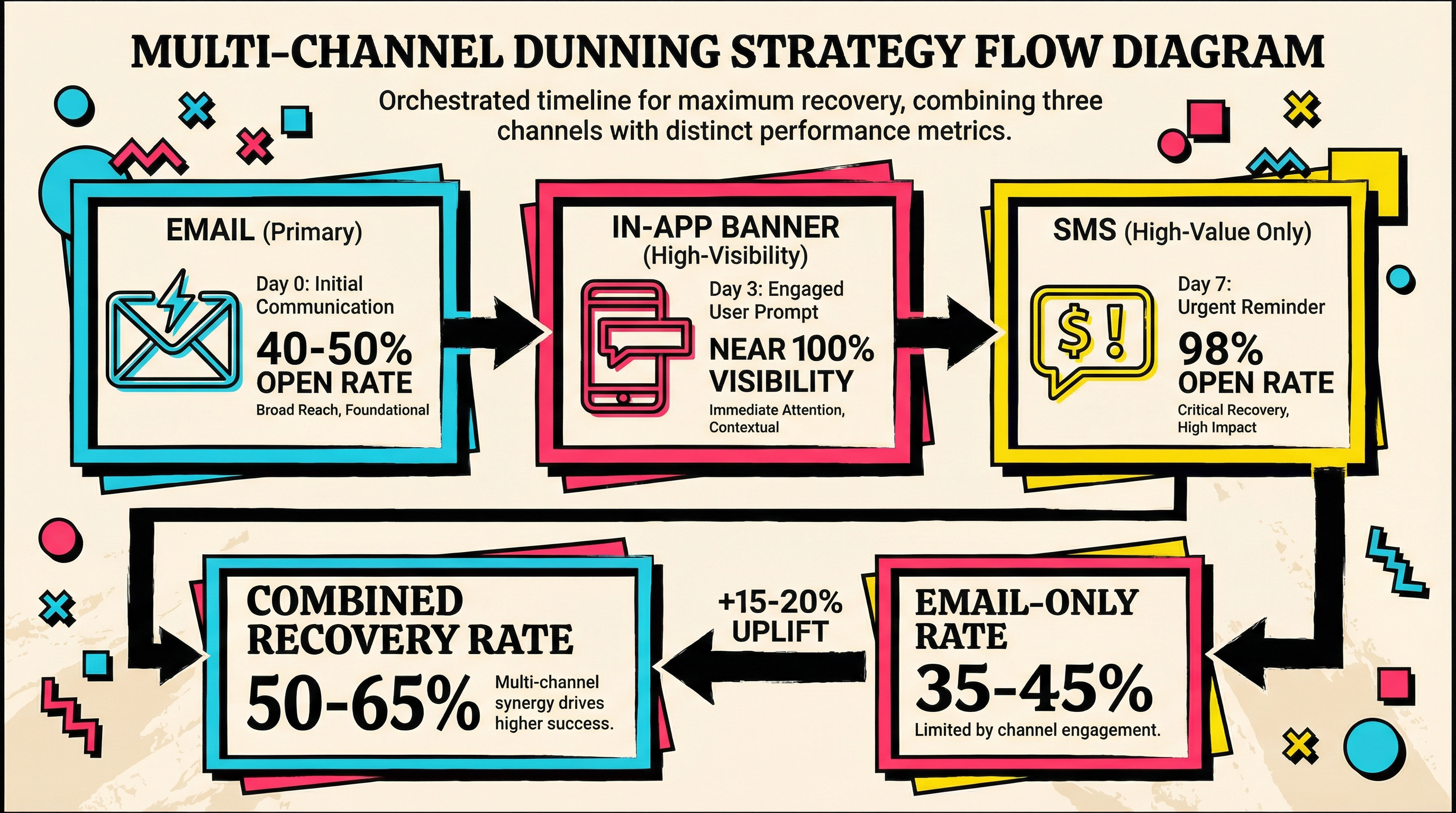
Here's what a multi-channel dunning approach looks like:
- In-app notifications. If the customer is actively using your product, show a non-intrusive banner: “Your payment needs attention. Update your card to keep your account active.” This catches customers who missed or ignored the email. In-app notifications have near-100% visibility for active users.
- SMS (for high-value accounts). A short text message can cut through inbox noise. “Hi [Name], your [Product] payment didn't go through. Update here: [link].” SMS open rates are 98%. Use this sparingly and only for customers who've opted in, but for high-value accounts, it's worth it.
- Push notifications. If you have a mobile app, a push notification is another high-visibility touchpoint.
- Account page warnings. Display a persistent but polite banner on the customer's dashboard. Even if they ignore every other channel, they'll see this when they log in.
The key is orchestration, not bombardment. Don't fire all channels simultaneously. Layer them: email first, then in-app, then SMS for high-value accounts that haven't responded after 7 days.
What to do instead: Start with email (it's the easiest to implement), but add at least one secondary channel. In-app notifications are the lowest-effort addition with the highest impact. If you're on Stripe, you can trigger in-app banners based on subscription status without much engineering work.
Myth 6: Once the Grace Period Ends, Cancel and Move On
The most destructive dunning myth is that the process ends when the grace period expires. Customer didn't update their card in 14 days? Cancel the subscription, remove access, move on.
This is where SaaS businesses hemorrhage revenue they could save.
A significant percentage of customers who are “canceled” due to failed payments will resubscribe if contacted 30, 60, or even 90 days later. These aren't customers who decided to leave. They're customers who forgot, got busy, or didn't realize their service was interrupted. Industry data suggests 10-15% of involuntarily churned customers can be won back with a simple reactivation email.
Think about it from the customer's perspective. They signed up for your product because they needed it. A failed payment didn't change that need. If you reach out a month later with a friendly “we noticed you left, want to come back?” message, many will say yes.
The win-back sequence should be separate from your dunning sequence. After cancellation, wait 7-14 days, then send a “we miss you” email with a one-click reactivation link. Follow up at 30 and 60 days. Some companies offer a small discount or extended trial to sweeten the deal, though this isn't always necessary.
You can check your payment recovery benchmarks to see how your current process compares to industry standards and identify where a win-back sequence could make the biggest impact.
What to do instead: Build a post-cancellation win-back sequence. Three emails over 60 days is a solid starting point. Make reactivation frictionless: a single link that takes the customer straight to a card update page with their account intact. Don't make them re-enter their information or re-onboard. The easier you make it, the more customers you'll recover.
The Real Cost of Dunning Myths
Let's put numbers to this. A typical SaaS business with $50,000 MRR loses 3-5% of revenue to failed payments monthly. That's $1,500-$2,500 in at-risk revenue every month.
With a single generic dunning email (Myth 1 + Myth 4), you recover maybe 20%. That's $300-$500 saved.
With a properly designed, multi-touch, segmented, multi-channel dunning system, you recover 50-65%. That's $750-$1,625 saved.
The difference? $450-$1,125 per month. That's $5,400-$13,500 per year. For a bootstrapped SaaS, that's meaningful revenue recovered by fixing a few emails.
And this scales. At $200,000 MRR, the gap between poor and good dunning is $21,600-$54,000 annually. At $500,000 MRR, you're looking at six figures in recoverable revenue.
Building a Better Dunning Strategy
Here's a practical checklist for fixing your dunning setup today:
- Audit your current flow. How many emails do you send? What's the recovery rate? If you don't know, find out. You can't improve what you don't measure.
- Expand to 4-6 emails over 14-21 days with varied messaging and tone.
- Segment by at least two criteria: customer value and failure reason.
- Add one non-email channel, starting with in-app notifications.
- Optimize send timing for weekday mornings in your customers' timezones.
- Build a win-back sequence for customers who churn despite your dunning efforts.
- Measure everything. Track open rates, click rates, and most importantly, recovery rates per email in the sequence.
Most SaaS founders spend weeks optimizing their pricing page for an extra 2% conversion lift while ignoring dunning emails that could recover 10-30% more failed payments. The ROI on fixing your dunning strategy is almost always higher than whatever growth hack you're considering.
If you're not sure where your dunning process stands, run a free churn audit to see exactly how much revenue is slipping through the cracks and where to focus first.
Related Posts
The SaaS Billing Compliance Checklist for 2026
Stripe Do Not Honor Recovery: What SaaS Teams Should Do Next

7 Failed Payment Segments Every Stripe Team Should Track
How healthy is your Stripe account?
Get a free churn health report. Find pending cancellations, failed payments, and expiring cards putting your MRR at risk.
Run Free Audit