7 Reasons Customers Don't Update Their Payment Methods
When a customer's card expires or gets reissued, your subscription billing fails. You send them an email asking them to update their payment method. Simple, right?
Except they don't do it. According to industry data, between 20% and 40% of customers who receive payment update requests never act on them. That's not laziness. There are real, predictable reasons why customers ignore your requests, and understanding those reasons is the first step to recovering that revenue.
Here are seven reasons your customers aren't updating their payment methods, and what you can do about each one.
1. They Don't Know Their Payment Failed
This is the most common reason by far. Most customers don't monitor their subscription billing. They signed up months ago, the charge goes through automatically, and they never think about it again. When their card expires or gets replaced by their bank, the first failed charge happens silently.
If your only notification is a single email with a subject line like "Payment failed," it probably landed in promotions or spam. The customer has no idea anything is wrong.
What to fix: Send multiple notifications across different channels. Email is table stakes, but consider in-app banners, push notifications, or even SMS for high-value accounts. The first email should go out within hours of the failure, not days. Make the subject line specific: "Your subscription to [Product] needs attention" performs better than generic payment failure language.
2. Your Update Flow Has Too Much Friction
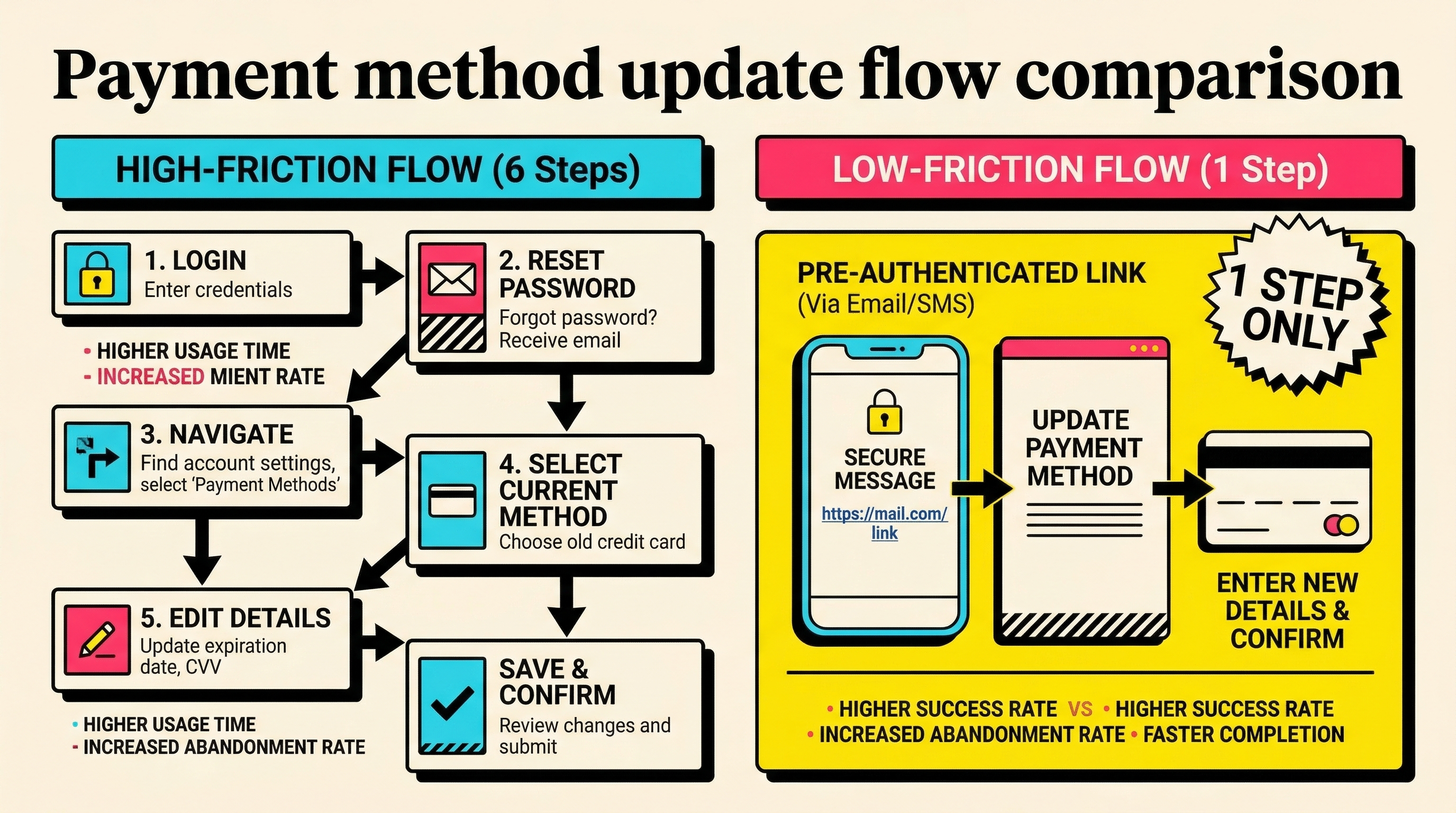
A customer opens your email, clicks the update button, and lands on a login page. They don't remember their password. They click "forgot password," wait for the reset email, create a new password, log in, navigate to billing settings, and finally update their card.
That's six steps when it should be one. Every additional step in the update process loses you customers. Data from subscription platforms shows that pre-authenticated update links convert 3x to 5x better than flows that require login.
What to fix: Use Stripe's customer portal or hosted payment method update pages. Generate tokenized, pre-authenticated links that drop the customer directly into a card update form. No login required. One click, enter new card details, done. Stripe's billing_portal session API makes this straightforward.
3. They've Already Mentally Cancelled
Here's the uncomfortable truth: some customers who don't update their payment method have already decided to leave. The failed payment is their exit. They're using the expired card as a passive cancellation mechanism because your product doesn't have a clear cancel button, or because they feel guilty about cancelling directly.
Research suggests that 15% to 25% of involuntary churn overlaps with voluntary churn intent. These customers were already on the fence.
What to fix: You can't save every one of these customers, but you can save some. Include a "still interested?" angle in your recovery emails. Offer a pause option instead of forcing a binary stay-or-go decision. And make your cancellation flow easy to find. Counterintuitively, making it easy to cancel reduces passive churn because customers who want to stay don't feel trapped, and those who want to leave do it explicitly instead of ghosting.
4. They Don't Trust the Email
Phishing has made people suspicious of any email that asks them to "update your payment information." Your perfectly legitimate dunning email looks identical to the hundreds of scam emails your customer ignores every month.
This is especially true if your email comes from a noreply@ address, uses a subdomain they don't recognize, or lacks obvious branding. Customers who are even mildly security-conscious will delete it without clicking.
What to fix: Brand your emails heavily. Use your product name in the sender name, not just the from address. Include specific details the customer would recognize: their plan name, their company name, the last four digits of their card. Add a line like "You can also update your payment method by logging into [product] directly." Give them an alternative path that doesn't require clicking a link in an email. And never, ever use link shorteners in payment-related emails.
5. The Timing Is Wrong
Your dunning email arrives at 3 AM on a Saturday. Or during a holiday week. Or while the customer is traveling and doesn't have their new card handy. Timing failures are responsible for a significant percentage of unactioned payment update requests.
Even when the timing isn't terrible, there's a recency problem. If you wait three days after the failed payment to send the first notification, the customer has already moved on mentally. The urgency evaporates.
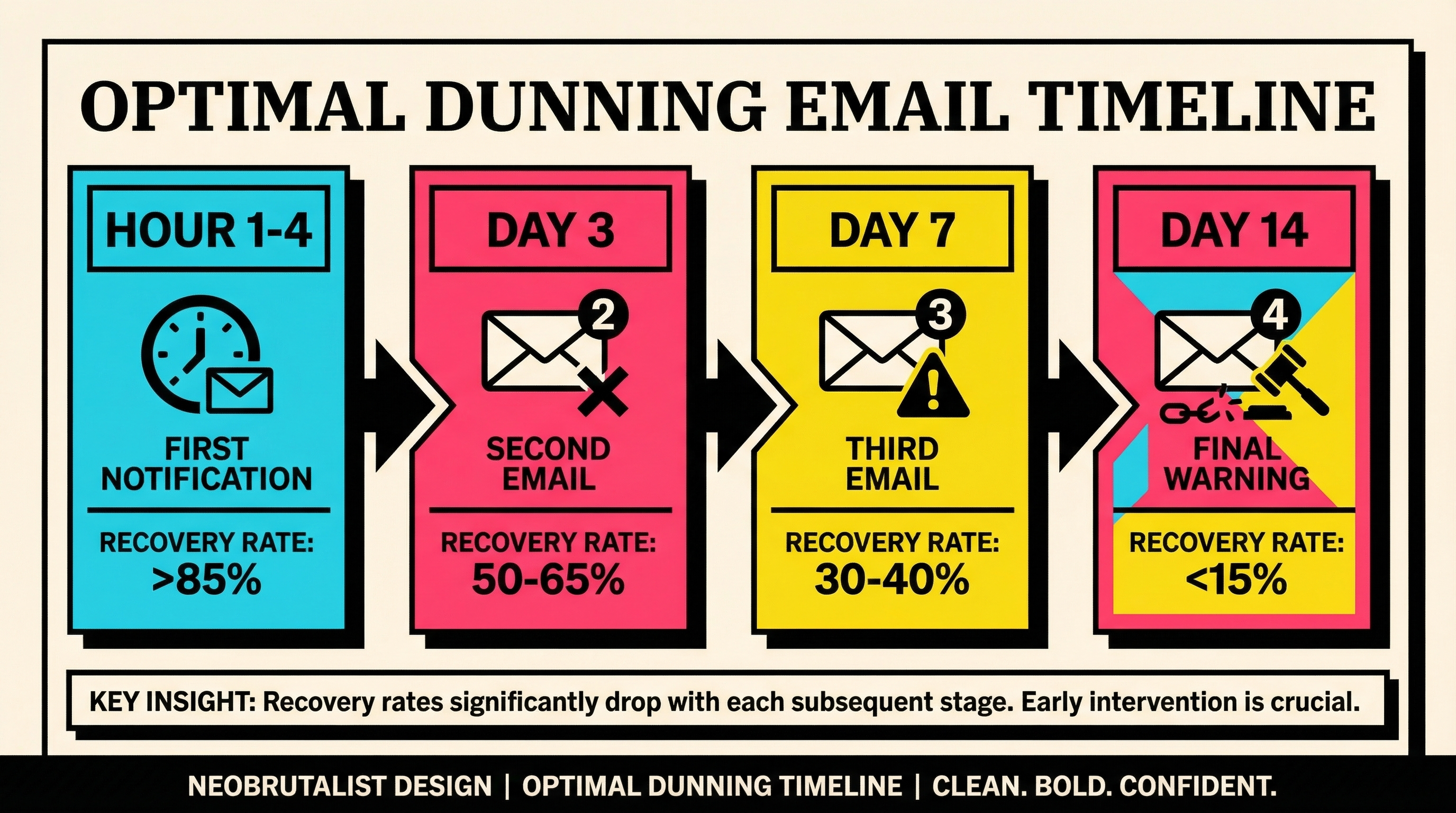
What to fix: Send the first notification within 1 to 4 hours of the failure. Schedule follow-ups for business hours in the customer's timezone (not yours). Retry the payment at different times of day and different days of the week, as some decline codes are temporary and resolve when the issuer's systems are less loaded. Space your emails: day 1, day 3, day 7, day 14. Front-load the urgency.
6. They Think It Will Resolve Itself
Many customers have experienced temporary card issues before. Their bank flagged a charge, they called to authorize it, and the next charge went through fine. When they get your failed payment email, they assume the same thing will happen again. "It'll sort itself out."
This is especially common with "soft" decline codes like do_not_honor or try_again_later, where the issue genuinely might be temporary. The problem is that customers don't understand the difference between a temporary hold and a card that needs replacing.
What to fix: Be specific in your messaging about what happened. Instead of "Your payment failed," say "Your Visa ending in 4242 was declined because it has expired. Please update your card to continue your subscription." When customers understand the specific reason, they're more likely to act. Include the decline code explanation in plain language. "Your bank declined the charge" is vague. "Your card expired in February" is actionable.
7. They Forgot They Had the Subscription
Subscription fatigue is real. The average consumer has 12 active subscriptions. The average business buyer has even more SaaS tools on their card. When a payment fails for a product they use infrequently, updating the payment method simply isn't a priority.
This is different from reason 3 (mental cancellation). These customers might genuinely value your product. They just forgot about it, and the cognitive cost of updating a card for something they use twice a month feels disproportionate.
What to fix: Your recovery emails need to remind customers why they subscribed. Include a usage summary: "You've used [feature] 14 times this month" or "Your team has [X] active projects." Give them a reason to care enough to spend 30 seconds entering new card details. If usage is genuinely low, consider offering a downgrade path instead of pushing for a full renewal. Getting them on a cheaper plan beats losing them entirely.
The Common Thread: Friction, Timing, and Communication
Every one of these seven reasons comes down to three things. Either the process is too hard (friction), the message arrives at the wrong time (timing), or the customer doesn't understand what happened or why they should care (communication).
The good news is that all three are fixable without changing your product. Better dunning emails, pre-authenticated update links, smarter retry timing, and clearer communication can recover 30% to 50% of otherwise-lost involuntary churn.
Here's a prioritized action list:
- Implement pre-authenticated update links. This is the single highest-impact change. No login required.
- Send the first notification within hours, not days. Speed matters more than perfect copy.
- Use multiple channels. Email plus in-app plus SMS for high-value accounts.
- Be specific about the failure reason. "Your card expired" beats "payment failed."
- Include usage data in recovery emails. Remind customers why they subscribed.
- Space your retries and follow-ups intelligently. Different times, different days.
- Offer alternatives to full cancellation. Pause, downgrade, or skip a billing cycle.
Stop Losing Revenue to Fixable Problems
Most SaaS businesses treat failed payments as an unavoidable cost of doing business. They're not. Every customer who doesn't update their payment method is telling you something about your recovery process, and the fix is almost always about reducing friction and improving communication.
If you're not sure where your biggest payment recovery gaps are, run a free churn audit to see exactly where your Stripe account is leaking revenue and which customers you can still recover.
Related Posts

7 Failed Payment Segments Every Stripe Team Should Track
The Anatomy of a Failed Payment: What Actually Happens
How healthy is your Stripe account?
Get a free churn health report. Find pending cancellations, failed payments, and expiring cards putting your MRR at risk.
Run Free Audit