How to Analyze Your Payment Recovery Funnel

Most SaaS teams track failed payments. Far fewer track the payment recovery funnel end to end.
That is a mistake. If you only look at your final recovery rate, you miss where revenue is actually leaking. You do not know whether the problem is retry timing, weak dunning emails, low payment method update completion, or a brutal drop-off after customers hit your billing page.
A payment recovery funnel gives you a much sharper view. It breaks recovery into stages you can measure, benchmark, and improve. Once you do that, you stop treating involuntary churn like bad luck and start treating it like an operational system.
For Stripe-based SaaS, the core question is simple: out of every 100 failed payments, how many eventually get recovered, and where do the others die?
This guide walks through how to analyze your payment recovery funnel, which stages matter most, what healthy conversion ranges often look like, and how to turn funnel analysis into retained MRR.
What a payment recovery funnel actually is
A payment recovery funnel is the sequence a customer moves through after a subscription payment fails.
A practical funnel usually looks like this:
- Payment fails.
- Customer enters a retry or dunning workflow.
- Customer sees or receives a recovery prompt.
- Customer clicks through to update payment details.
- Customer completes the payment method update.
- A retry succeeds and the subscription stays active.
That may sound obvious, but most teams blend these steps together. They know 500 payments failed and 220 were eventually recovered, but they cannot answer questions like:
- How many customers actually saw a recovery message?
- Which email in the sequence drove the most updates?
- How many people clicked through but abandoned the billing page?
- Which decline reasons recover quickly and which almost never recover?
If you cannot answer those questions, you cannot improve your payment recovery funnel with confidence.
Why funnel analysis matters more than a single recovery rate
Your overall recovery rate is a lagging summary metric. It tells you the result, not the cause.
Imagine two companies both recover 45% of failed payments.
- Company A gets plenty of clicks from dunning emails, but its billing page converts poorly.
- Company B has a strong billing page, but weak outreach and terrible retry timing.
Same top-line result. Completely different problems.
That is why funnel analysis matters. It helps you isolate the exact stage where recovery breaks down.
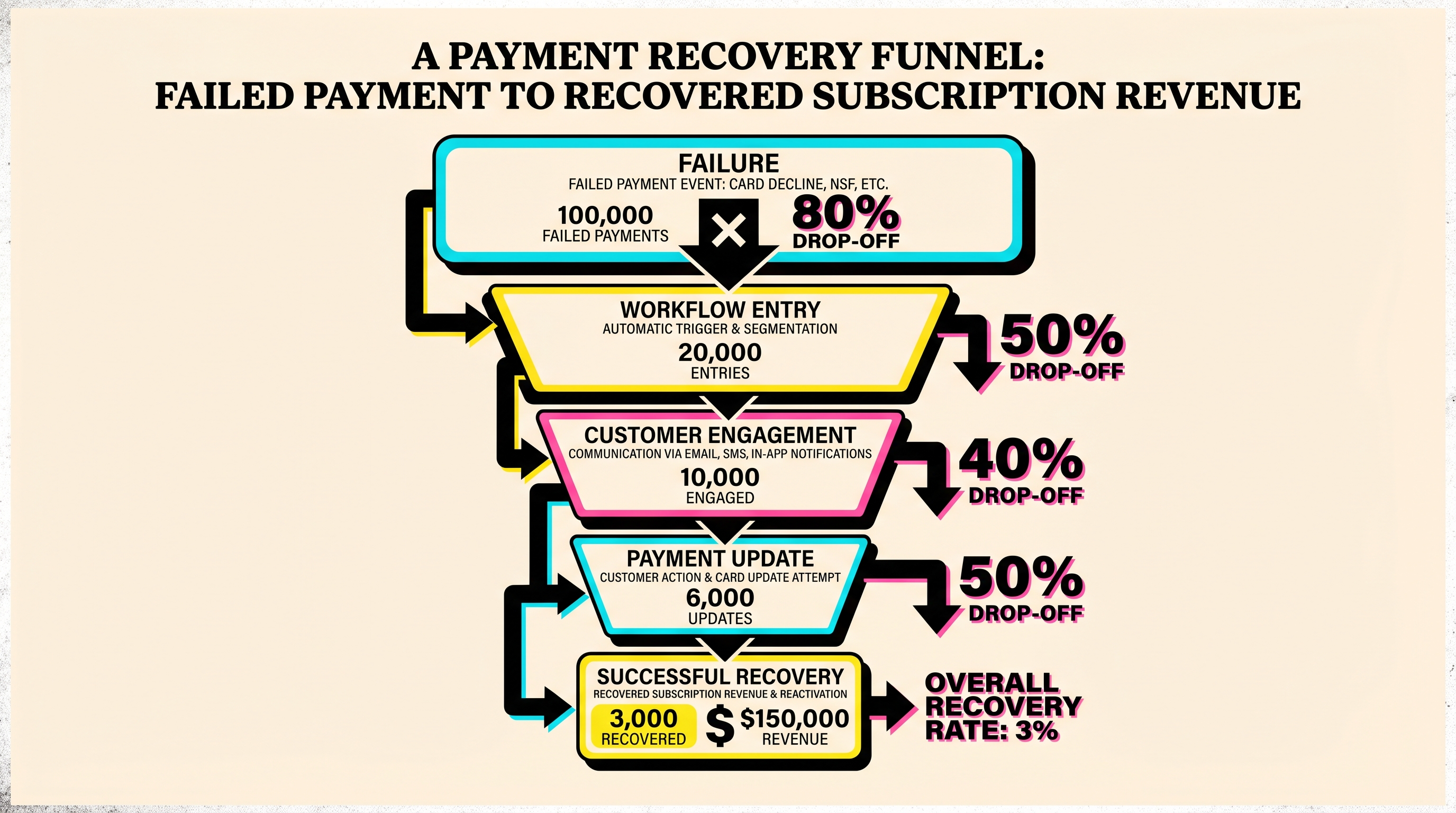
In practice, analyzing the payment recovery funnel usually reveals one of four ugly truths:
- You are not getting enough customers into the funnel quickly enough.
- Customers see the prompt but do not click.
- Customers click but do not finish the payment update.
- The payment update succeeds, but your retry logic is still weak.
Each problem needs a different fix. Treating them all as generic churn reduction is lazy and expensive.
The five stages you should measure
You do not need a 40-metric dashboard. Start with five stages and one denominator: total failed payments.
1. Failed payments
This is the top of the funnel. Count all failed subscription collection attempts in the period you are analyzing.
Break them down by:
- decline reason
- plan type or customer segment
- geography if relevant
- first failure vs repeated failure
- payment method type
This matters because not all failures have the same recovery potential. An expired card behaves very differently from insufficient funds.
2. Recoverable failures entered into workflow
Some failures should move into retries and dunning immediately. Others should be excluded, deprioritized, or handled differently.
For example:
- soft declines usually belong in an automated retry path
- expired cards need update prompts fast
- hard fraud or stolen card cases may need a different treatment
If only 70 out of 100 failed payments actually enter a meaningful workflow, that gap is not random. It is a funnel leak.
3. Recovery prompt engagement
This is where you measure whether customers actually engage with your recovery messaging.
Typical signals include:
- dunning email opens
- dunning email clicks
- in-app banner clicks
- hosted billing page visits
This stage tells you whether your messaging and timing are working. If engagement is weak, the rest of the funnel does not matter because customers are not even reaching the point where they can fix the issue.
4. Payment method update completion
This is one of the most important and most ignored stages in the payment recovery funnel.
A customer can click your email, land on the billing page, fully intend to pay, and still drop out because the update experience is clunky, confusing, or feels risky.
Watch for:
- click-to-page-view rate
- page-view-to-update-start rate
- update-start-to-update-complete rate
A lot of teams assume billing page friction is minor. Usually it is not.
5. Successful recovery
This is the bottom of the funnel: the payment actually clears, the subscription remains active, and revenue is retained.
That success can come from:
- an automated retry succeeding
- a newly updated card being charged successfully
- a customer manually paying through a billing link
Your bottom-line payment recovery funnel conversion rate is:
Recovered payments / total failed payments
But by the time you get here, you should already know which upstream stage deserves blame or credit.
A simple way to calculate your funnel
Here is a clean example for one month:
- 1,000 subscription payments fail
- 820 enter your recovery workflow
- 420 customers engage with a recovery prompt
- 260 complete a payment method update or reach a valid retry state
- 230 payments recover successfully
That gives you:
- Workflow entry rate: 82%
- Engagement rate: 42% of failures, or 51% of workflow entrants
- Update completion rate: 26% of failures, or 62% of engaged customers
- Final recovery rate: 23%
That 23% headline number is useful. But the real story is clearer when you look at the middle:
- Workflow coverage is decent.
- Engagement is weak.
- Billing completion is okay.
- Bottom-of-funnel success is not the main bottleneck.
Without a funnel view, you might waste time tweaking retry timing when the bigger problem is that your dunning emails are not getting enough action.
What healthy ranges often look like
Benchmarks vary by product, customer base, ticket size, and payment mix, so do not get religious about exact percentages. Still, rough operating ranges are useful.
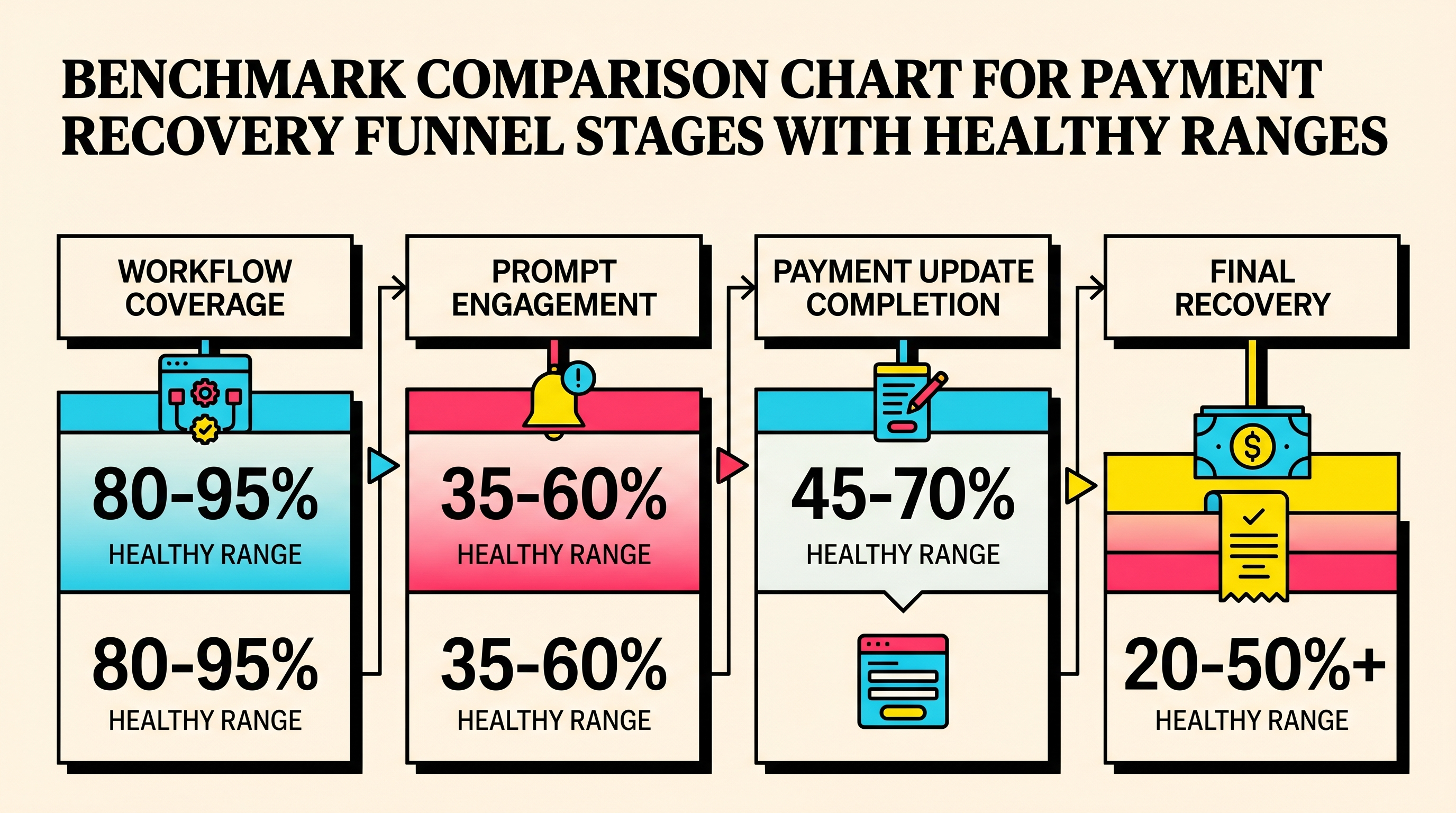
For a reasonably healthy payment recovery funnel in SaaS, you often want to see something like:
- Workflow coverage: 80% to 95% of relevant failed payments
- Prompt engagement: 35% to 60% of workflow entrants
- Payment update completion: 45% to 70% of engaged users
- Final recovery rate: 20% to 50%+ of all failed payments, depending on decline mix and sophistication
Those ranges are not a law of physics. They are directional.
If your engagement rate is 12%, that is probably a messaging or timing problem.
If engagement is healthy but update completion is 18%, your billing flow probably sucks.
If both are good but recoveries stay low, the issue may be retry logic, decline mix, or weak fallback handling.
Segment your funnel or you will fool yourself
An unsegmented funnel is how teams talk themselves into fake progress.
Say your overall final recovery rate improves from 31% to 36%. Sounds good. But then you segment the data and find out:
- low-value monthly customers improved a lot
- annual contracts barely moved
- expired cards recover well
- do-not-honor declines remain terrible
- Europe performs better than the US because payment method mix is different
That is the kind of nuance that matters.
At minimum, segment your payment recovery funnel by:
Decline reason
This is mandatory. Different decline categories need different workflows. Generic analysis across all failures hides the truth.
For example, soft declines often benefit from retry logic and timing optimization. Expired cards depend more on frictionless update flows. Fraud-related failures may be unrecoverable and should not distort your expectations.
Customer value
A customer paying $20 per month and one paying $2,000 per month should not always get the same treatment. High-value accounts may justify faster escalation, personal outreach, or a different messaging cadence.
Payment method and geography
Payment behavior varies across markets and payment rails. If you support more than cards, segment hard. ACH, bank debit, and card flows do not behave the same.
First-time vs repeat failure
A first failed payment can often be recovered with light-touch messaging. Repeat failures are a red flag. They may require a more direct experience or stricter offboarding logic.
The bottlenecks you are most likely to find
When teams finally analyze their payment recovery funnel properly, the same issues keep showing up.
Weak or delayed dunning
The first outreach goes out too late, the copy is vague, or the call to action is buried. Customers are willing to fix the issue, but you are making them work too hard to understand what happened.
Fixes:
- send the first recovery prompt fast
- make the CTA painfully clear
- say exactly what happens if nothing changes
- test shorter, more direct copy
Billing page friction
This is the silent killer. Customers click, arrive, and then bounce.
Common problems:
- too many steps
- confusing login requirements
- poor mobile experience
- weak trust signals
- broken handoff between email and billing page
If you want a better payment recovery funnel, obsess over the update flow like it is a checkout flow. Because it is.
Retry logic that ignores context
Blindly retrying everything on a fixed schedule is not strategy. It is wishful thinking.
Retry behavior should reflect what actually failed. Generic schedules often underperform compared with reason-aware logic. This is especially true for funds-related failures versus permanent card issues. If you have not reviewed your retry design recently, compare it against your Stripe setup and related recovery paths, including guides like how to set up a payment recovery flow in Stripe.
Missing multi-channel recovery
If email is your only recovery surface, you are leaving money behind. In-app prompts, billing portal reminders, and account notices can catch customers who ignore inbox nudges.
Not every company needs a complex multi-channel machine. But many teams underuse the channels they already control.
How to turn funnel analysis into action
The point of a payment recovery funnel is not to build a prettier dashboard. The point is to make better decisions.
Use this sequence:
- Measure the funnel monthly and weekly for trend visibility.
- Find the largest percentage drop between stages.
- Segment that drop by decline type, customer value, and channel.
- Form one clear hypothesis.
- Run one focused improvement at a time.
Examples:
- Low click-through from first dunning email: test a clearer subject line and CTA.
- High billing-page abandonment: simplify the update flow and reduce required steps.
- Strong updates but weak final recovery: review retry timing and payment method handling.
- Bad performance on specific decline reasons: create dedicated workflows instead of one generic sequence.
This is boring operational work. Good. Boring operational work is where a lot of retained revenue lives.
The dashboard that is actually worth building
If you are building a weekly recovery dashboard, keep it lean. Track:
- total failed payments
- total recovered payments
- final recovery rate
- workflow coverage rate
- engagement rate by channel
- update completion rate
- recovery rate by top decline reasons
- involuntary churn lost after failed payment workflows end
That is enough to manage the payment recovery funnel without drowning in vanity metrics.
If you want one extra view, add time-to-recovery. Speed matters. A payment recovered in 24 hours is healthier than one recovered three weeks later, especially if product access or account trust degrades in the meantime.
A quick revenue example
Suppose your SaaS has:
- $80,000 MRR
- 4% of monthly billings failing
- 320 failed payments in a month
- average failed invoice value of $100
If your current payment recovery funnel converts 22% of failed payments, you recover $7,040 and lose $24,960 in at-risk monthly revenue.
If funnel analysis helps you lift recovery to 34%, you recover $10,880 instead.
That is an extra $3,840 per month, or $46,080 per year, before even thinking about downstream retention effects.
That is why this matters. Small stage-by-stage improvements compound.
What to do this week
If you want fast traction, do these three things:
- Map your current payment recovery funnel in one sheet with raw counts and stage conversion rates.
- Segment the funnel by your top three decline reasons.
- Review your billing page and first dunning message like a conversion funnel, not an admin workflow.
Most teams do not have a recovery problem. They have three smaller problems stacked on top of each other and hidden inside one blended metric.
Once you analyze the payment recovery funnel properly, the next move usually becomes obvious.
If you want a faster read on where revenue is slipping through the cracks, run a free churn audit at ChurnBot. It is a simple way to spot failed payment recovery opportunities in your Stripe setup before more customers slide out of the funnel.
Related Posts

7 Failed Payment Segments Every Stripe Team Should Track
9 Strategies to Stop Losing Customers to Payment Failures
The Complete Toolkit for Managing Failed Payments
How healthy is your Stripe account?
Get a free churn health report. Find pending cancellations, failed payments, and expiring cards putting your MRR at risk.
Run Free Audit