The Failed Payment Prevention Checklist for New SaaS
Every SaaS founder remembers their first failed payment. You check Stripe, see the red “Failed” badge, and wonder: did I lose that customer? For early-stage SaaS companies, the answer is often yes. And it did not have to happen.
Failed payments account for 20-40% of all churn in subscription businesses. The painful part? Most of these are preventable. Customers who churn involuntarily did not decide to leave. Their card expired, their bank flagged the charge, or a simple technical misconfiguration caused the payment to bounce.
If you are building a new SaaS product on Stripe, the time to prevent failed payments is before they start piling up. This checklist gives you 15 actionable items to lock down your billing infrastructure from day one, so you stop losing revenue to problems you could have avoided.
Why New SaaS Companies Are Especially Vulnerable
Startups face a unique failed payment risk profile. Your customer base is small, which means every single churned subscriber hits your MRR hard. Lose 3 out of 50 customers to payment failures and you have just taken a 6% revenue hit in a single month.
Three factors make early-stage SaaS particularly exposed:
Small denominator problem. When you have 500 customers, a 2% involuntary churn rate means 10 lost subscriptions. That stings but is survivable. When you have 30 customers, 2% rounds up to 1 lost customer, and statistically you are likely to lose more than that. Each failure is a significant percentage of your revenue.
No recovery infrastructure. Established SaaS companies have dunning sequences, retry logic, and automated card updaters running in the background. New companies have none of that. A failed payment just... fails.
Stripe defaults are not optimized. Stripe’s out-of-the-box settings work reasonably well, but they are designed for the average business. Your specific billing model, customer geography, and payment timing might need different configurations to maximize success rates.
The good news: most prevention measures take less than an hour to implement. The checklist below is ordered by impact and ease of implementation.
The Checklist: 15 Steps to Prevent Failed Payments
1. Enable Stripe Smart Retries
This is the single highest-impact setting you can toggle. Stripe’s Smart Retries use machine learning to determine the optimal time to retry a failed payment based on signals like the decline code, card network, and time of day.
How to enable it: In your Stripe Dashboard, go to Settings > Billing > Subscriptions and invoices > Manage failed payments. Select “Use Smart Retries.”
Smart Retries alone can recover 10-15% of initially failed payments without any action from you or your customer. If you do nothing else on this checklist, do this one.
2. Configure Your Retry Schedule
Even with Smart Retries enabled, you should understand and customize the retry schedule. Stripe allows up to 4 retry attempts over a configurable window (typically 1-4 weeks).
Recommended schedule for new SaaS:
- First retry: 1 day after failure
- Second retry: 3 days after first retry
- Third retry: 5 days after second retry
- Final retry: 7 days after third retry
This gives you a roughly 16-day recovery window. Shorter windows lose recoverable revenue. Longer windows keep zombie subscriptions active too long.
3. Set Up Automatic Card Updates
Stripe supports automatic card updates through the card networks’ Account Updater service. When a customer’s card is reissued with a new number or expiration date, Stripe can automatically update the stored payment method.
How to enable it: This is on by default for most Stripe accounts, but verify it in Settings > Billing > Subscriptions and invoices. Look for “Automatic card updates.”
Card expiration is one of the top 3 reasons for failed payments. Automatic updates prevent a significant chunk of these failures before they happen.
4. Collect Complete Billing Information
This sounds basic, but incomplete billing data is a silent killer. Cards that are saved without a ZIP/postal code or CVC have higher decline rates because issuing banks use this data for fraud checks.
What to always collect:
- Full card number
- Expiration date
- CVC
- Billing ZIP/postal code
- Country
If you are using Stripe Checkout or Payment Element, these fields are collected by default. If you built a custom form, make sure you are passing all of them.
5. Implement 3D Secure Where Required
3D Secure (3DS) adds an authentication step for card payments. While it creates a small amount of friction, it reduces declines from banks that require strong customer authentication (especially in Europe under PSD2).
The rule of thumb: Let Stripe handle 3DS dynamically. Stripe Checkout and the Payment Intents API automatically trigger 3DS when the issuing bank requests it. Do not force 3DS on every transaction as that kills conversion. Do not skip it entirely as that causes hard declines in regulated markets.
For a deeper look at how 3D Secure affects your payment success rates, see our breakdown of 3D Secure impacts on subscription payments.
6. Send Pre-Charge Reminders
A simple email sent 3-7 days before a subscription renewal can prevent a surprising number of failures. The email serves two purposes: it reminds the customer the charge is coming (reducing disputes), and it prompts them to update their card if it is about to expire.
This is not dunning. This is prevention. The customer has not failed yet. You are making sure they do not.
7. Add a Self-Service Payment Update Page
Make it dead simple for customers to update their payment method without contacting support. Stripe’s Customer Portal does this out of the box.
How to set it up: Enable Stripe’s Customer Portal in your Dashboard. Generate a portal link for each customer. Add it to your app’s settings page and include it in pre-charge reminder emails.
Friction here is your enemy. Every extra click between “I need to update my card” and “my card is updated” costs you recoveries.
8. Monitor Card Expiry Dates Proactively
Do not wait for cards to expire and payments to fail. Query your Stripe customer data monthly and identify cards expiring in the next 30-60 days. Send targeted emails to those customers asking them to update.
This is one of the cheapest churn prevention strategies available. A single API query and a transactional email can save you thousands in annual recurring revenue.
9. Use Stripe Webhooks for Real-Time Monitoring
Do not rely on checking your Stripe Dashboard manually. Set up webhooks to catch payment events as they happen.
Essential webhooks for payment health:
invoice.payment_failed— Triggers your dunning flowinvoice.payment_succeeded— Confirms recoverycustomer.subscription.updated— Catches status changespayment_method.automatically_updated— Logs automatic card updatescustomer.subscription.deleted— Final churn event
If you want a comprehensive list, our guide to Stripe webhooks for payment health covers every event worth monitoring.
10. Understand Your Decline Codes
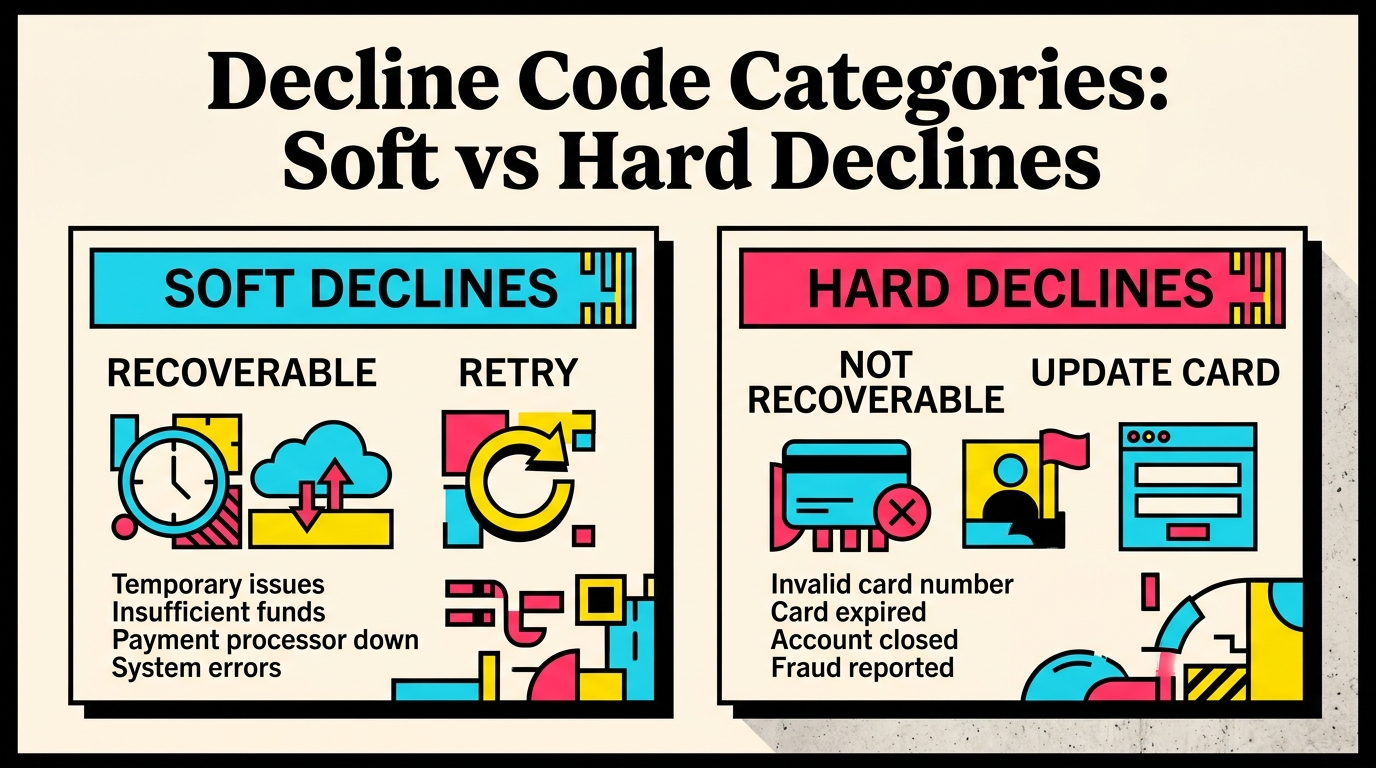
Not all payment failures are the same. A “card_declined” is different from “expired_card” which is different from “insufficient_funds.” Each decline code tells you something specific about why the payment failed and what your recovery options are.
The big categories:
- Soft declines (insufficient funds, processing error): Often recoverable with retries
- Hard declines (stolen card, invalid number): Will not recover with retries. Stop trying and ask the customer to use a different card
- Authentication required (3DS needed): Recoverable if you prompt the customer to authenticate
You can look up any specific decline code in our Stripe decline code reference to understand what each one means and how to respond.
11. Set Billing Anchor Dates Strategically
If your customers are mostly in one geography, align your billing dates to avoid known problem periods. Payments attempted on the 1st of the month often see higher failure rates because banks process higher volumes that day.
Practical tip: If you offer monthly billing, consider letting customers choose their billing date at signup. If you set it programmatically, avoid the 1st and the last day of the month. Mid-month dates (10th-20th) tend to have slightly better success rates.
12. Support Multiple Payment Methods
Credit cards fail. That is a fact. The more alternative payment methods you accept, the more fallback options your customers have.
High-impact additions for SaaS:
- Debit cards (already accepted if you take cards)
- Bank debits / ACH (lower failure rates than cards)
- Digital wallets (Apple Pay, Google Pay: tokenized cards have lower decline rates)
- SEPA Direct Debit (essential for European customers)
You do not need all of these on day one. But if you are seeing high failure rates from a particular region or customer segment, adding a local payment method can dramatically reduce involuntary churn.
13. Implement Dunning Emails Before You Need Them
Do not wait until you have your first wave of failed payments to figure out your dunning sequence. Set it up now so it fires automatically.
Minimum viable dunning sequence:
- Day 0 (payment fails): Email with direct card update link
- Day 3: Follow-up email, slightly more urgent
- Day 7: Final warning with clear “your access will be paused” language
- Day 14: Subscription paused/cancelled notice
Keep the tone helpful, not threatening. The customer did not choose to fail. They will appreciate a clear, friendly nudge to fix the problem.
14. Test Your Payment Flow End-to-End
Use Stripe’s test mode to simulate every failure scenario before going live. Stripe provides test card numbers that trigger specific decline codes.
Scenarios to test:
- Successful payment
- Insufficient funds decline
- Expired card decline
- 3D Secure required
- Network error / processing error
- Card update via Customer Portal
If any of these scenarios does not work as expected (wrong error message, missing retry, broken webhook), fix it before a real customer hits it.
15. Review Your Payment Health Monthly
Prevention is not a set-and-forget exercise. Your payment success rate, decline reasons, and recovery rate should be metrics you check monthly, right alongside MRR and customer count.
Key metrics to track:
- Payment success rate: % of payment attempts that succeed on first try (target: 95%+)
- Recovery rate: % of failed payments eventually recovered (target: 50-70%)
- Involuntary churn rate: % of customers lost to payment failures (target: <1% monthly)
- Top decline codes: Which failures are most common this month?
Check our payment recovery benchmarks to see how your numbers compare to industry standards.
A Quick-Reference Prevention Matrix
Here is a condensed view of all 15 items, grouped by when they help:
Before the charge:
- Pre-charge reminder emails (item 6)
- Card expiry monitoring (item 8)
- Billing anchor date optimization (item 11)
- Automatic card updates (item 3)
During the charge:
- Smart Retries enabled (item 1)
- Complete billing data collected (item 4)
- 3D Secure properly configured (item 5)
- Multiple payment methods available (item 12)
After the charge fails:
- Custom retry schedule (item 2)
- Dunning email sequence (item 13)
- Self-service payment update page (item 7)
- Webhook monitoring (item 9)
Ongoing:
- Decline code understanding (item 10)
- End-to-end testing (item 14)
- Monthly payment health review (item 15)
The Compound Effect of Prevention
No single item on this checklist will eliminate failed payments. But stacking them creates a compound effect. Smart Retries alone might recover 12% of failures. Add automatic card updates and you prevent another 15% from happening. Add pre-charge reminders and you catch another 5%. Add a proper dunning sequence and you recover another 20% of what is left.
The math gets compelling fast. A SaaS company with $10,000 MRR and a 5% monthly payment failure rate is losing $500/month to failed payments. Implementing even half of this checklist can cut that to $150/month or less. That is $4,200/year in recovered revenue from a few hours of setup.
For early-stage SaaS, $4,200 is not a rounding error. That is runway. That is your next feature. That is proof that your business is working, not slowly bleeding out from preventable payment failures.
Start With What You Have
You do not need to implement all 15 items this week. Start with the top 5 (Smart Retries, retry schedule, automatic card updates, complete billing data, and 3D Secure). Those alone will catch the majority of preventable failures.
Then work your way down the list. Each item you add makes your billing infrastructure more resilient, and your revenue more predictable.
If you want to know exactly where your Stripe account stands today, including which of these prevention measures you are missing, run a free churn audit. It takes 2 minutes and shows you exactly how much revenue you are leaving on the table.
Related Posts
Stripe Do Not Honor Recovery: What SaaS Teams Should Do Next

7 Payment Recovery KPIs Every Stripe Team Should Track

7 Failed Payment Segments Every Stripe Team Should Track
How healthy is your Stripe account?
Get a free churn health report. Find pending cancellations, failed payments, and expiring cards putting your MRR at risk.
Run Free Audit