Manual vs Automated Payment Recovery: The Real Cost
Manual payment recovery feels sensible when you are small. A failed charge comes in, someone on the team checks Stripe, sends an email, maybe nudges the customer in-app, and hopes the payment clears before the subscription quietly dies.
The problem is not that manual recovery never works. The problem is that it hides its cost. It quietly steals operator time, delays outreach, lowers recovery rates, and makes revenue leaks look like normal churn.
If you run a SaaS business on Stripe, this is one of those boring systems that can quietly tax growth. The choice between manual and automated payment recovery is really a choice between fragile operations and repeatable revenue retention.
This guide breaks down the real cost difference, where manual still makes sense, where automation becomes non-negotiable, and how to decide based on volume instead of gut feel.
What manual payment recovery really means
Manual payment recovery usually looks like a mix of Stripe exports, Slack messages, saved email templates, and a spreadsheet that one person on the team mostly understands.
A common workflow looks like this:
- Check Stripe for failed invoices or past_due subscriptions.
- Export or filter the affected customers.
- Send a reminder email manually.
- Wait for replies or payment method updates.
- Follow up again a few days later.
- Track the outcome in a sheet or CRM.
- Retry the charge manually or rely on default Stripe settings.
That process is survivable when you have 20 customers. It starts to creak at 100. Past that, it becomes a recurring ops job disguised as customer care.
The hidden issue is timing. Every hour between a failed payment and the first recovery step lowers your odds. Customers forget. Cards remain expired. Team members batch work for later. Finance assumes the revenue will come back on the next retry. Nothing breaks spectacularly, but money drips out of the bucket.
What automated payment recovery actually changes
Automated payment recovery does not just send emails automatically. A good flow compresses detection, response, retries, and visibility into one system.
In practice, automation means:
- Failed payments are detected instantly via Stripe events.
- Customers receive a payment reminder while the failed charge is still fresh.
- Retry timing happens on a schedule instead of whenever the team remembers.
- Payment method update links reduce friction.
- Follow-ups happen consistently without operator effort.
- Recovery performance is measured instead of guessed.
That consistency is the real upgrade. The best recovery systems win because they do boring things on time, every time.
If you have not reviewed your current recovery setup recently, it is worth comparing it with broader payment recovery benchmarks for SaaS. Most founders are more optimistic than their actual recovery rate deserves.
Time cost: manual work scales linearly, automation does not
Manual workflows scale with failure volume. Automation mostly scales with configuration and occasional review.
Take a simple example:
- 500 active customers
- $49 average monthly subscription
- 5% monthly payment failure rate
- 25 failed payments per month
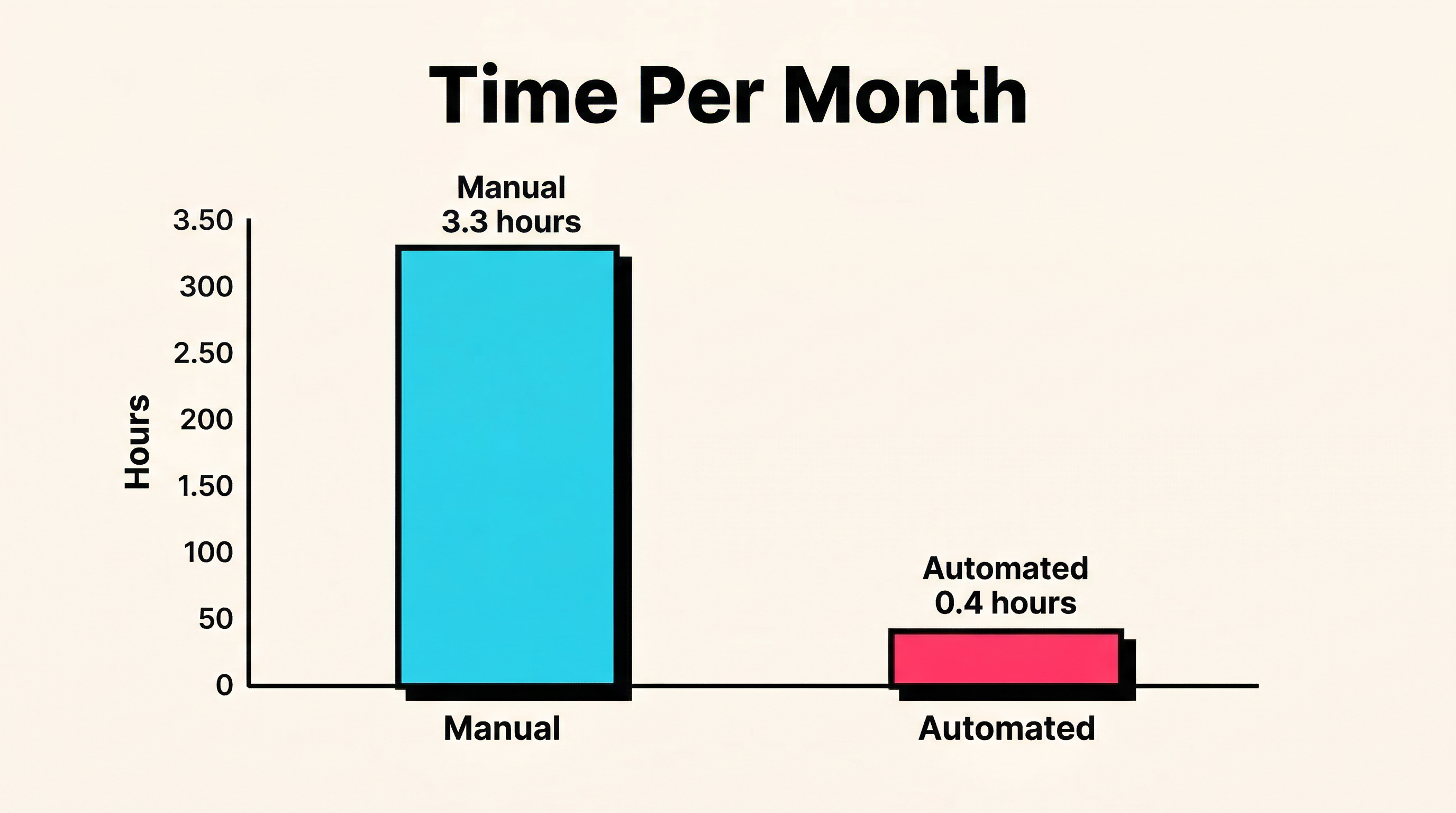
For a manual process, monthly time often looks like this:
- 20 minutes identifying failures and checking statuses
- 45 minutes sending first-round emails
- 30 minutes answering replies or nudging customers internally
- 30 minutes sending second follow-ups
- 30 minutes sending final follow-ups
- 30 to 45 minutes reconciling outcomes
That lands around 3 to 3.5 hours per month. It is not catastrophic, which is exactly why it lingers.
Now double customer count to 1,000. Nothing about the process gets smarter. You are simply doing more of it. A system like that scales linearly with pain.
An automated setup usually flips the pattern:
- 1 to 2 hours initial configuration
- 15 minutes monthly review
- 10 to 20 minutes for edge cases
Once it is running, the workload stays nearly flat even as failed payments rise.
For a founder valuing their time at £100 to £150 per hour, saving even 3 hours a month is already meaningful. But time savings are not the main prize. Recovery rate is.
Revenue impact: the recovery rate gap is bigger than most teams think
Manual recovery underperforms for predictable reasons:
- The first touch is delayed.
- Follow-up timing is inconsistent.
- Different team members use different messaging.
- Retry logic is basic or ignored.
- Reporting is weak, so poor performance hides in aggregate churn.
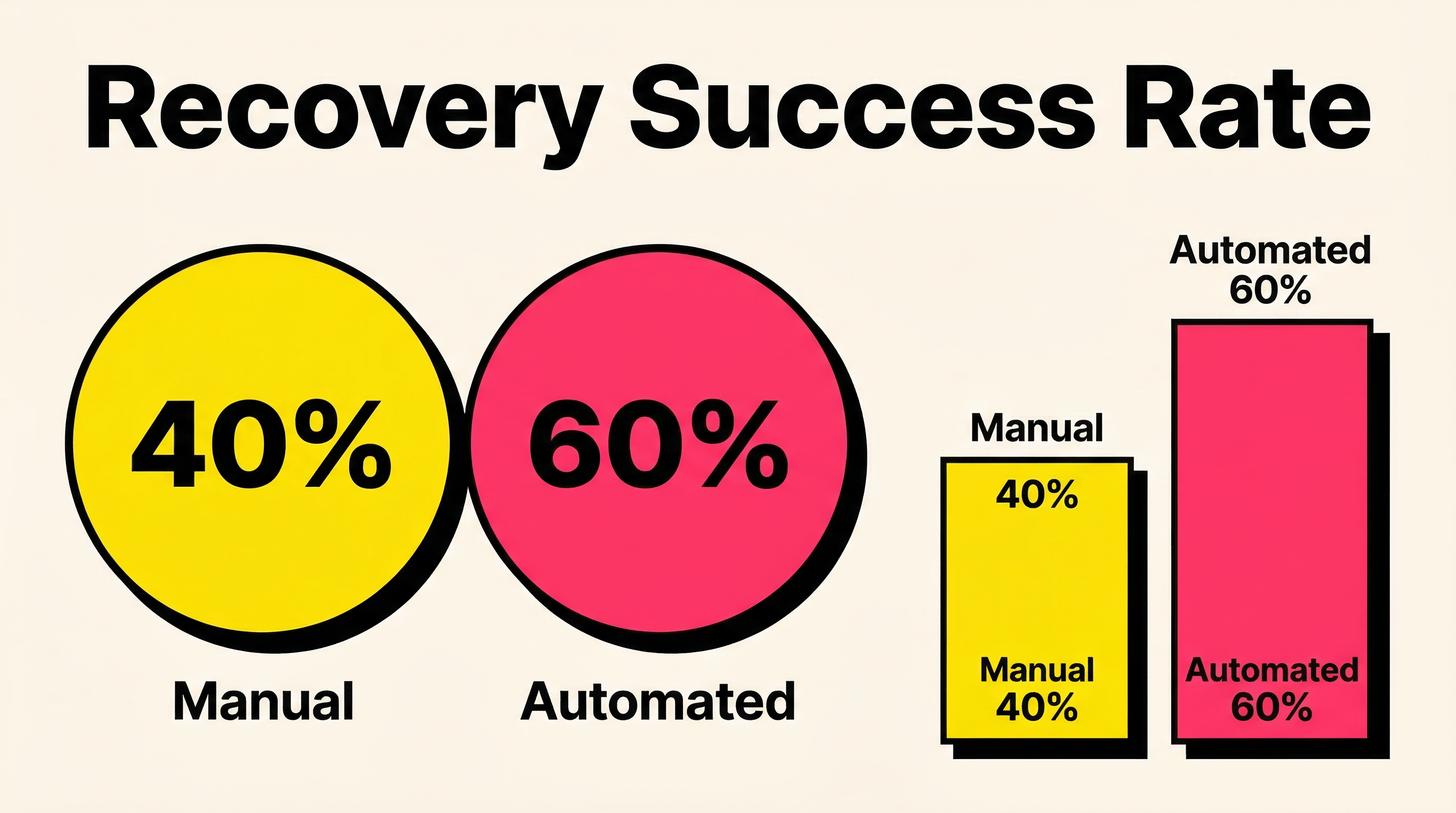
A reasonable manual recovery rate for many small SaaS teams sits around 35% to 45%. A solid automated setup often pushes that into the 55% to 70% range, depending on decline mix, customer profile, and how well the flow is tuned.
That gap matters fast.
Using the same 500-customer example:
- 25 failed payments per month
- $49 MRR each
- $1,225 revenue at risk each month
At a 40% manual recovery rate:
- Revenue recovered: $490 per month
- Revenue lost: $735 per month
- Annualized loss: $8,820
At a 60% automated recovery rate:
- Revenue recovered: $735 per month
- Revenue lost: $490 per month
- Annualized loss: $5,880
That is a $2,940 annual swing from one operational decision, before counting the labor cost.
And this is still a modest SaaS example. At 2,000 customers or higher ARPU, the difference gets rude very quickly.
Why manual systems fall apart sooner than founders expect
The biggest trap with manual recovery is that it can look "good enough" right up until the team gets busy.
1. It depends on someone remembering
Manual systems rely on a human noticing a failed payment, acting on it, and following through. The moment that person is sick, traveling, buried in support, or shipping a release, recovery slips.
2. It creates inconsistent customer experience
One customer gets a clear reminder with a payment update link. Another gets a vague plain-text nudge two days later. Another gets nothing until cancellation. That inconsistency is not just operational debt. It changes outcomes.
3. It buries insight
When the workflow lives in inboxes and spreadsheets, you do not learn much. You cannot easily see which failure reasons recover best, which messages drive updates, or where the funnel actually breaks.
That is the same reason many teams miss the benefit of pre-dunning before failed payments happen. If the process is manual, prevention usually never gets built.
4. It makes growth look noisier than it is
Founders often blame "churn" in the abstract when a chunk of the loss is just failed payment recovery underperformance. If involuntary churn is leaking into your topline, your retention picture is dirtier than your product probably deserves.
When manual payment recovery still makes sense
Manual is not stupid. It is just temporary.
There are a few cases where it is still the right call.
Very early stage SaaS
If you are under 50 active customers, manual recovery gives you direct signal. You learn how customers talk about billing friction. You can see whether failures are mostly expired cards, insufficient funds, or something more structural.
At this stage, the learning may be worth more than the efficiency. You can still hear the actual customer language around billing friction instead of looking at it later through a dashboard summary.
High-touch enterprise accounts
If each account is worth thousands per month and already has a human relationship, a manual touch can be appropriate. A customer success manager reaching out about a failed enterprise invoice is not crazy.
But even there, detection and internal alerting should still be automated. No serious team should rely on someone casually checking Stripe in the morning.
Short-term message testing
Manual outreach can help you test tone, subject lines, and call-to-action language before locking in an automated sequence. That is useful. Just do not confuse testing with a long-term operating model.
When automation becomes the obvious move
Most SaaS teams wait too long because the pain shows up gradually.
Automation is usually the obvious move when:
You consistently see more than 5 failed payments per month
That is often the first threshold where founder time alone justifies the change.
Your business is self-serve or product-led
Self-serve customers expect smooth, low-friction billing recovery. Delayed manual email chains feel out of step with the rest of the product experience.
You want cleaner retention metrics
Automated recovery makes it easier to separate voluntary churn from recoverable payment failure. That sharpens decision-making across finance, product, and growth.
It also improves board-level and founder-level reporting. If involuntary churn is mixed into general cancellations, you can end up making bad product decisions based on billing problems. Clean recovery data tells you whether the issue is customer intent or payment mechanics, which are two very different problems with two very different fixes.
You are trying to scale without adding ops headcount
This is the big one for bootstrapped founders. Automation is leverage. Manual recovery is a recurring tax.
The build vs buy angle most founders underestimate
Some teams decide to build their own flow because Stripe already provides webhooks, retries, and billing primitives. That instinct is understandable, but usually optimistic.
A real recovery system needs more than event handling:
- decline-aware retry logic
- good email timing
- reliable payment update experience
- analytics and attribution
- fail-safe handling for weird billing states
- enough visibility to improve it over time
That is why the build route often costs more than it seems. Before going custom, it is worth reading the blunt build vs buy dunning system breakdown. Most founders are not choosing between free and paid. They are choosing between visible software spend and invisible team drag.
A simple break-even framework
If you want a practical rule, score your setup on these four questions:
- How many failed payments do we get per month?
- How many team hours do we spend recovering them?
- What percent of failed payments do we actually recover?
- Would we notice quickly if recovery performance dropped next week?
If you do not know the answer to question four, that alone is a strong signal you need automation or at least better instrumentation.
A rough break-even point for many SaaS businesses is when:
- failed payments exceed 5 to 10 per month, or
- recovery admin exceeds 2 hours per month, or
- the value of one recovered customer exceeds the monthly cost of tooling
That threshold usually arrives earlier than most people expect.
What a founder-friendly migration path looks like
You do not need a giant billing transformation project. Keep it boring.
A sensible migration path is:
- Audit current failed payment volume and recovery rate.
- Map your current customer touchpoints after a failed charge.
- Add immediate automated first-touch reminders.
- Add payment method update links that reduce friction.
- Standardize follow-up cadence.
- Review recovery performance monthly.
A useful founder habit is to review three numbers every month: failed payment rate, recovery rate, and recovered MRR. Those three metrics tell you whether the billing system is healthier or just busier. They also make it easier to justify tooling decisions with real economics instead of vague operational frustration.
The goal is not to automate everything because automation is fashionable. The goal is to stop losing money to delays, inconsistency, and forgotten follow-ups.
The verdict
Manual payment recovery is acceptable as a learning phase. It is not a mature operating model.
Once failed payments become a recurring line item instead of a rare annoyance, automation wins on speed, consistency, reporting, and founder sanity. The labor savings are nice. The recovered revenue is the real story.
If your team is still handling payment failures out of Stripe filters, spreadsheets, and memory, you are probably underestimating how much revenue is slipping away.
Run a free churn audit at churnbot.co/audit to see exactly where failed payments and involuntary churn are leaking revenue in your Stripe account.
Related Posts

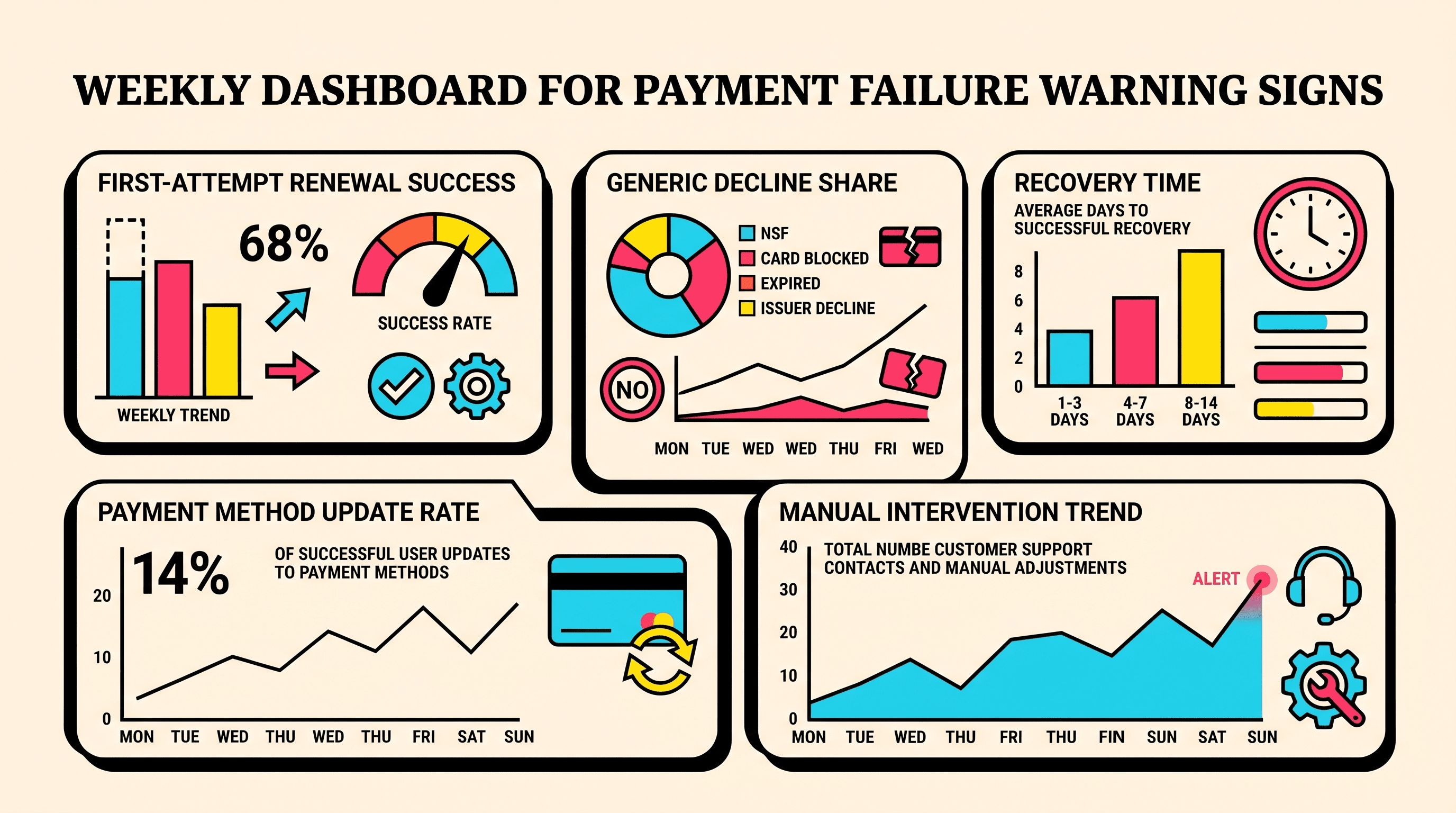
10 Early Warning Signs of Growing Payment Failure Risk
Regional Payment Failure Patterns: What the Data Shows
How healthy is your Stripe account?
Get a free churn health report. Find pending cancellations, failed payments, and expiring cards putting your MRR at risk.
Run Free Audit