How Stripe Radar Affects Payment Decline Rates
Stripe Radar is the fraud detection engine that sits between every charge attempt and your revenue. For most SaaS founders, it runs silently in the background. You set it up once (or never touched it at all), and it just... works. Until it doesn't.
The problem: Radar's default settings are tuned for e-commerce, not recurring subscriptions. That means it can flag legitimate renewal charges as suspicious, silently declining payments from customers who've been paying you for months. The result is involuntary churn you never see coming.
This guide breaks down exactly how Stripe Radar interacts with your payment decline rates, which settings matter most for subscription businesses, and what you can do to stop losing revenue to overzealous fraud rules.
What Stripe Radar Actually Does
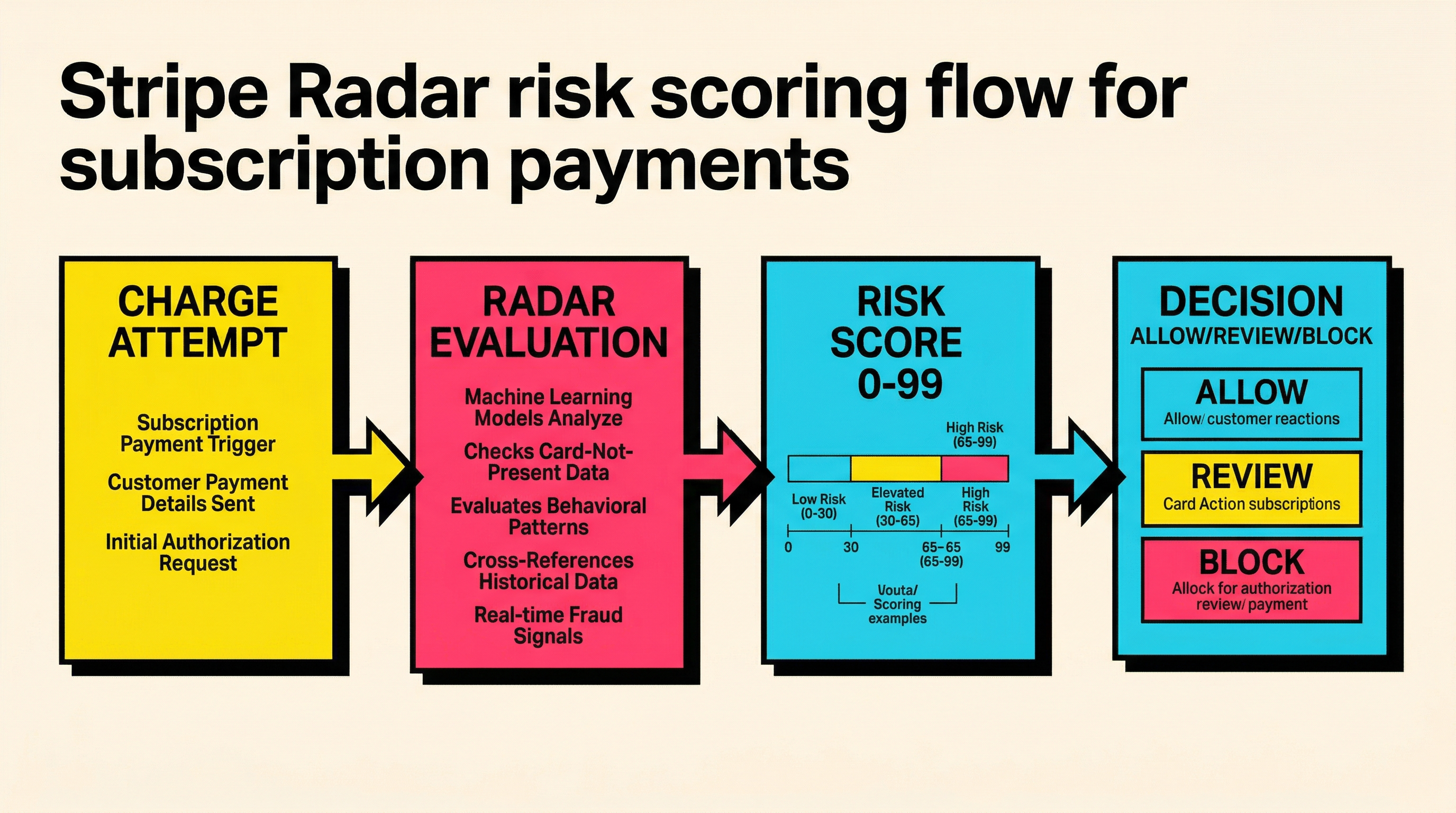
Stripe Radar is a machine learning system that evaluates every payment attempt in real time. It assigns a risk score between 0 and 99, then makes a decision: allow, review, or block.
Here's what happens under the hood:
- Charge attempt initiated — your subscription renews, Stripe creates the charge
- Radar evaluates — checks the card fingerprint, IP address, device signals, velocity patterns, and hundreds of other data points
- Risk score assigned — a number from 0 (safe) to 99 (almost certainly fraud)
- Decision made — based on your rules, the charge is allowed, sent to manual review, or blocked outright
For one-time purchases, this flow makes perfect sense. A new customer with a fresh card and an unusual IP pattern might genuinely be a fraudster. But for a subscription renewal from a customer who's been paying $49/month for the last eight months? The risk calculus is completely different.
Why Radar's Defaults Hurt Subscription Businesses
Stripe's default Radar rules are designed to minimize chargebacks across all Stripe users. That's a reasonable goal for the platform, but it creates a specific problem for SaaS businesses.
The Legitimate Renewal Problem
When a subscription renews, several factors can trigger Radar's suspicion:
- Changed IP address — your customer traveled, switched to a VPN, or got a new ISP
- Card metadata mismatch — the card issuer updated the card's BIN range or associated address
- Velocity triggers — if you bill multiple plans or add-ons, rapid successive charges look suspicious
- New device fingerprint — the renewal happens server-side, so there's no browser fingerprint at all
That last point is critical. Off-session payments (charges made without the customer actively present) lack the device and behavioral signals that Radar relies on for risk assessment. This means recurring charges inherently have less data for Radar to work with, which can push risk scores higher.
The Numbers
Industry data suggests that fraud detection systems cause between 2% and 5% of legitimate subscription payments to be declined. For a SaaS business doing $50,000 MRR, that's $1,000 to $2,500 per month in unnecessary declines, before you even count the customers who churn because they never update their payment method.
Stripe doesn't publish Radar's exact false positive rate for subscriptions, but the pattern is consistent: businesses that customize their Radar rules for recurring billing see measurable improvements in payment success rates.
How to Check If Radar Is Declining Your Payments
Before you change anything, you need to know if Radar is actually causing problems. Here's how to check.
Step 1: Review Your Decline Breakdown
In your Stripe Dashboard, go to Payments > All payments and filter for failed payments. Look at the decline reasons. The ones related to Radar will show up as:
fraudulent— Radar blocked the chargedo_not_honor— sometimes triggered by Radar risk signals passed to the issuergeneric_decline— a catch-all that can include Radar-influenced decisions
If you're seeing a high percentage of fraudulent declines on renewal charges (not new purchases), Radar is likely being too aggressive. You can dig deeper into each specific decline code meaning to understand what's happening.
Step 2: Check Radar's Block Rate
Go to Radar > Overview in your Stripe Dashboard. Look at the "Blocked" section. This shows charges that Radar stopped before they even reached the card issuer. For subscription businesses, a healthy block rate on recurring charges should be well under 1%. If you're seeing 2% or higher on renewals specifically, your rules need tuning.
Step 3: Review Individual Blocked Charges
Click into individual blocked payments. Radar shows you the risk score and which rules triggered the block. Common culprits for legitimate renewals:
- Rule: Block if risk score > 75 — the default is often too aggressive for recurring charges
- Rule: Block if CVC check fails — CVC isn't available for stored card renewals
- Rule: Block if postal code check fails — same issue with off-session charges
Radar Rules That Matter for Subscriptions
Stripe Radar has two tiers: the default (included free) and Radar for Fraud Teams ($0.07/screened transaction). Even on the free tier, you can adjust settings that significantly impact your subscription decline rates.
Rules to Adjust
1. Risk threshold for recurring charges
The default risk threshold blocks charges above a certain score. For subscriptions, consider creating a rule that's more lenient for recurring charges:
Block if :risk_score: > 65 AND :is_recurring: = false
Block if :risk_score: > 85 AND :is_recurring: = true
This keeps tight fraud controls on new purchases while giving recurring charges more room to succeed.
2. CVC and AVS checks on renewals
CVC (card verification code) and AVS (address verification) checks often fail on stored-card renewals because the data isn't re-submitted. If you're blocking charges where these checks fail, you'll catch legitimate renewals:
# Don't block recurring charges for missing CVC
Allow if :cvc_check: != 'pass' AND :is_recurring: = true
3. Velocity rules
If you bill multiple subscription items or have usage-based add-ons, velocity rules can flag rapid successive charges as suspicious. Adjust the velocity window or exempt recurring charges from velocity checks.
Rules to Keep Strict
Not everything should be loosened. Keep these tight:
- Stolen card lists — always block charges from cards reported stolen
- High-risk countries — if you don't sell in certain regions, keep geographic blocks
- Explicit block lists — any cards or customers you've manually flagged
The goal is precision: block actual fraud while allowing legitimate renewals to pass.
The Hidden Cost: Radar Declines That Trigger Dunning
Here's what makes Radar-related declines especially expensive for subscription businesses: they trigger your entire dunning sequence unnecessarily.
When Radar blocks a renewal charge, Stripe records it as a failed payment. This triggers:
- Your retry logic kicks in (usually 3-4 retries over days)
- Dunning emails go out to the customer
- The customer sees "payment failed" messaging
- If retries also fail (because Radar blocks those too), the subscription cancels
The customer had a perfectly valid card. They wanted to keep paying you. But your own fraud system stopped them. And now they're getting emails saying their payment failed, which damages trust and increases voluntary churn on top of the involuntary kind.
For a deeper look at how these cascading failures add up, check the payment recovery benchmarks to see where your business stands relative to industry norms.
Radar for Fraud Teams: Is It Worth the Extra Cost?
Stripe Radar for Fraud Teams costs $0.07 per screened transaction. For subscription businesses, the key features that justify the cost are:
Custom Rules Engine
The free tier gives you basic rules. Fraud Teams unlocks the full rules engine with:
- Custom metadata matching — create rules based on your own customer attributes
- More granular conditions — combine multiple factors in a single rule
- Review queues — send borderline charges to manual review instead of auto-blocking
Manual Review Queues
Instead of auto-blocking suspicious charges, you can route them to a review queue. For subscription renewals, this means a human can approve legitimate charges that Radar flagged incorrectly. Most SaaS businesses find that 80-90% of flagged recurring charges are legitimate.
Cost-Benefit Math
If you're processing 1,000 subscription renewals per month at $100 average, and Radar is incorrectly blocking 3%:
- Lost revenue: 30 charges x $100 = $3,000/month
- Radar for Fraud Teams cost: 1,000 x $0.07 = $70/month
- Net benefit: $2,930/month (assuming you recover even half the false positives)
For most subscription businesses doing over $10,000 MRR, the math works out clearly in favor of the upgrade.
Step-by-Step: Optimizing Radar for Your SaaS
Here's a practical playbook for reducing Radar-related declines without increasing your fraud exposure.
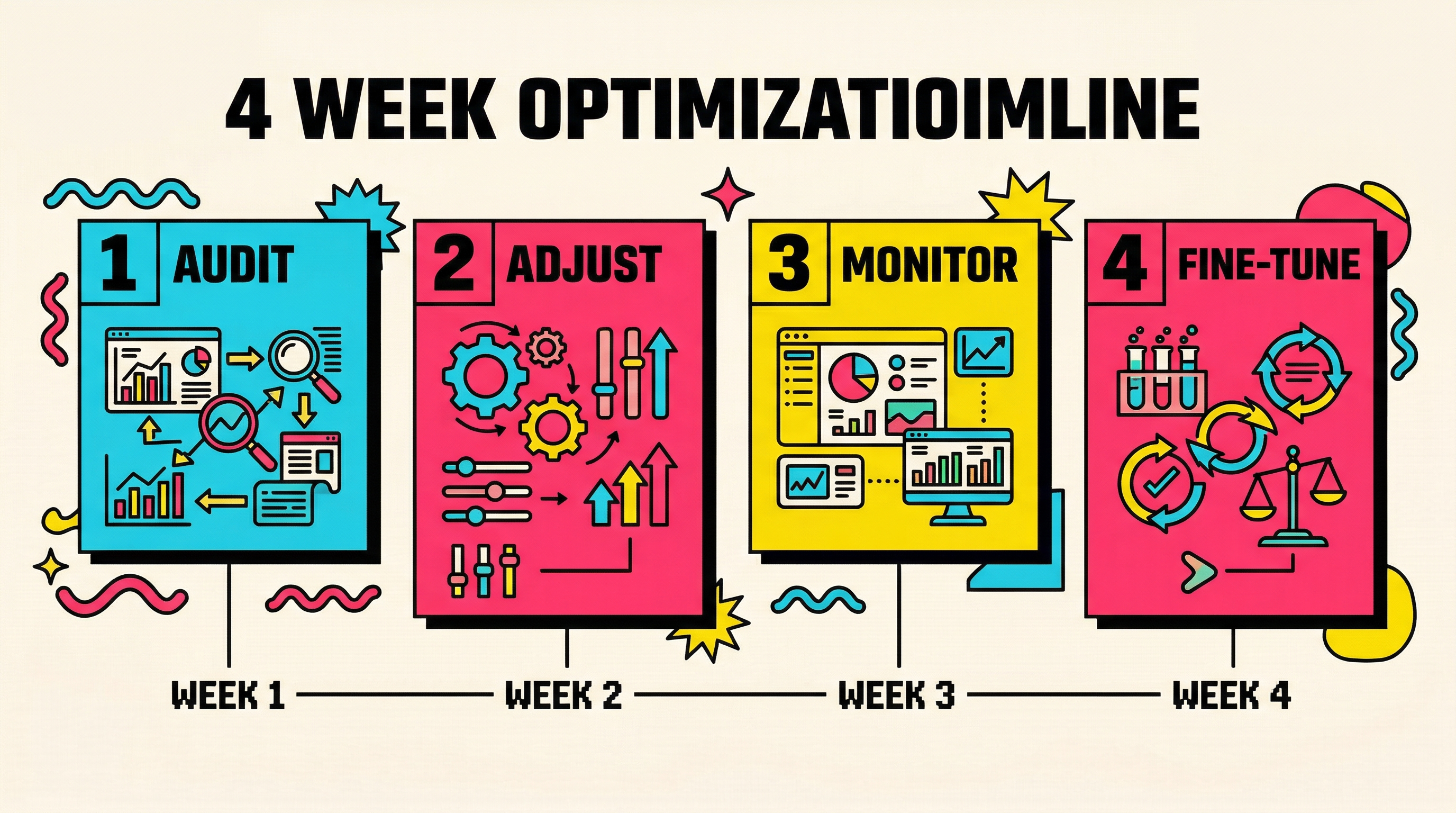
Week 1: Audit
- Export your last 90 days of failed payments from Stripe
- Filter for decline reason
fraudulentor charges blocked by Radar - Cross-reference with customer tenure: how many were customers for 3+ months?
- Calculate your Radar false positive rate: (legitimate renewals blocked / total renewals blocked)
Week 2: Adjust Rules
- Log into Stripe Dashboard > Radar > Rules
- Add a rule to increase the risk threshold for recurring charges (start with 85)
- Remove or relax CVC/AVS requirements for off-session payments
- If using Fraud Teams, create a review queue for recurring charges scoring 75-85
Week 3: Monitor
- Track your daily block rate for recurring vs. one-time charges
- Watch for any increase in actual fraud (chargebacks, disputes)
- Compare payment success rate week-over-week
Week 4: Fine-Tune
- Adjust thresholds based on Week 3 data
- Add any new patterns to your allow/block lists
- Document your final rule set for your team
Common Mistakes When Configuring Radar
Mistake 1: Disabling Radar Entirely
Some founders get frustrated with false declines and turn Radar off. Don't. Subscription fraud is real, especially for SaaS businesses with free trials that convert to paid. The goal is tuning, not disabling.
Mistake 2: Using the Same Rules for New and Recurring Charges
A first-time purchase from an unknown card deserves more scrutiny than a renewal from a year-long customer. Treat them differently in your rules.
Mistake 3: Ignoring the "Review" Category
Charges in the review queue aren't blocked, but they're also not automatically approved. If you're using Fraud Teams and not checking your review queue regularly, charges can time out and fail. Set up alerts or assign someone to check daily.
Mistake 4: Not Testing Rule Changes
Stripe's rule simulator lets you test rule changes against historical data before going live. Use it. A rule that seems reasonable can have unexpected consequences when applied to your specific payment patterns.
Mistake 5: Forgetting About 3D Secure Interactions
Radar and 3D Secure (SCA) interact in ways that compound decline rates. If Radar flags a charge AND 3D Secure authentication is required, the customer faces double friction. For recurring charges in regions requiring SCA, make sure your exemption requests are configured properly.
Radar and Payment Retries: The Compounding Effect
When a charge fails due to Radar, Stripe's retry logic will attempt the charge again. But here's the catch: if your Radar rules haven't changed, the retry will likely be blocked again with the same risk score.
This creates a frustrating loop:
- Initial charge: Radar blocks it (risk score 78)
- First retry (24 hours later): Radar blocks it again (risk score 77)
- Second retry (48 hours later): Radar blocks it again (risk score 76)
- Final retry: blocked again, subscription cancels
The risk score barely changes between retries because the underlying data (same card, same customer, same billing amount) hasn't changed. The only thing that changes is time, which might slightly reduce velocity-related scores.
The fix: If you're using Stripe Smart Retries, Radar applies fresh scoring to each retry attempt. But if you're using manual retry logic, consider adding a Radar rule that exempts retry attempts from the most aggressive blocking rules.
For an in-depth comparison of retry approaches, see how Stripe Smart Retries compare to custom retry logic for recovering failed payments.
Measuring the Impact
After optimizing your Radar settings, track these metrics weekly:
Primary Metrics
- Payment success rate (recurring) — should increase by 1-3 percentage points
- Radar block rate (recurring) — should drop below 1%
- Involuntary churn rate — should decrease as fewer legitimate charges are blocked
Secondary Metrics
- Chargeback rate — monitor to ensure it doesn't increase (should stay under 0.5%)
- Dispute rate — watch for any uptick in fraud-related disputes
- Revenue recovered — track the dollar value of charges that now succeed after rule changes
Red Flags
If after adjusting Radar rules you see:
- Chargeback rate increasing above 0.75%: tighten rules back up
- New pattern of fraudulent charges: review and add specific block rules
- Customers reporting unauthorized charges: investigate immediately
Wrapping Up
Stripe Radar is a powerful fraud prevention tool, but its defaults aren't optimized for subscription businesses. The gap between e-commerce fraud patterns and SaaS renewal patterns means that out-of-the-box Radar settings can silently increase your involuntary churn rate.
The fix isn't complicated. Audit your Radar decline data, create separate rules for recurring and one-time charges, and monitor the results. Most SaaS businesses can recover 1-3% of previously declined renewals with a few hours of rule tuning.
If you're not sure where your payment decline rates stand or how much revenue you're losing to false declines, run a free churn audit. It takes two minutes and shows you exactly where your Stripe account is leaking revenue, including Radar-related declines.
Related Posts

The SaaS Billing Compliance Checklist for 2026
Stripe Insufficient Funds Recovery: A Playbook for SaaS Teams
How healthy is your Stripe account?
Get a free churn health report. Find pending cancellations, failed payments, and expiring cards putting your MRR at risk.
Run Free Audit