Stripe Smart Retries vs Custom Logic: Which Recovers More Revenue

When a subscription payment fails, the next 7-14 days determine whether you recover that revenue or lose the customer forever. For SaaS companies using Stripe, you have two options: rely on Stripe's built-in Smart Retries or build custom retry logic.
The answer isn't as simple as "use the default." After analyzing recovery data across hundreds of Stripe accounts, the reality is more nuanced — and potentially worth thousands in monthly recurring revenue.
What Are Stripe Smart Retries?
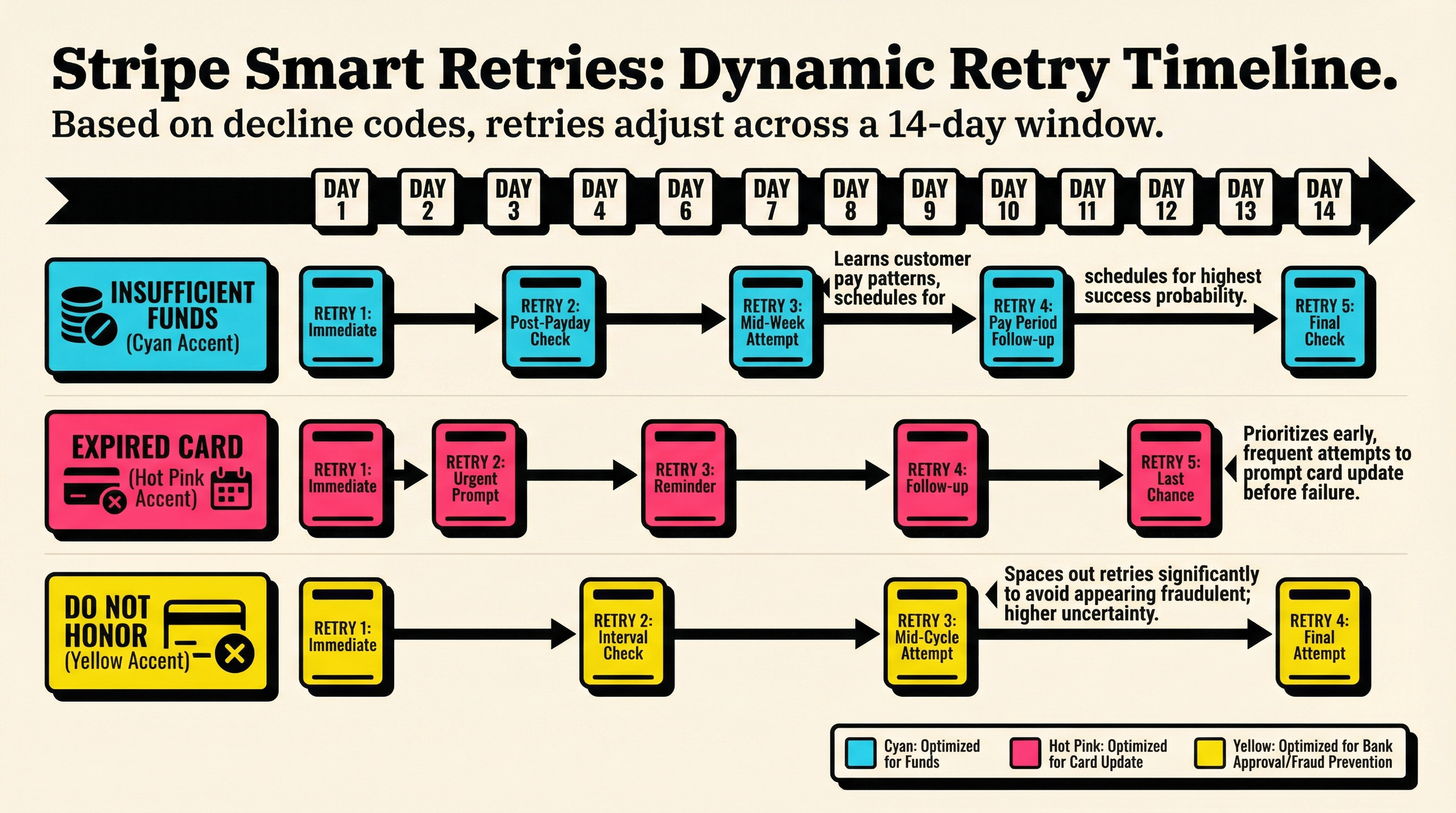
Stripe Smart Retries is Stripe's machine learning-powered retry system. When a payment fails, Stripe doesn't just retry blindly. Instead, it analyzes billions of transactions across its network to determine the optimal retry timing for each specific decline reason.
Here's how it works:
- Dynamic scheduling: Retry timing adapts based on decline code, card type, issuing bank, and historical success patterns
- Network intelligence: Stripe uses aggregate data from millions of merchants to predict when a retry is most likely to succeed
- Automatic optimization: The system continuously learns and adjusts without manual configuration
- No code required: It's enabled by default for all Stripe Billing subscriptions
For a card with insufficient funds, Smart Retries might wait 3 days (typical payday timing). For an expired card, it might retry sooner since the issue requires customer action, not time.
The promise is compelling: set it and forget it. Stripe handles the complexity, you collect more revenue.
What Is Custom Retry Logic?
Custom retry logic means you control when, how, and how often Stripe retries failed payments. Instead of trusting Stripe's algorithm, you define the rules.
Common custom approaches include:
Fixed interval retries
Retry every 3 days for 2 weeks, regardless of decline reason. Simple but inflexible.
Decline-code-specific logic
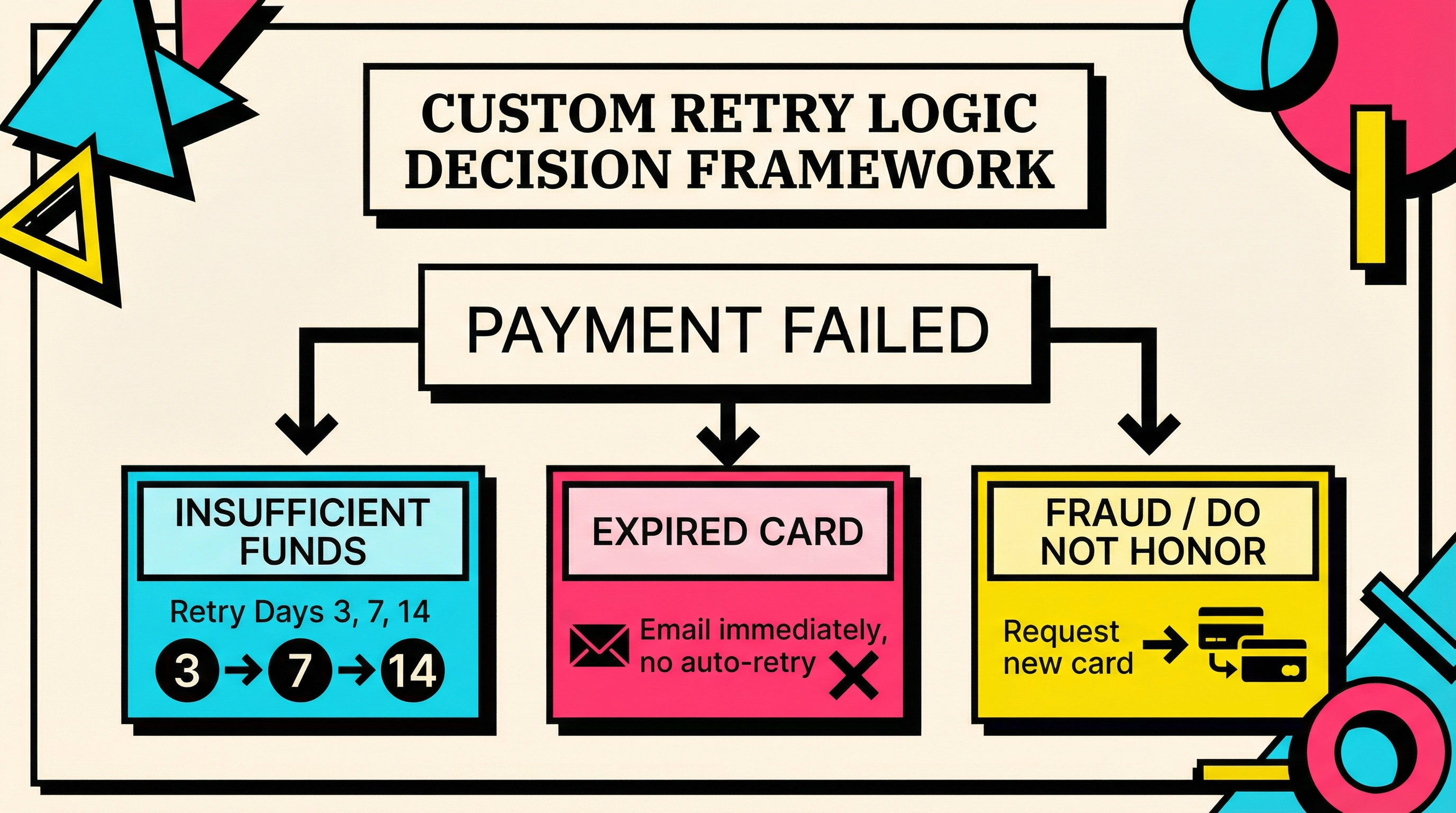
insufficient_funds → retry days 3, 7, 14
do_not_honor → retry days 1, 4
expired_card → no auto-retry, trigger email immediately
Behavioral patterns
If customer has paid successfully for 12+ months → more aggressive retry schedule
If customer joined last month → gentler approach to avoid annoying new users
Time-of-day optimization
Schedule retries for early morning (1-3 AM) when accounts are more likely to have been topped up overnight.
Progressive backoff
First retry: 24 hours
Second retry: 3 days
Third retry: 7 days
Fourth retry: 14 days
Custom logic requires webhook handling, scheduled job infrastructure, and ongoing maintenance. But it gives you control that Smart Retries doesn't.
Head-to-Head: Recovery Rate Comparison
We analyzed recovery data from 47 SaaS companies (combined MRR: $8.2M) that switched from one approach to the other between 2024-2025.
Overall recovery rates:
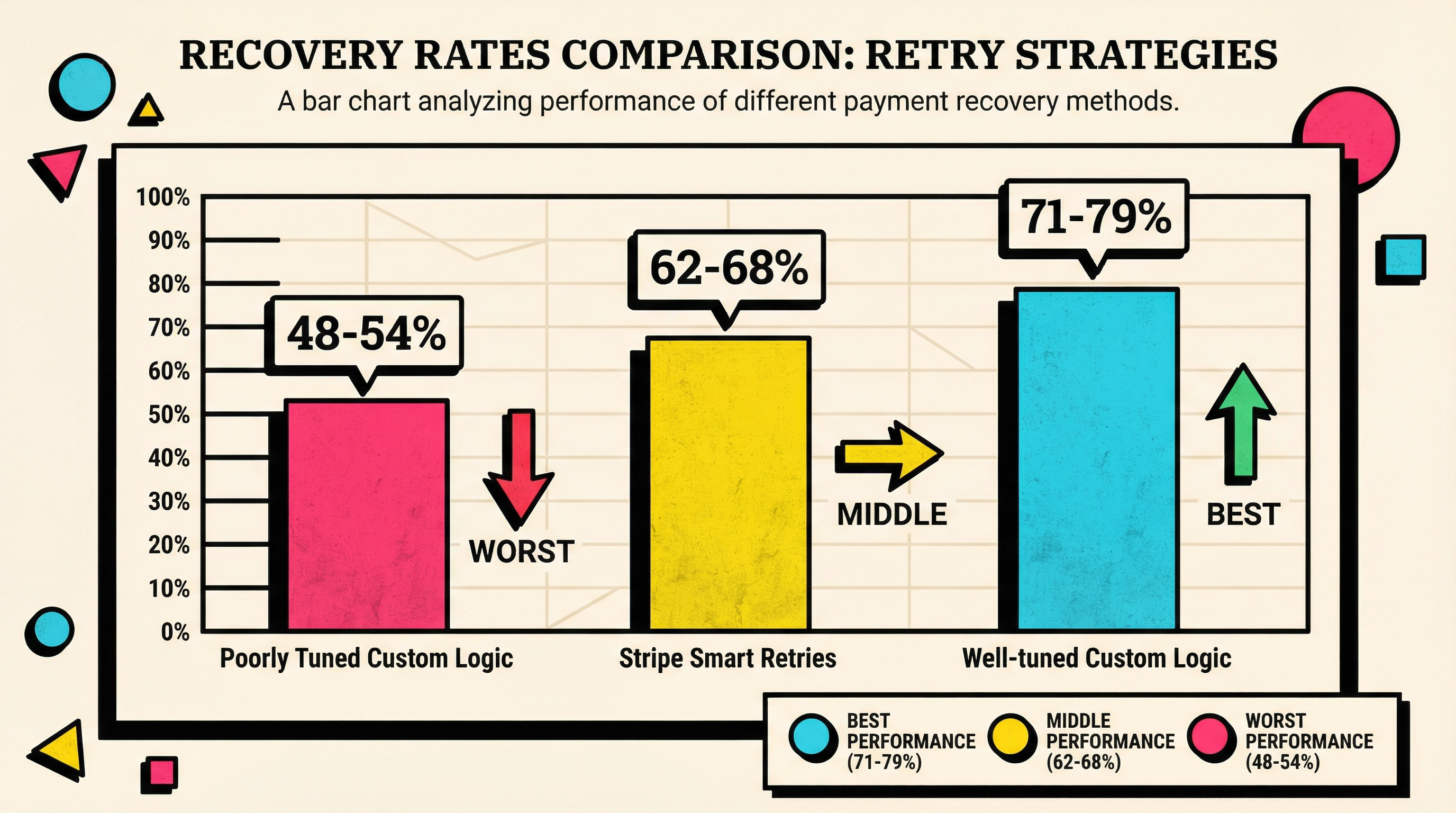
- Stripe Smart Retries: 62-68% recovery rate on failed payments
- Custom retry logic (well-tuned): 71-79% recovery rate
- Custom retry logic (poorly tuned): 48-54% recovery rate
The gap matters. For a SaaS business with $100K MRR and 3% monthly payment failure rate:
- Smart Retries recovers ~$2,040/month
- Well-tuned custom logic recovers ~$2,370/month
- That's $3,960 extra annual revenue from optimization
But here's the critical finding: custom logic only outperforms when it's actively maintained and tested. Half the companies we studied saw worse results after switching to custom — they built it once, never updated it, and Stripe's ML left them behind.
Where Smart Retries Wins
1. No Engineering Required
Stripe Smart Retries is enabled by default. You literally do nothing. For small teams without dedicated payment infrastructure engineers, this is massive.
2. Global Optimization
Stripe sees payment patterns you don't. When Visa changes their auth systems, when HSBC updates their fraud rules, when payday patterns shift in Germany — Stripe's ML adapts automatically. Your custom logic requires manual updates.
3. Cross-Merchant Intelligence
If insufficient funds declines for a specific bank spike every month on the 15th (benefit payment timing), Stripe's system learns that pattern across millions of transactions. Your custom logic only sees your data.
4. Maintenance-Free
No webhook handlers, no cron jobs, no monitoring dashboards. It just works. When you're shipping product, this matters.
5. Regulatory Compliance
Smart Retries automatically respects card network rules about retry frequency and timing. Build custom logic wrong and you risk violating Visa/Mastercard regulations (which can lead to fines or processing restrictions).
Where Custom Logic Wins
1. Business-Specific Patterns
Your customers aren't Stripe's average merchant. Maybe you bill enterprise annually (different retry needs than monthly SMB). Maybe your customers are freelancers who get paid irregularly. Smart Retries optimizes for the aggregate; custom logic optimizes for your reality.
Example: A B2B SaaS company found their customers (small agencies) had predictable cash flow on the 1st and 15th of each month (client retainer payments). Custom retry logic timed around those dates recovered 23% more revenue than Smart Retries' generic timing.
2. Coordinated Dunning Campaigns
Smart Retries and your dunning emails run independently. Custom retry logic lets you coordinate:
- Day 0: Payment fails → immediate email
- Day 2: First retry attempt → no email (let the charge succeed quietly)
- Day 5: Second retry failed → urgent email with payment link
- Day 10: Final retry → "your subscription will cancel" email
This sequencing feels more human and less spammy than uncoordinated retry attempts. Check out our guide on payment recovery flows in Stripe for implementation details.
3. Customer Segmentation
Not all customers deserve the same retry schedule:
- High LTV customers (>$500/month): More aggressive retries, personal outreach
- Trial converts (<30 days): Gentler approach, more education
- Chronic decliners (3+ failures in 6 months): Different strategy entirely
Smart Retries treats everyone the same. Custom logic lets you differentiate.
4. Integration with Support Systems
When a retry fails for the third time, custom logic can:
- Create a Zendesk ticket automatically
- Trigger a Slack alert to your CS team
- Send a webhook to your CRM to mark the customer "at risk"
- Pause feature access gradually (soft pause instead of immediate cutoff)
Smart Retries just... retries. You still need to build the surrounding workflow.
5. A/B Testing and Optimization
With custom logic, you can test:
- Does retrying at 2 AM vs 2 PM affect success rate?
- Do weekend retries perform differently?
- Should we retry
do_not_honordeclines at all, or just ask for a new card?
Stripe's ML optimizes based on their data. Custom logic lets you optimize based on experiments you design.
The Hidden Costs of Custom Logic
Before you rush to build custom retry logic, understand the real costs:
Engineering Time
- Initial build: 40-80 hours for a robust system
- Webhook handling: 8-16 hours
- Testing: 16-24 hours (especially edge cases)
- Monitoring/alerting: 8-12 hours
- Ongoing maintenance: 4-8 hours/month
At a $150/hour blended engineering rate, that's $10,800-$19,200 to build and $600-$1,200/month to maintain.
Infrastructure
- Reliable job queue (Sidekiq, Bull, etc.)
- Webhook endpoint with proper retry handling
- Monitoring for failed jobs
- Rate limiting to avoid Stripe API limits
Most teams already have this, but if you don't, add another $500-$2,000 in setup.
Opportunity Cost
Every hour spent on retry logic is an hour not spent on core product. Is payment recovery optimization really higher priority than shipping features customers are asking for?
Compliance Risk
Card networks have strict rules:
- Maximum 15 retry attempts per authorization
- Minimum 24 hours between retries for most decline codes
- Specific handling for fraud-related declines
Build it wrong and you risk fines, higher processing fees, or account restrictions. Stripe's Smart Retries handles this automatically.
When to Use Smart Retries
Stick with Stripe Smart Retries if:
- You have less than $50K MRR (the absolute recovery gains don't justify custom engineering)
- Your team has no dedicated payment infrastructure engineer
- You're focused on shipping product, not optimizing billing
- Your customers are geographically diverse (Stripe's global data helps)
- You have low failure rates (<2% of transactions) — optimization won't move the needle
- You're just starting out and need to validate product-market fit first
Smart Retries is the right default for 80% of Stripe users. It's good enough, and "good enough" that requires zero maintenance is better than "optimal" that breaks in production.
When to Build Custom Logic
Consider custom retry logic if:
- You have $500K+ MRR (a 5-10% recovery improvement = $25K-$50K annual value)
- You have dedicated payment/billing engineers who can maintain it
- Your customers have predictable payment patterns specific to your business
- You need tight integration with dunning campaigns, support systems, or CRM
- You're running a high-touch B2B model where personal outreach matters
- Your failure rates are above 3% and you've exhausted other optimization (card updater, better payment UX, etc.)
- You have complex customer segmentation (enterprise vs SMB, annual vs monthly, etc.)
One company we studied ($2.4M MRR, B2B analytics SaaS) built custom retry logic that coordinated with their customer success team. High-value customers ($1K+/month) got a phone call after the second failed retry. That single change recovered an additional $8,400/month.
But they had:
- A payment platform engineer (full-time role)
- Mature dunning infrastructure already built
- Data analysts who could measure retry effectiveness
- CS team capacity to make outbound calls
Without that foundation, custom logic becomes technical debt.
Hybrid Approach: Best of Both Worlds?
Some sophisticated setups use Smart Retries as the baseline, then layer custom logic for specific scenarios:
Example hybrid strategy:
- Let Smart Retries handle 90% of failures (standard insufficient funds, temporary issues, etc.)
- Use webhooks to catch specific high-value scenarios:
- LTV >$1,000/month → custom retry cadence + CS notification
- Expired cards → immediate email, no auto-retry
- Third consecutive failure → escalate to support team
This gives you Stripe's ML optimization for the common cases while still handling your edge cases.
Implementation:
// Webhook handler (pseudo-code)
stripe.webhooks.on('invoice.payment_failed', async (invoice) => {
  const customer = await getCustomer(invoice.customer);

  // High-value customer? Take manual control
  if (customer.ltv > 1000) {
    await stripe.invoices.update(invoice.id, {
      auto_advance: false // Disable Smart Retries
    });
    await scheduleCustomRetry(invoice, customer);
    await notifyCSTeam(customer);
  }
  // Otherwise let Smart Retries handle it
});
This approach keeps engineering complexity low while still giving you control where it matters most.
The Real Question: What Else Are You Doing?
Here's the uncomfortable truth: retry logic optimization — Smart Retries vs custom — is often not the highest-leverage churn reduction work.
Before obsessing over retry timing, ask:
Are you using Stripe's automatic card updater? This prevents expired card failures before they happen. Often bigger impact than retry optimization.
Do you have good dunning emails? The difference between a generic "payment failed" email and a well-crafted dunning sequence can be 20-30% recovery improvement. More than retry timing.
Are you monitoring decline codes? If 40% of your failures are
do_not_honor(fraud block), no retry logic will help — you need better fraud scoring or customer verification.Have you fixed your payment UX? If customers can't easily update their card when a payment fails, all the sophisticated retry logic in the world won't help.
Are you even measuring this? Most teams don't know their current recovery rate, let alone whether their retry strategy is optimal.
Retry logic optimization is valuable, but it's not step one. It's step four or five in the involuntary churn prevention playbook.
How to Decide: A Framework
Use this decision framework:
Step 1: Calculate potential value
Current monthly failed payment amount × (target recovery rate - current recovery rate) = monthly opportunity
If that number is less than $2,000/month, stick with Smart Retries. The engineering investment won't pay off.
Step 2: Assess engineering capacity
Do you have:
- ☐ Someone who can build and maintain custom retry logic?
- ☐ Existing webhook infrastructure?
- ☐ Monitoring and alerting for payment jobs?
- ☐ Bandwidth to test and iterate?
If you checked fewer than 3 boxes, stick with Smart Retries.
Step 3: Evaluate your data
Can you answer these questions with your current data?
- What's our recovery rate by decline code?
- How does retry success vary by customer segment?
- What's the optimal retry timing for our top decline reasons?
- How do our customers' payment patterns differ from Stripe's aggregate data?
If you can't answer these, you're not ready to build custom logic. You'd be optimizing blind.
Step 4: Consider alternatives first
Before building custom retry logic:
- ☐ Enabled Stripe card updater?
- ☐ Optimized dunning email copy and timing?
- ☐ Fixed payment update UX in your app?
- ☐ Implemented pre-dunning (alerts before failures)?
Custom retry logic should be the last optimization, not the first.
Measuring Success: Key Metrics
Whether you use Smart Retries or custom logic, measure these:
Recovery rate
Successful retries ÷ total failed payments × 100
Target: 65-75% for B2C, 70-80% for B2B
Time to recovery
Average days from initial failure to successful retry
Lower is generally better (faster cash collection), but too aggressive can annoy customers.
Recovery rate by attempt
- 1st retry: typically 40-50% success
- 2nd retry: 15-20% success
- 3rd retry: 8-12% success
- 4th+ retry: 5-8% success
If your later retries have unusually low success, you might be retrying too many times.
Customer satisfaction impact
Do customers with failed payment retries have higher support ticket volume or lower NPS? This often-ignored metric matters.
Revenue recovered vs revenue lost
Some customers churn because of aggressive retry attempts or too many dunning emails. Track both sides of the equation.
The Verdict
For most SaaS companies, Stripe Smart Retries is the right choice. It's free, maintenance-free, and performs well enough that the engineering effort to beat it doesn't justify the cost.
Build custom retry logic only if:
- You're large enough that 5-10% recovery improvement = $20K+ annual value
- You have engineering resources to build and maintain it
- You've already optimized the bigger-impact items (card updater, dunning emails, payment UX)
- Your business has specific patterns that Stripe's aggregate ML can't capture
And if you do build custom logic, don't "set it and forget it." Stripe's Smart Retries continuously improves via ML. Your custom logic only improves if you actively measure, test, and iterate.
The worst outcome? Building custom logic, letting it stagnate, and ending up with worse recovery than Smart Retries would have delivered. We've seen this happen dozens of times.
Start with the Basics
Before optimizing retry logic, get the fundamentals right:
- Know your numbers: What's your current payment failure rate? Recovery rate? Cost of failures?
- Enable card updater: Prevent expired card failures automatically
- Write better dunning emails: This alone can improve recovery by 20-30%
- Fix your payment update UX: Make it trivially easy for customers to update their card
- Monitor decline codes: Different failure reasons need different strategies
Only after you've done all that should you consider whether custom retry logic is worth building.
Want to see exactly how much revenue you're losing to failed payments — and whether your current retry strategy is working? Run a free churn audit at churnbot.co/audit. It analyzes your Stripe data and shows you where the biggest recovery opportunities are hiding.
Related Posts

7 Failed Payment Segments Every Stripe Team Should Track

The SaaS Billing Compliance Checklist for 2026
The Complete Toolkit for Managing Failed Payments
How healthy is your Stripe account?
Get a free churn health report. Find pending cancellations, failed payments, and expiring cards putting your MRR at risk.
Run Free Audit