Stripe Decline Codes Explained: What Each One Means for Your Revenue

Every failed payment in Stripe comes with a decline code. Most founders ignore them. That's a mistake.
Decline codes tell you exactly why a payment failed and, more importantly, whether you can do anything about it. Some codes signal a temporary issue that'll resolve with a retry. Others mean the card is dead and no amount of dunning will help.
Understanding Stripe decline codes is the difference between wasting time chasing unrecoverable payments and focusing your energy where it matters. In this guide, we'll break down every major Stripe decline code, what it means for your revenue, and how to respond.
How Stripe Decline Codes Work
When a payment fails, Stripe receives a decline code from the card issuer (the bank). Stripe then translates that into one of ~50 standardized codes and attaches it to the failed payment event.
You can find decline codes in:
- The Stripe Dashboard (Payments → Failed)
- Webhook events (
charge.failed,invoice.payment_failed) - The Stripe API (
decline_codefield on charges)
Each code falls into one of three categories:
- Hard declines: The card is dead, don't retry
- Soft declines: Temporary issue, retry may work
- Fraud/risk declines: Stripe or the bank blocked it for security reasons
Knowing which category your declines fall into changes everything about your recovery strategy.
The Most Common Stripe Decline Codes (and What to Do)
insufficient_funds
The cardholder doesn't have enough money to cover the charge. This is the #1 decline code for subscription businesses.
What it means:
- The account balance is too low
- Could be temporary (payday hasn't hit yet)
- Could be permanent (customer is broke)
What to do:
- Retry in 3-5 days (align with typical payday cycles)
- Send a friendly dunning email explaining the issue
- Consider offering a payment plan or downgrade option
- This is a common cause of involuntary churn worth addressing proactively
Recovery rate: 30-40% if you retry strategically. The key is timing your retry attempts around payday cycles (15th and end of month for most people).
card_declined
The generic "bank said no" code. Stripe uses this when the bank doesn't provide a specific reason.
What it means:
- Could be insufficient funds, but the bank didn't say so
- Could be fraud detection
- Could be a spending limit issue
- Could be literally anything
What to do:
- Treat it as a soft decline and retry
- Contact the customer and ask them to check with their bank
- Your dunning emails should specifically mention "card_declined" and suggest contacting the bank
Recovery rate: 20-30%. This one's unpredictable because you don't know the root cause.
expired_card
The card has passed its expiration date.
What it means:
- The customer's card expired
- They probably got a new card but haven't updated it in your system
- This should NEVER happen if you're using Stripe's automatic card updater
What to do:
- Send an immediate email asking them to update their payment method
- If they're a high-value customer, reach out personally
- Enable Stripe's automatic card updater to prevent this in the future
- Consider pre-dunning strategies to catch expirations before they fail
Recovery rate: 60-70% if you catch them quickly. Most people still want the service, they just forgot to update.
do_not_honor
The bank declined for an unspecified reason and isn't telling you why.
What it means:
- Usually fraud detection by the bank
- Could be a spending limit
- Could be the card is restricted (e.g., doesn't allow international transactions)
- The bank is being deliberately vague
What to do:
- Retry once after 24-48 hours
- Email the customer and ask them to contact their bank or try a different card
- Don't retry more than twice — this is often a hard decline in disguise
Recovery rate: 10-20%. Low success rate because the root cause is unknown.
lost_card / stolen_card
The cardholder reported the card lost or stolen.
What it means:
- The card is dead, permanently
- The customer probably got a replacement
- They might not even know you tried to charge them
What to do:
- Do NOT retry — the card is blocked
- Send an email immediately asking them to update their payment method
- Emphasize that their card was reported lost/stolen (they'll know what you mean)
- Make updating the card as easy as possible (direct link, no login required if possible)
Recovery rate: 40-50% if you're fast. The customer still wants the service, they just need to update their card.
invalid_account
The card number doesn't correspond to a valid account.
What it means:
- The card was closed
- Could be a bank merger or account change
- Rare but permanent
What to do:
- Hard decline, do not retry
- Request a new payment method immediately
- This is non-recoverable without customer action
Recovery rate: 30-40%. Requires customer to add a new card.
processing_error
Something went wrong on the processor's side (Stripe, the bank, or the card network).
What it means:
- Not the customer's fault
- Could be a temporary outage
- Could be a network glitch
- Stripe recommends retrying
What to do:
- Retry immediately (or within minutes)
- If it fails again, wait 24 hours and retry
- Don't email the customer about this one — it's on your end
Recovery rate: 80%+. This is usually temporary and resolves quickly.
pickup_card / restricted_card
The card is restricted by the bank or flagged for fraud.
What it means:
- The bank suspects fraud
- The card might be blocked for international transactions
- Could be a stolen card that hasn't been reported yet
What to do:
- Do not retry
- Email the customer and suggest they contact their bank
- Offer an alternative payment method
- If this happens repeatedly with different customers, check if your Stripe account is flagged or your descriptor looks suspicious
Recovery rate: 15-25%. Usually requires the customer to resolve the issue with their bank first.
incorrect_cvc / incorrect_number / incorrect_zip
The card details are wrong.
What it means:
- Typo in the CVC, card number, or ZIP code
- This usually happens during signup, not recurring billing
- If it happens on a recurring charge, something went very wrong (data corruption?)
What to do:
- For recurring charges: investigate immediately, this shouldn't happen
- Ask the customer to re-enter their card details
- Check your payment form for UX issues
Recovery rate: 90%+ for signup failures (just ask them to try again). Near 0% for recurring billing (data corruption is rare and serious).
generic_decline
The bank declined without giving a reason. Similar to card_declined but even more vague.
What it means:
- The bank said "no" and didn't explain
- Could be fraud detection
- Could be a limit issue
- Could be anything
What to do:
- Retry once after 24 hours
- Email the customer and ask them to contact their bank or use a different card
- Treat as a soft decline
Recovery rate: 20-30%.
Decline Codes You Should Never Retry
Some decline codes are permanent. Retrying them wastes Stripe fees and annoys customers.
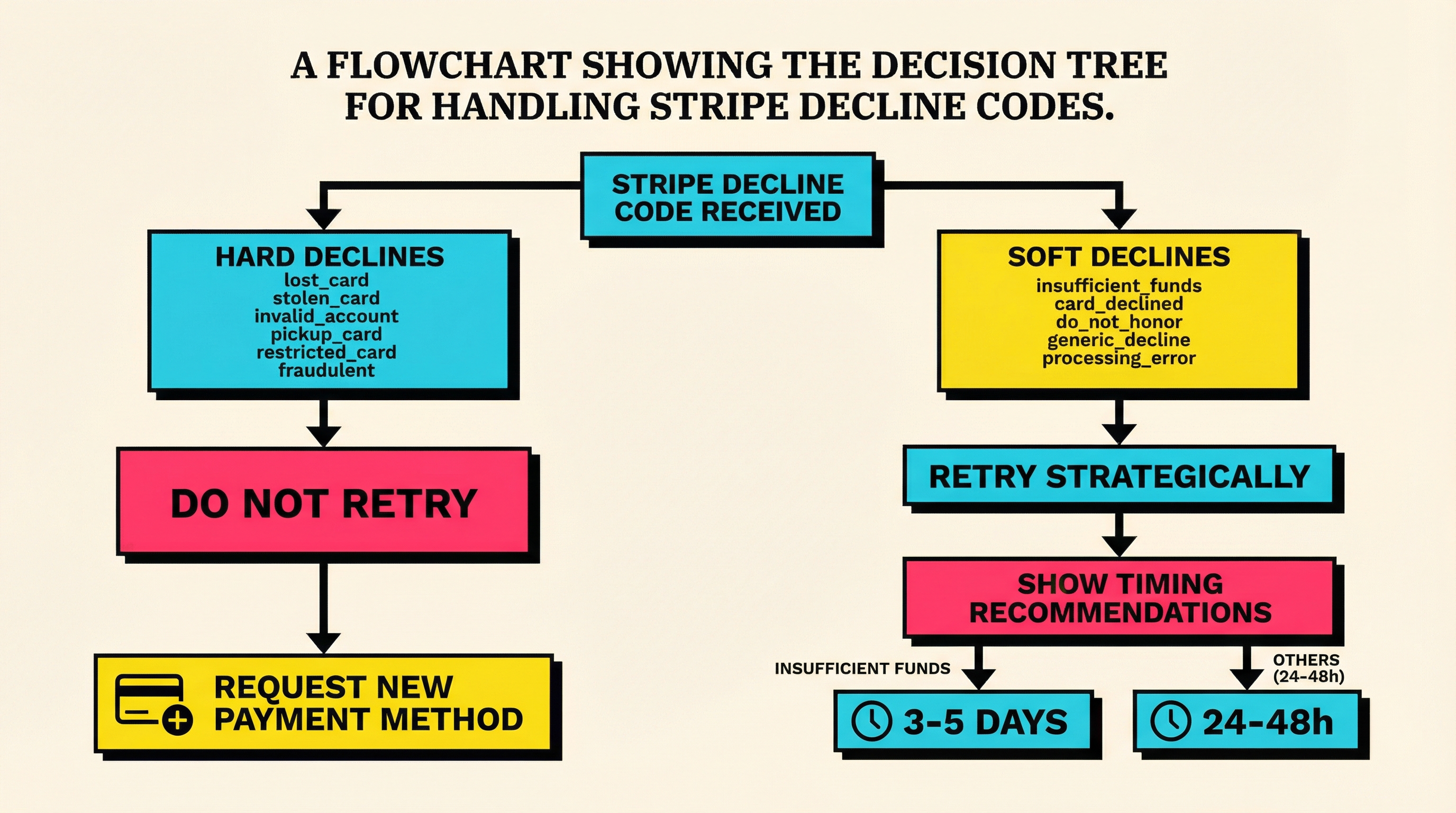
Hard declines (do not retry):
lost_cardstolen_cardinvalid_accountpickup_cardrestricted_cardfraudulentcard_not_supported(e.g., the card doesn't support your transaction type)
Why this matters:
Every retry attempt costs you the Stripe fee ($0.25-$0.30 for failed US cards). If you retry a hard decline 5 times, you've burned $1.50 for zero chance of success.
Stripe's Smart Retries feature automatically avoids hard declines, but if you're managing retries manually, pay attention to these.
Decline Codes Worth Retrying
Soft declines (retry strategically):
insufficient_funds(retry in 3-5 days)card_declined(retry in 1-3 days)do_not_honor(retry once after 24-48 hours)generic_decline(retry once after 24 hours)processing_error(retry immediately or within minutes)
Key principle: Space out your retries. Retrying the same card 3 times in 3 hours is pointless. Retrying 3 times over 10 days gives the customer time to fix the issue (get paid, contact their bank, etc.).
How to Track Decline Codes (and Why You Should)
Most SaaS founders look at total failed payments. That's useful but incomplete. You need to break down why payments are failing.
What to track:
- Decline code distribution (which codes are most common?)
- Recovery rate per decline code (which codes are worth retrying?)
- Time to recovery (how long does it take to recover each code?)
- Customer LTV by decline reason (do high-value customers fail for different reasons?)
Where to find this data:
- Stripe Dashboard → Analytics → Payments → Failed → Group by decline code
- Custom reporting via Stripe API
- Tools like ChurnBot that audit your Stripe failed payments and surface patterns
Why this matters:
If 60% of your failed payments are insufficient_funds, you know the problem is timing (retry around payday). If 60% are expired_card, you know the problem is communication (warn customers before their card expires). Different decline codes require different solutions.
The Revenue Impact of Decline Codes
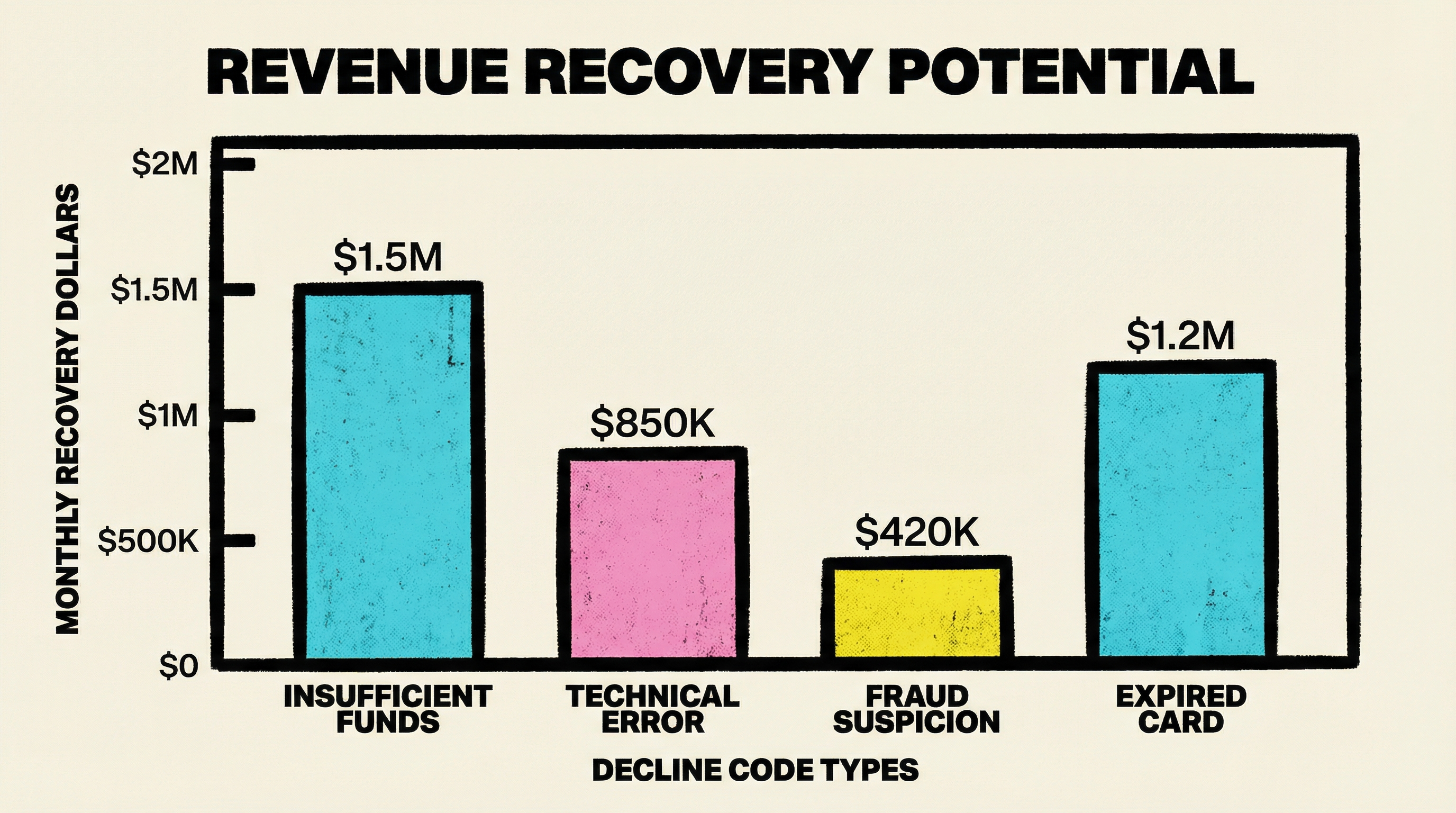
Let's say your SaaS does $50k MRR and has a 5% involuntary churn rate (industry average).
That's $2,500/month in failed payments.
If you're not looking at decline codes, you're treating all failures the same. But:
insufficient_funds(40% of failures) → $1,000 → 30% recoverable → $300/mo savedexpired_card(20% of failures) → $500 → 70% recoverable → $350/mo savedlost_card(15% of failures) → $375 → 50% recoverable → $187/mo saved- Hard declines (10% of failures) → $250 → 0% recoverable with retries, but fixable with customer outreach
By treating each decline code differently, you can recover $800-$1,000/month.
Over a year, that's $10k-$12k in saved revenue from one operational change.
Building a Decline Code Strategy
Here's a simple framework:
1. Categorize your declines
Run a report on your last 90 days of failed payments. Group by decline code. Identify your top 5.
2. Set retry rules per code
- Hard declines → 0 retries, request new card immediately
- Soft declines → 2-3 retries spaced over 7-10 days
- Processing errors → Retry immediately, then once more after 24 hours
3. Customize your dunning emails per code
insufficient_funds→ "Your payment failed due to insufficient funds. We'll retry in a few days."expired_card→ "Your card expired. Update your payment method here."do_not_honor→ "Your bank declined the charge. Contact them or try a different card."
4. Monitor and optimize
Track recovery rate per code. If insufficient_funds is recovering at 40%, experiment with retry timing. If expired_card is recovering at 50%, improve your pre-expiry warnings.
Common Mistakes with Stripe Decline Codes
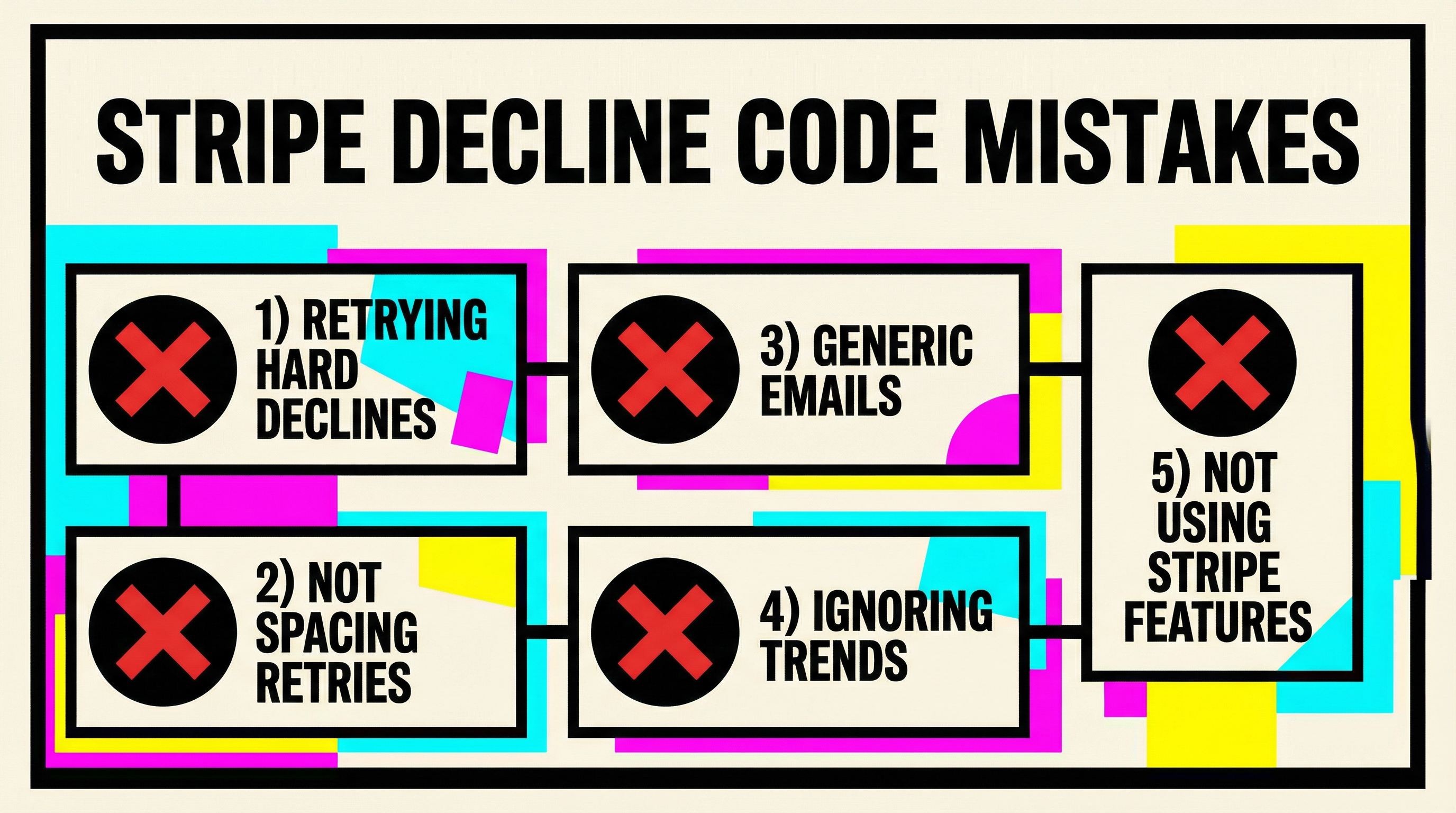
1. Retrying hard declines
Wastes money, annoys customers, achieves nothing.
2. Not spacing retries
Retrying insufficient_funds 3 times in 3 hours is pointless. Wait until payday.
3. Generic dunning emails
Telling a customer "your payment failed" doesn't help. Telling them "your card expired, update it here" does.
4. Ignoring decline code trends
If expired_card is suddenly spiking, you have a communication problem. If insufficient_funds spikes in January, it's post-holiday cash flow. Trends tell you where to focus.
5. Not enabling Stripe features
- Automatic card updater prevents
expired_card - Smart Retries automatically handles retry logic
- Radar reduces fraud declines
Use them.
The Role of Decline Codes in Churn Prevention
Involuntary churn — customers who leave because of payment failures, not because they wanted to cancel — accounts for 20-40% of total SaaS churn.
Decline codes are the key to fighting it.
When you understand why payments fail, you can:
- Prioritize recoverable failures
- Stop wasting effort on unrecoverable ones
- Customize your messaging
- Improve your retry timing
- Identify systemic issues (e.g., too many fraud declines = your Stripe descriptor might look sketchy)
This isn't theory. Research shows that 40% of SaaS churn is preventable with better payment recovery.
What to Do Right Now
- Log into Stripe → Payments → Failed → Last 90 days
- Group by decline code and see which ones dominate
- Check your retry logic — are you retrying hard declines? Stop.
- Review your dunning emails — are they generic? Customize them per decline code.
- Enable Stripe's automatic card updater if you haven't already
- Run a free churn audit at churnbot.co/audit to see exactly where your payment recovery strategy is leaking revenue
Stripe decline codes are one of the most overlooked levers in SaaS revenue retention. Most founders don't look at them until it's too late. The ones who do save thousands per month.
Your move.
Related Posts

7 Failed Payment Segments Every Stripe Team Should Track

The Anatomy of a Failed Payment: What Actually Happens
The Complete Toolkit for Managing Failed Payments
How healthy is your Stripe account?
Get a free churn health report. Find pending cancellations, failed payments, and expiring cards putting your MRR at risk.
Run Free Audit