What Is Involuntary Churn? The Silent Killer of SaaS Revenue
What Is Involuntary Churn? The Silent Killer of SaaS Revenue
You've built a great product. Your customers love it. Your retention strategy is working. But every month, you're still losing 20-40% of your churn to something that has nothing to do with product satisfaction.
Welcome to involuntary churn — the silent killer that's bleeding your MRR dry while you sleep.
What Is Involuntary Churn?
Involuntary churn (also called passive churn or delinquent churn) happens when customers don't deliberately cancel their subscription, but you lose them anyway due to failed payment processing.
Think about it: These customers want to stay. They're using your product. They value what you've built. But their credit card expired, their bank declined the charge, or their account had insufficient funds — and suddenly they're gone.
Unlike voluntary churn (where customers actively decide to cancel), involuntary churn is:
- Completely preventable
- Often invisible in your metrics
- Typically cheaper to fix than acquiring new customers
- Responsible for 20-40% of total SaaS churn
The Real Cost of Involuntary Churn
Let's do the math. Say you're running a $50/month SaaS with 1,000 customers:
- Monthly Recurring Revenue (MRR): $50,000
- Total monthly churn rate: 5% (industry average)
- Involuntary churn: 2% (40% of total churn)
- Monthly revenue lost to failed payments: $1,000
- Annual cost: $12,000
But that's just the immediate loss. The real damage compounds:
- Customer Lifetime Value (LTV) destruction: Each lost customer represents 12-36 months of future revenue
- Acquisition cost waste: You paid to acquire these customers, now you're paying again to replace them
- Negative word-of-mouth: Customers whose cards fail often think you cancelled them, damaging your brand
- Support overhead: Failed payments generate support tickets that drain team resources
- Revenue recognition issues: Failed payments create accounting headaches and revenue timing problems
For a fast-growing SaaS, involuntary churn can represent $50,000-$500,000+ in preventable annual losses.
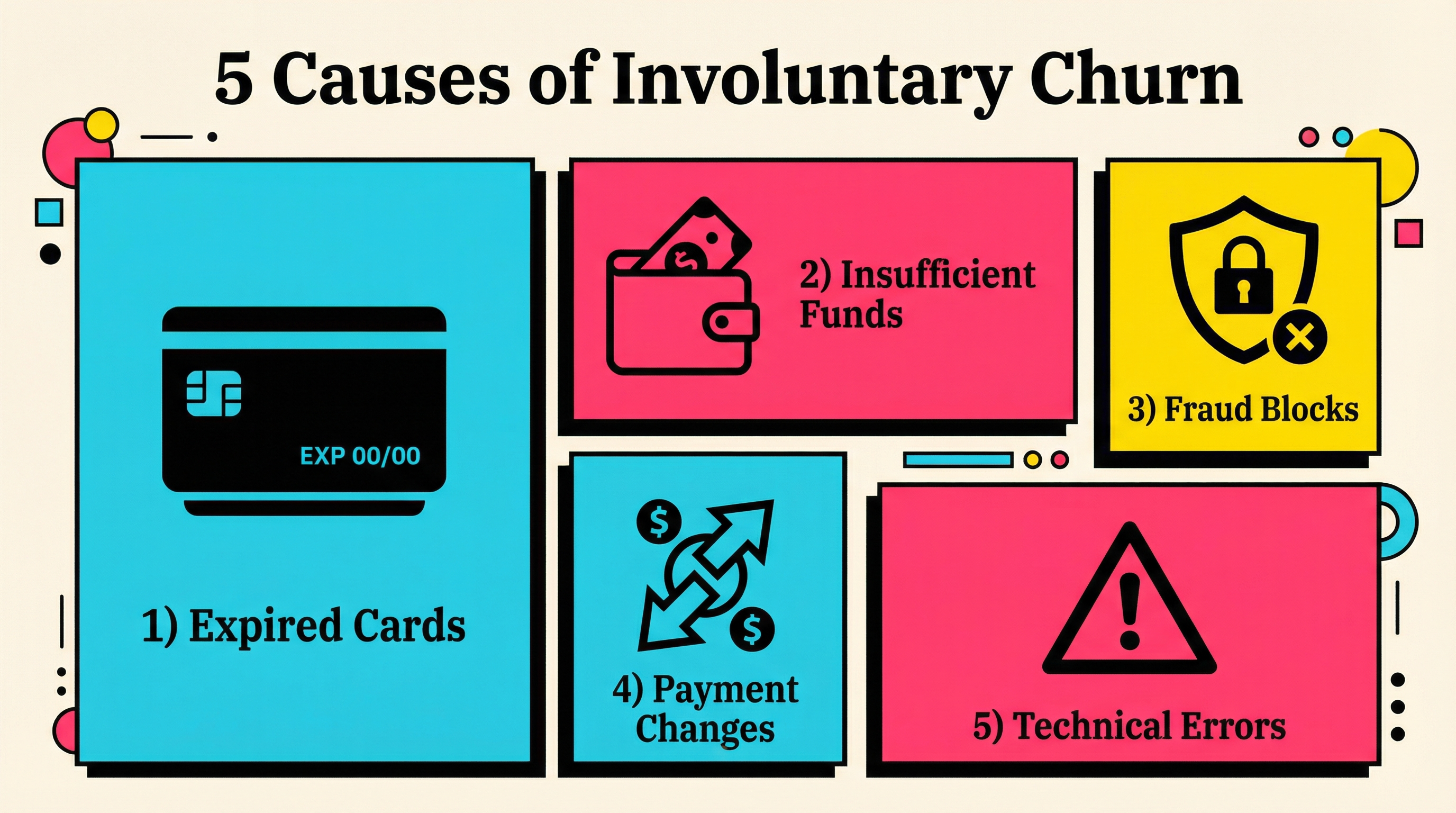
Why Involuntary Churn Happens: The 5 Main Culprits
1. Expired Credit Cards
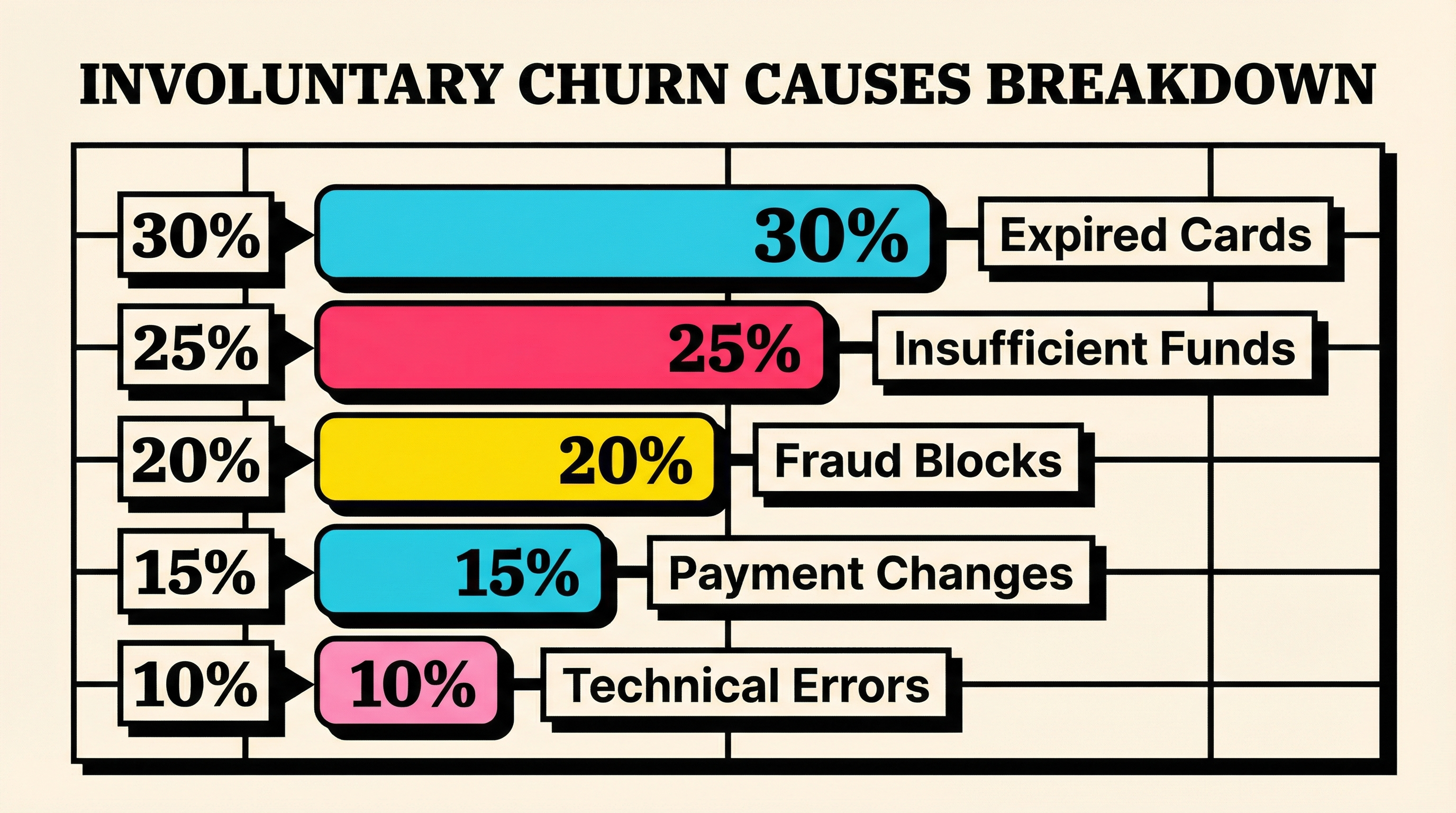
The most common cause. Credit cards typically expire every 2-4 years, and most customers forget to update their payment method.
The numbers:
- 15-20% of cards expire annually
- Only 30-40% of customers proactively update before expiration
- Card expiry accounts for 25-30% of all failed payments
2. Insufficient Funds
Especially common in B2C SaaS and lower-priced subscriptions. Customers hit their credit limit or have insufficient bank balance when billing runs.
Peak risk times:
- First week of the month (bills due)
- Holiday seasons (increased spending)
- Economic downturns
3. Card Declines and Fraud Prevention
Banks decline charges for dozens of reasons: suspected fraud, international transaction blocks, spending limit reached, incorrect CVV, outdated billing address.
The problem:
- Stripe decline codes span 60+ different reasons
- Many are temporary and would succeed on retry
- Customers often don't know their card was declined
4. Payment Method Changes
Customers get new cards, switch banks, or replace lost/stolen cards. The old payment method becomes invalid, but they forget they have subscriptions attached.
The gap:
- Average time for customer to realize: 2-4 weeks
- Average SaaS grace period before cancellation: 7-14 days
- Result: Customer loses access before they know there's a problem
5. Technical and Processing Errors
Payment gateway timeouts, network issues, bank processing errors, incorrect merchant descriptor codes, or temporary system failures.
Why this matters:
- These are 100% recoverable with retry logic
- Many SaaS companies don't retry failed payments effectively
- Timing your retry attempts dramatically affects recovery rates
How Involuntary Churn Differs from Voluntary Churn
Understanding the distinction is crucial for building the right retention strategy.
| Voluntary Churn | Involuntary Churn |
|---|---|
| Customer actively cancels | Customer doesn't intend to leave |
| Requires product/value improvements | Requires payment infrastructure fixes |
| Harder and more expensive to prevent | Cheaper and easier to recover |
| Takes months of work to reduce | Can be fixed in days/weeks |
| Requires understanding why they left | Just requires catching the failed payment |
| 60-80% of total churn | 20-40% of total churn |
For a deeper look at the differences and where to focus first, check out our guide on why 40% of SaaS churn is preventable.
The Involuntary Churn Lifecycle: What Actually Happens
Here's how a customer goes from active subscriber to involuntary churn:
Day 0: Billing date arrives. Payment processor attempts charge.
Day 0 (Hour 0): Card is declined. Customer usually doesn't know yet.
Day 1-3: Most SaaS platforms send a "payment failed" email. Customer might not see it (spam folder, ignored, wrong email).
Day 3-7: No response from customer. Product access might be restricted.
Day 7-14: Follow-up emails sent. Customer still hasn't updated payment method.
Day 14-30: Subscription cancelled. Customer loses access. Revenue lost.
Day 30+: Customer realizes they lost access. Contacts support. Blames you for cancelling.
The recovery window: You have roughly 14-21 days to recover a failed payment before the customer is effectively gone. After that, win-back rates drop to single digits.
How to Measure Involuntary Churn
You can't fix what you don't measure. Here's how to calculate your involuntary churn rate:
The Formula
Involuntary Churn Rate = (Customers Lost to Failed Payments / Total Customers at Start of Period) × 100Where to Find the Data
If you're using Stripe:
- Go to Stripe Dashboard → Billing → Subscriptions
- Filter by cancellation reason: "Payment failed"
- Count cancellations in the last 30 days
- Divide by your total customer count at month start
Example
- Start of month: 1,000 customers
- Failed payment cancellations: 20
- Involuntary churn rate: 2%
What Good Looks Like
- Excellent: <1% involuntary churn
- Good: 1-2% involuntary churn
- Needs work: 2-4% involuntary churn
- Critical: >4% involuntary churn
If you don't know your involuntary churn rate, run a free churn audit at churnbot.co/audit to see exactly where you stand.
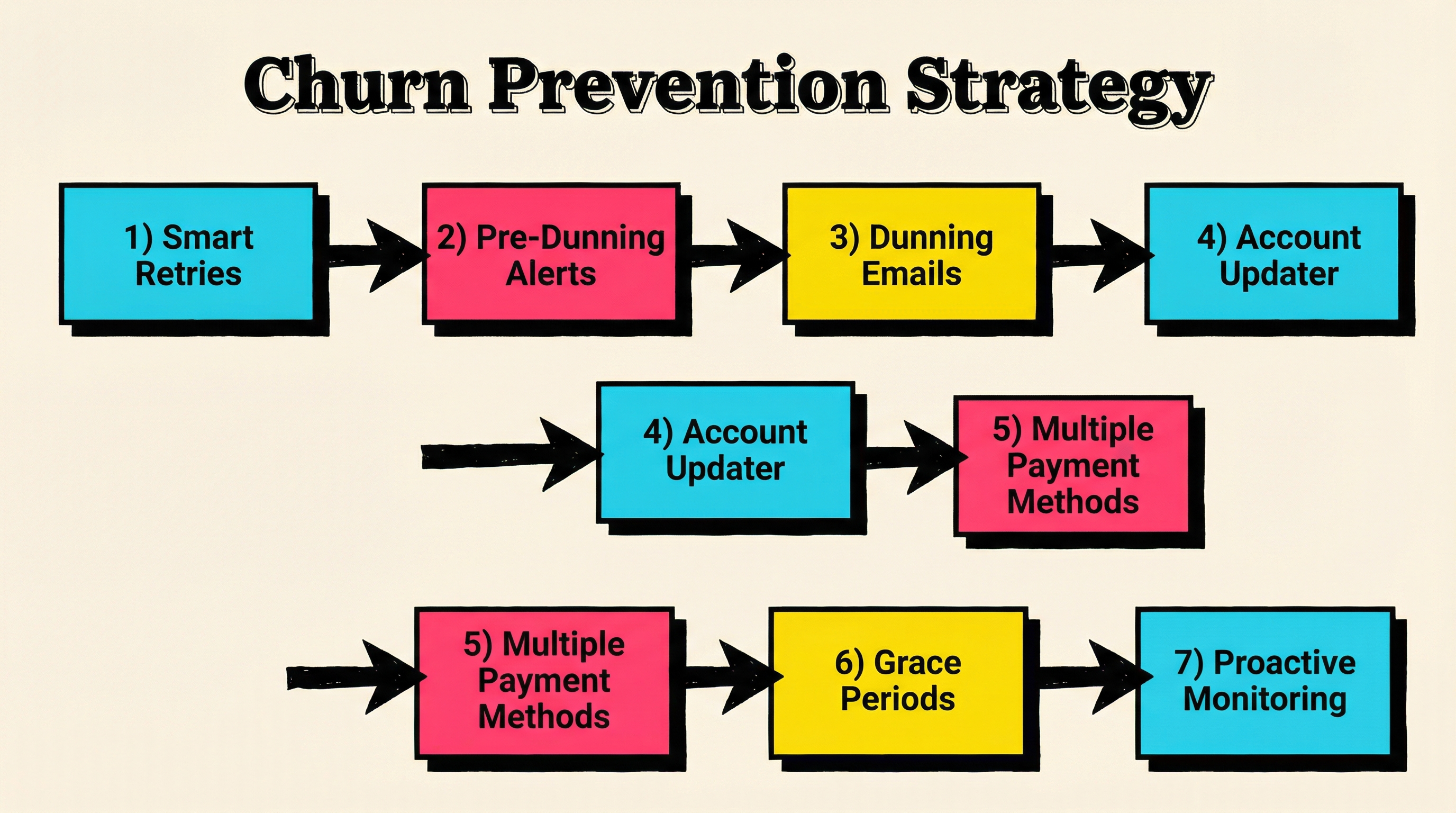
7 Strategies to Reduce Involuntary Churn
1. Implement Smart Payment Retries
Don't just retry failed payments randomly. Use intelligent retry logic:
- Retry timing matters: Best results come from retrying 3, 5, and 7 days after initial failure
- Vary retry times: Don't retry at the same time each day (banking systems have different peak times)
- Limit retry attempts: 4-6 retries max to avoid annoying customers and banks
- Exponential backoff: Space retries further apart over time
Most payment processors (including Stripe) have built-in smart retry logic, but many SaaS companies don't enable or optimize it.
2. Set Up Pre-Dunning Notifications
Warn customers before their card expires or payment fails:
- Send card expiry reminders 30, 14, and 7 days before expiration
- Use in-app notifications, not just email
- Make updating payment methods frictionless (one-click update links)
- Incentivize updates ("Update your card, get 10% off next month")
3. Create Effective Dunning Email Sequences
When payments fail, your email sequence is your recovery mechanism:
Best practices:
- Send first email within hours of failure (while they're still active users)
- Use a friendly, helpful tone (never accusatory)
- Make the call-to-action crystal clear (big button: "Update Payment Method")
- Include a direct link to update billing (no login required if possible)
- Follow up 2-3 times over 14 days
- Use different subject lines and messaging each time
Example sequence:
- Day 0: "Oops! We couldn't process your payment"
- Day 3: "Your [Product] access expires in 7 days"
- Day 7: "Last chance to keep your [Product] account"
- Day 14: "We'd hate to see you go — update in 1 click"
4. Enable Account Updater Services
Major payment networks (Visa, Mastercard, Amex) offer automatic card update services:
- When customers get new cards, the network shares the new details with merchants
- Stripe's Account Updater catches ~30% of expired/replaced cards automatically
- This happens silently in the background — customers never know
- Costs a few cents per customer, saves dollars in churn
Make sure this is enabled in your payment processor settings.
5. Use Multiple Payment Methods
Don't rely solely on credit cards:
- Offer ACH/bank transfers for higher-value customers
- Enable digital wallets (Apple Pay, Google Pay) — higher success rates
- Consider PayPal for international customers
- Invoice billing for enterprise customers
Higher-friction payment methods (like ACH) actually have lower involuntary churn because they're tied to bank accounts, not cards.
6. Implement Grace Periods Strategically
Don't cut off access immediately when payment fails:
- Give customers 7-14 days of grace period to fix payment issues
- Restrict new feature access but preserve existing work/data
- Send escalating reminders during grace period
- Make updating payment method the most prominent action in-app
The longer customers retain access, the higher your recovery rate — but balance this against revenue risk.
7. Monitor Payment Health Proactively
Track these metrics weekly:
- Payment failure rate (total attempts vs. successes)
- Recovery rate (failed payments eventually recovered)
- Time to recovery (how long it takes customers to update)
- Decline code distribution (which errors are most common)
- Expiring cards in next 30/60/90 days
Set up alerts for:
- Sudden spikes in failed payments (might indicate processor issues)
- Individual customers with multiple failures (call them directly)
- Cards expiring in <14 days (proactive outreach)
Common Mistakes That Make Involuntary Churn Worse
Mistake #1: Cutting Off Access Too Quickly
Many SaaS companies disable access within 24-48 hours of a failed payment. This:
- Gives customers no time to fix the issue
- Creates frustration and negative brand perception
- Trains customers to check email less (they know you'll cut access anyway)
Better approach: 7-14 day grace period with escalating reminders.
Mistake #2: Sending Generic, Boring Dunning Emails
"Your payment failed. Please update your card." — This is what 90% of SaaS companies send.
Result: Ignored, deleted, sent to spam.
Better approach: Personalize. Be human. Create urgency without being pushy.
Mistake #3: Not Retrying Failed Payments
Many failed payments would succeed on retry (temporary bank issues, insufficient funds that get resolved, etc.).
If you attempt payment once and give up, you're leaving 30-50% of recoverable revenue on the table.
Better approach: Implement smart retry logic with 4-6 attempts over 14-21 days.
Mistake #4: Making It Hard to Update Payment Methods
If customers have to:
- Log into your app
- Navigate to settings → billing → payment methods
- Re-enter full card details
- Verify email/2FA
...They won't do it.
Better approach: Include a direct "Update Payment Method" link in dunning emails that goes straight to a card update form.
Mistake #5: Ignoring the Mobile Experience
60%+ of customers read emails on mobile. If your payment update flow doesn't work seamlessly on mobile, you're losing half your potential recoveries.
Better approach: Mobile-first dunning email design and one-tap payment updates.
When to Prioritize Involuntary Churn vs. Voluntary Churn
You have limited time and resources. Should you focus on involuntary or voluntary churn first?
Focus on involuntary churn first if:
- You're losing >2% of customers monthly to failed payments
- You don't have automated dunning/retry systems in place
- Your payment recovery rate is <50%
- You have limited engineering resources (involuntary churn fixes are mostly operational, not product)
Focus on voluntary churn first if:
- Your involuntary churn is already <1%
- You're seeing lots of "product isn't valuable" cancellation reasons
- Your product is early-stage and still finding product-market fit
- Your voluntary churn rate is >5%/month
In most cases, involuntary churn is the low-hanging fruit. You can reduce it by 50-80% in a few weeks with the right systems — while voluntary churn requires months of product improvements.
Tools and Resources to Combat Involuntary Churn
The good news: You don't need to build everything from scratch.
Payment Infrastructure:
- Stripe's built-in Smart Retries
- Stripe Account Updater
- Alternative payment gateways with better recovery rates
Dunning Management:
- Dedicated dunning email services
- In-app notification systems
- SMS recovery flows (higher open rates than email)
Analytics & Monitoring:
- Payment health dashboards
- Churn analytics platforms
- Stripe webhook monitoring
Starting Point:
If you're not sure where to begin, start with a free churn audit at churnbot.co/audit to understand exactly how much involuntary churn is costing you and where to focus first.
The Bottom Line
Involuntary churn is the silent killer of SaaS revenue — but it's also one of the most fixable problems in your business.
Unlike voluntary churn (which requires product improvements, competitive positioning, and customer success work), involuntary churn is largely a payments infrastructure and operations problem.
With the right systems in place:
- Smart retry logic
- Effective dunning sequences
- Account updater services
- Proactive card expiry management
- Mobile-optimized payment update flows
...You can reduce involuntary churn by 50-80% in a matter of weeks.
That's not just saving customers — it's reclaiming tens of thousands of dollars in MRR that's leaking out of your business every month.
The question isn't whether you should fix involuntary churn. It's how much longer you can afford to ignore it.
Ready to stop losing revenue to failed payments? Run a free churn audit at churnbot.co/audit and see exactly how much involuntary churn is costing your business.
Related Posts

7 Failed Payment Segments Every Stripe Team Should Track
The Complete Toolkit for Managing Failed Payments
Stripe Do Not Honor Recovery: What SaaS Teams Should Do Next
How healthy is your Stripe account?
Get a free churn health report. Find pending cancellations, failed payments, and expiring cards putting your MRR at risk.
Run Free Audit