Why Payment Retry Timing Matters More Than Retry Count
Most SaaS founders obsess over how many times to retry a failed payment. Three times? Five? Seven? They configure Stripe's retry settings, bump the count up, and assume more attempts equals more recovered revenue.
They're focused on the wrong variable.
The data consistently shows that when you retry matters far more than how many times you retry. A well-timed sequence of 3 retries will outperform a poorly-timed sequence of 7 retries every single time. And yet most subscription businesses set their retry count and never think about the timing at all.
This is one of the most overlooked aspects of payment recovery. Let's break down why retry timing is the key lever, what the data actually shows, and how to build a retry schedule that maximizes your recovery rate.
The Retry Count Trap
Here's the intuition most founders follow: if a payment fails, try again. If it fails again, try again. Keep trying until it works or you give up. More retries = more chances = more revenue recovered.
This logic feels sound. But it ignores a fundamental reality of how payment failures work.
Most failed payments fall into two buckets:
- Temporary failures (insufficient funds, issuer temporarily unavailable, rate limits) that will resolve on their own within hours or days
- Permanent failures (expired card, stolen card, closed account) that will never succeed no matter how many times you retry
For temporary failures, timing determines everything. An "insufficient funds" decline at 2 AM on a Tuesday might clear at noon on Friday, after payday. Retrying that same card 3 hours later, 6 hours later, and 9 hours later accomplishes nothing. You've burned through 3 retry attempts without ever hitting the window when the card would actually work.
For permanent failures, no amount of retries helps. You're just sending repeated requests to a card that will never authorize. Each retry is wasted API overhead.
The real question isn't "how many times should I retry?" It's "when are the moments when a previously failed card is most likely to succeed?"
What the Data Shows About Retry Timing
Payment processors have studied retry timing extensively, and the patterns are clear.
Payday alignment is the single biggest factor. For the most common decline reason, insufficient funds, success rates spike around common payroll dates. In the US, the 1st and 15th of each month see significantly higher authorization rates than mid-cycle days. In the UK, the last working day of the month is prime time. Aligning your retries with these dates can increase recovery rates by 15-25% compared to evenly spaced retries.
Time of day matters too. Retries sent between 6 AM and 10 AM local time tend to perform better than those sent overnight. This isn't random. Banks process batch transactions overnight, and morning retries hit cards after those batches clear. Retry attempts sent at 3 AM often compete with other automated charges and are more likely to fail.
The first 24-48 hours are critical. About 40-50% of recoverable payments will succeed within the first 48 hours of failure. After 7 days, recovery rates drop sharply. After 14 days, they're in single digits. This means your retry schedule needs to be front-loaded, not evenly distributed.
Day of week patterns exist. Tuesdays and Wednesdays tend to have the highest authorization rates across most industries. Weekends are generally the worst for retries. If you're spacing retries evenly (every 3 days, no matter what day it lands on), you're ignoring this signal entirely.
Why More Retries Can Actually Hurt
This is counterintuitive, but adding more retries to a badly timed schedule can reduce your overall recovery rate. Here's why.
Issuer fatigue. Payment processors track how many times a card number gets declined. If you're hammering the same card with retry after retry, issuers may start treating subsequent attempts with more suspicion. Some issuers will auto-decline repeated attempts from the same merchant within a short window. Your 5th retry in 48 hours might get blocked not because the card can't pay, but because the issuer flagged the pattern.
Stripe's machine learning adapts. Stripe's Smart Retries system uses signals from across their network to decide the optimal retry moment. If you're layering your own retry logic on top of Stripe's, you can actually interfere with their optimization. You might trigger a retry right before Stripe's algorithm was about to fire a better-timed attempt.
Customer experience degrades. Every failed retry can trigger notifications, emails, or dashboard alerts to your customer. If they see 7 "payment failed" notifications in 10 days, they're more likely to feel pestered than helped. Compare that to 3 well-timed attempts with a clear dunning email sequence that gives them time to act.
Processing costs add up. Every retry attempt has a cost, even if it's small. For high-volume SaaS companies processing thousands of retries per month, the difference between 3 attempts and 7 attempts per failed invoice is significant in aggregate.
The Anatomy of an Optimized Retry Schedule
So what does a well-timed retry schedule actually look like? Here's a framework based on recovery data patterns.
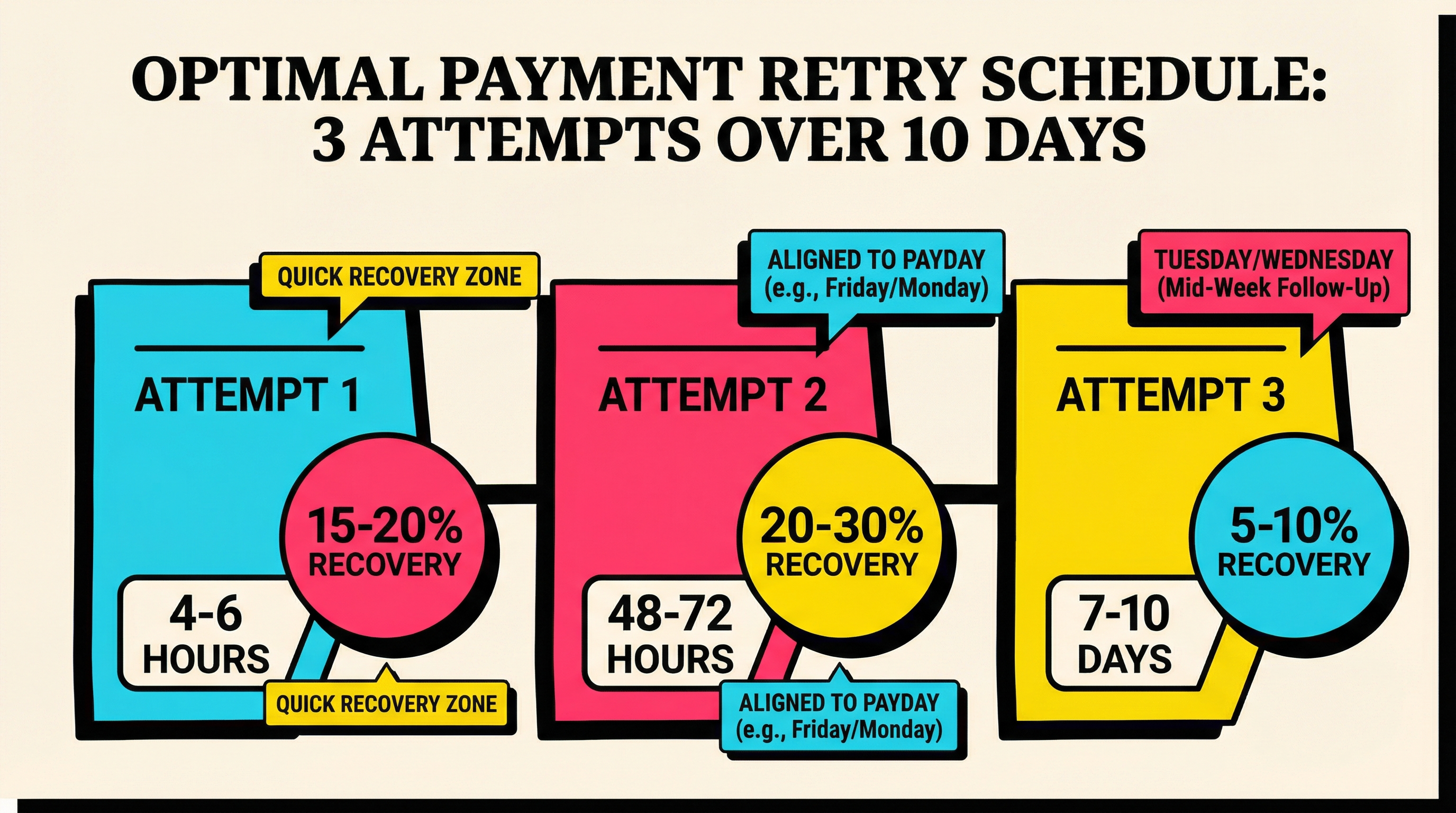
Attempt 1: 4-6 Hours After Initial Failure
Don't retry immediately. Give the initial failure time to surface in the customer's banking system. A 4-6 hour window catches "soft" declines (temporary processing errors, brief holds) that resolve quickly without any customer action.
This first retry recovers the easy wins. About 15-20% of failed payments that will eventually succeed will clear on this first retry.
Attempt 2: 48-72 Hours Later, Aligned to Payday
This is your highest-value retry. Space it 2-3 days from the first attempt, but adjust the exact day to align with common payroll cycles. If the initial failure happened on the 12th, push this retry to the 15th. If it happened on the 27th, push to the 1st.
This retry catches the largest cohort: people whose cards were temporarily low on funds and have now been replenished. Done right, this single attempt can recover 20-30% of remaining recoverable payments.
Attempt 3: 5-7 Days After Attempt 2, Tuesday or Wednesday Morning
Your final retry targets the long tail. By this point, you've already sent dunning emails, the customer has had time to update their payment method, and you're catching anyone whose funding cycle didn't align with your second attempt.
Schedule this for a Tuesday or Wednesday between 8-10 AM in the customer's timezone. This maximizes authorization rates based on day-of-week and time-of-day patterns.
After 3 Attempts: Shift to Dunning
If three well-timed retries don't recover the payment, additional retries have rapidly diminishing returns. Shift your strategy to direct customer communication: dunning emails, in-app notifications, and payment method update prompts.
Retry Timing by Decline Code
Not all failures are created equal. The optimal retry timing depends heavily on why the payment failed.
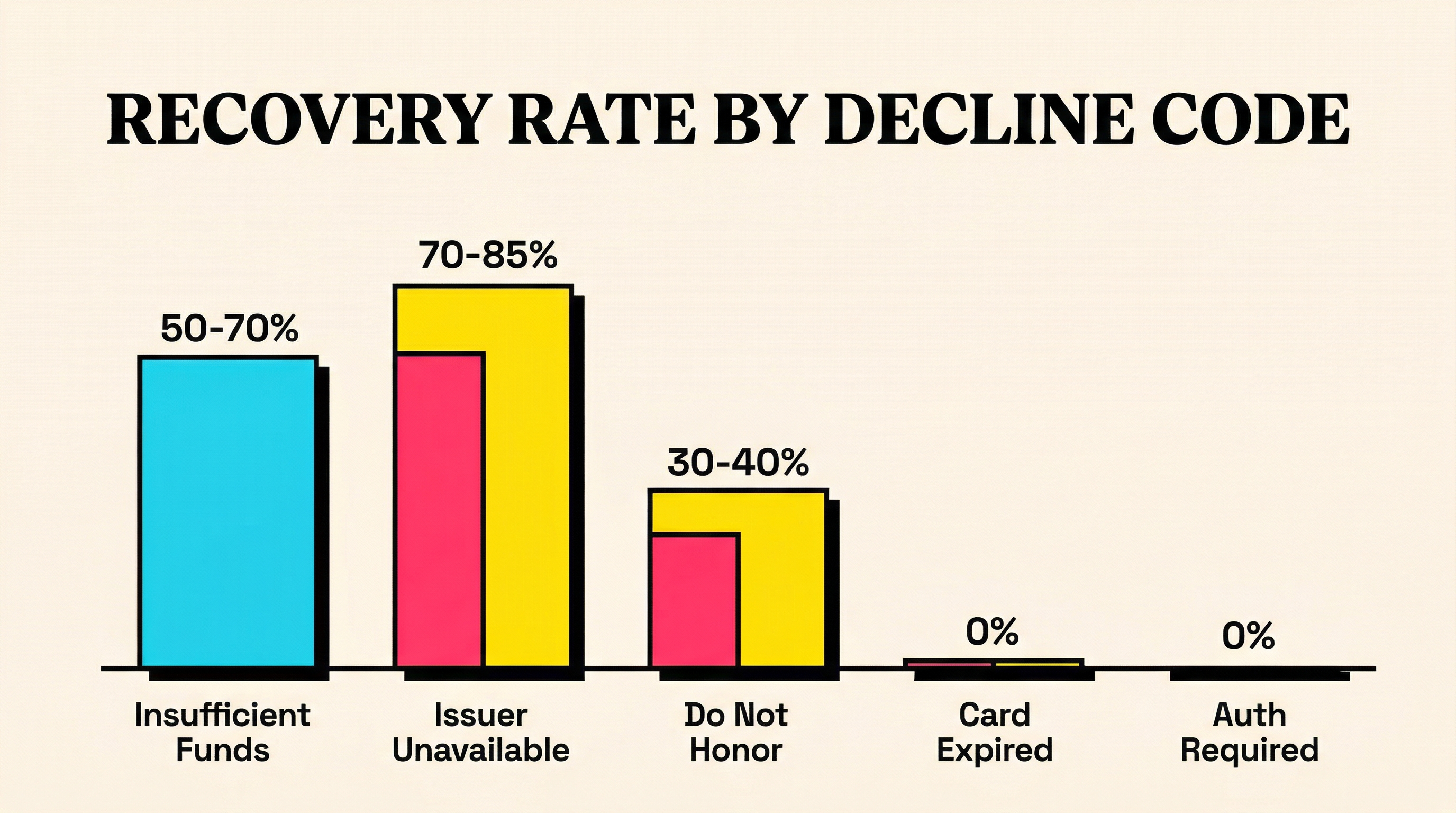
Insufficient Funds (Most Common, ~35% of Failures)
- Best retry window: 2-3 days later, aligned to payroll dates
- Second retry: 5-7 days after, catch next payroll cycle
- Time of day: Morning (8-10 AM customer local time)
- Recovery potential: High (50-70% with good timing)
Issuer Temporarily Unavailable / Try Again Later
- Best retry window: 1-4 hours later
- Second retry: 24 hours if first retry fails
- Time of day: During banking hours
- Recovery potential: Very high (70-85%), these are almost always temporary
Card Expired
- Retry value: Very low. The card number won't work until updated.
- Better approach: Skip retries entirely. Send a payment method update email immediately.
- Recovery potential with retries: Near 0%. Recovery depends on customer action.
Do Not Honor / Generic Decline
- Best retry window: 24-48 hours (give issuer time to resolve)
- Second retry: 5-7 days later
- Recovery potential: Moderate (30-40%), depends on underlying reason
Authentication Required (3D Secure)
- Retry value: Zero. Retries won't help because the customer needs to complete authentication.
- Better approach: Redirect customer to complete 3DS challenge via payment method update link.
- Recovery potential with retries: 0%. Requires customer interaction.
Stripe Smart Retries vs Custom Timing
If you're using Stripe Billing, you already have access to Smart Retries. This feature uses network-level signals, including data from millions of merchants, to choose retry timing automatically.
Smart Retries is a strong default. Stripe's network-wide data gives them visibility into patterns that no individual merchant can see: what time a specific bank's authorization rates peak, when batch processing cycles run, and which BIN ranges have higher success rates at certain times.
When Smart Retries is enough:
- You're under 1,000 subscriptions
- Your customer base is primarily in one country
- You haven't analyzed your own decline patterns
- You want a hands-off approach
When to layer custom timing on top:
- You have a large enough volume to identify your own patterns
- Your customers are concentrated in specific industries with known payroll cycles (e.g., government, healthcare)
- You've identified specific decline codes that Stripe's retries don't handle well for your cohort
- You want to coordinate retries with your dunning email schedule
If you do build custom logic, don't fight Stripe's system. Use Stripe's next_payment_attempt webhook data to see when Stripe plans to retry, and schedule your dunning communications around those windows rather than triggering competing retries.
How to Measure Retry Timing Effectiveness
You can't optimize what you don't measure. Here's how to evaluate whether your retry timing is working.
Key Metrics to Track
Recovery rate by attempt number. What percentage of ultimately recovered payments succeed on the 1st retry, 2nd, and 3rd? If your 3rd retry is recovering less than 5% of total recoveries, it's likely not worth the processing cost and customer friction.
Recovery rate by day of week. Break down your successful retries by the day they cleared. If Tuesdays recover 2x what Sundays do, that's a clear signal to shift your timing.
Recovery rate by time of day. Same analysis, different dimension. Morning vs afternoon vs evening. The pattern will be specific to your customer base.
Time-to-recovery distribution. How many days after initial failure does the average recovered payment take? If most of your recoveries happen within 48 hours, a 14-day retry window is wasteful.
Recovery rate by decline code. Segment your data by the original decline reason. "Insufficient funds" should have a high recovery rate; "expired card" should have near zero from retries alone.
Running the Numbers
Pull this data monthly. Even a simple spreadsheet tracking these five metrics will tell you more about your retry effectiveness than any default setting.
If you're not sure where your current recovery stands, a good starting point is benchmarking your numbers against industry averages. Most SaaS companies recover 40-60% of failed payments with automated retries. If you're below 40%, your timing is likely the issue, not your retry count.
Building Your Retry Timing Strategy: A Step-by-Step Approach
Step 1: Analyze Your Decline Code Distribution
Pull your last 90 days of failed payments from Stripe. Group them by decline code. This tells you where to focus. If 60% of your failures are "insufficient funds," your entire retry strategy should be optimized for fund availability timing.
Step 2: Map Your Customer Payroll Patterns
If you serve B2B customers, their payment cards are often tied to corporate expense accounts that get refreshed on specific cycles. B2C customers tend to align with standard 1st/15th payroll dates. Understanding your customer mix shapes your optimal retry dates.
Step 3: Front-Load Your Schedule
Set your first retry within 4-6 hours. Set your second retry 2-3 days later, aligned to the next likely funding date. Set your third (and likely final) retry 5-7 days after that, on a Tuesday or Wednesday morning.
Step 4: Coordinate with Dunning
Your retry schedule and dunning email schedule should work together, not independently. Send a "heads up, your payment failed" email after the first failed attempt. Send a "your card was declined, here's how to update it" email before your second retry. Send a final "last chance" email after your third retry fails.
Step 5: Measure and Iterate
After 30 days, pull the metrics outlined above. Adjust timing based on what the data shows for your customer base. The optimal schedule varies by industry, geography, and price point.
Common Retry Timing Mistakes
Retrying too fast. Hitting the same card 3 times in 24 hours is almost never optimal. Space your retries out.
Retrying on weekends. Authorization rates are lower on Saturdays and Sundays. If possible, skip weekend retries entirely.
Ignoring timezones. If your customers span multiple timezones, retrying at 9 AM UTC means hitting customers in California at 1 AM. Use customer timezone data where available.
Treating all decline codes the same. An "insufficient funds" failure and an "expired card" failure need completely different responses. Generic retry timing wastes attempts on cards that will never succeed.
Not coordinating with dunning. If your retry fires at the same moment your dunning email lands, the customer might update their card after the retry already failed. Sequence matters: notify first, then retry after giving the customer time to act.
The Bottom Line
Payment retry timing is one of the highest-leverage, lowest-effort improvements you can make to your involuntary churn rate. Most SaaS companies leave 10-20% of recoverable revenue on the table simply because their retries fire at the wrong moments.
The fix isn't complicated:
- Front-load your retries (most recoveries happen within 48 hours)
- Align retries with payroll cycles (1st and 15th of the month)
- Prefer weekday mornings over nights and weekends
- Match your approach to the decline code
- Coordinate retries with your dunning communication
Three well-timed retries beat seven random ones. Every time.
Not sure how your current retry timing stacks up? Run a free churn audit to see where your Stripe account is leaving recoverable revenue behind.
Related Posts

7 Failed Payment Segments Every Stripe Team Should Track
The Complete Toolkit for Managing Failed Payments
Stripe Do Not Honor Recovery: What SaaS Teams Should Do Next
How healthy is your Stripe account?
Get a free churn health report. Find pending cancellations, failed payments, and expiring cards putting your MRR at risk.
Run Free Audit