7 Ways to Make Your Dunning Emails Actually Get Opened
Your dunning emails are probably going straight to the trash.
Not because they're bad emails. Because they look, sound, and feel exactly like every other automated "your payment failed" message sitting in your customers' inboxes. And customers have been trained to ignore those.
Here's the thing: the average SaaS dunning email has an open rate between 20% and 30%. That means up to 80% of your failed-payment customers never even see your recovery attempt. Every unopened dunning email is a customer you're losing by default.
The good news? Dunning email open rates are one of the most improvable metrics in your entire payment recovery stack. Small changes to subject lines, timing, sender identity, and personalization can push open rates above 50%, and in some cases above 65%.
This guide covers seven specific, actionable strategies to get your dunning emails opened. Not clicked. Not converted. Opened. Because nothing else matters if the email never gets read.
1. Rewrite Your Subject Lines Like a Human Being
The single biggest lever for dunning email open rates is the subject line. And the single biggest mistake SaaS companies make is using subject lines that sound like they were written by a billing system.
Examples of subject lines that get ignored:
- "Payment failed for your subscription"
- "Action required: Update your payment method"
- "Invoice #INV-4829 payment unsuccessful"
These are technically accurate. They're also instantly recognizable as automated billing noise. Your customer's inbox is full of promotional emails, notifications, and updates. A subject line that screams "I'm an automated system message" gets filed away immediately.
What works better:
- "Quick question about your [Product] account"
- "Hey [Name], something went wrong with your payment"
- "[Name], your access to [Product] might be interrupted"
- "Can we help fix this? Your payment didn't go through"
Notice the pattern. These subject lines are conversational. They sound like they came from a person, not a cron job. They create mild curiosity or urgency without being alarmist.
The data backs this up. Subject lines with the recipient's first name see 22% higher open rates on average. Subject lines under 40 characters outperform longer ones by 12%. And subject lines that imply a question or conversation consistently beat declarative statements.
One more trick: avoid the word "failed" in your subject line. It's negative and triggering. Customers associate it with something they did wrong. Try "didn't go through," "needs attention," or "we noticed an issue" instead.
2. Send From a Real Person, Not a System

Check the "From" field on your dunning emails right now. If it says something like "Billing Department," "noreply@yourapp.com," or just your company name, you're losing opens before the email even loads.
Emails from a real person's name get opened 15-25% more often than emails from a brand name or department. This is well-documented across email marketing, and it applies just as much to transactional and dunning emails.
What to change:
- From name: "Sarah from [YourApp]" or "[YourApp] Support Team"
- From address: sarah@yourapp.com or support@yourapp.com (never noreply@)
- Reply-to: A real address that actually gets monitored
The psychology is simple. When you see a person's name in your inbox, your brain processes it differently than a brand name. It feels like a message, not a notification. And that split-second difference determines whether someone opens or scrolls past.
If you're a solo founder or small team, this is actually an advantage. Send dunning emails from yourself. "John from ChurnBot" feels more genuine than "The ChurnBot Team" when your team is three people. Authenticity beats polish in dunning.
Important: make sure replies actually go somewhere. Nothing kills trust faster than getting a bounce-back when a customer tries to respond to your "personal" dunning email. If you're asking them to take action on their payment, they should be able to reply with questions. Understanding your payment recovery benchmarks helps you measure whether these sender changes are actually moving the needle.
3. Time Your Emails Around Inbox Attention Patterns
Most dunning systems fire the first email immediately after a payment fails. Makes sense on the surface. The payment failed, so notify the customer.
But "immediately" often means 2 AM, or Saturday afternoon, or during a holiday weekend. Your dunning email lands in the inbox alongside 47 other messages, and by the time the customer checks their email during work hours, it's buried.
Optimal dunning email timing based on industry data:
- Weekdays outperform weekends by 18-23% for open rates
- Tuesday through Thursday are the strongest days for transactional email opens
- 9 AM to 11 AM in the recipient's local timezone is the sweet spot
- Avoid Mondays (inbox overload from the weekend) and Fridays (mental checkout)
This doesn't mean you should delay the first notification for days. It means you should be smart about scheduling:
- If a payment fails at 3 AM Tuesday, queue the email for 9:30 AM Tuesday
- If it fails Friday evening, send it Monday at 10 AM (or Saturday morning at most)
- If it fails during business hours on a weekday, send within 1-2 hours
The cadence matters too. Your follow-up sequence should be spaced thoughtfully. A common pattern that works:
- Email 1: Same day or next business morning
- Email 2: 3 days later
- Email 3: 5 days after that
- Final notice: 3 days before cancellation
Each touchpoint needs to arrive when the customer is likely to be checking email and able to take action. Sending a "last chance" email at 11 PM on a Sunday is basically sending it to the void.
4. Personalize Beyond Just the First Name
Dropping [First Name] into a template is table stakes. It's 2026. Everyone does it. Your customers can spot a mail merge from orbit.
Real personalization means using the context you already have about the customer to make the email feel relevant and specific:
- Plan name: "Your Pro plan payment didn't go through" vs "Your payment didn't go through"
- Usage data: "You've used 847 API calls this month. Let's make sure your access continues."
- Account age: "You've been with us for 14 months" (loyalty acknowledgment)
- Last activity: "You were working on [project name] yesterday" (shows you know they're active)
- Payment amount: "The $49/month charge for your team plan" (specific beats vague)
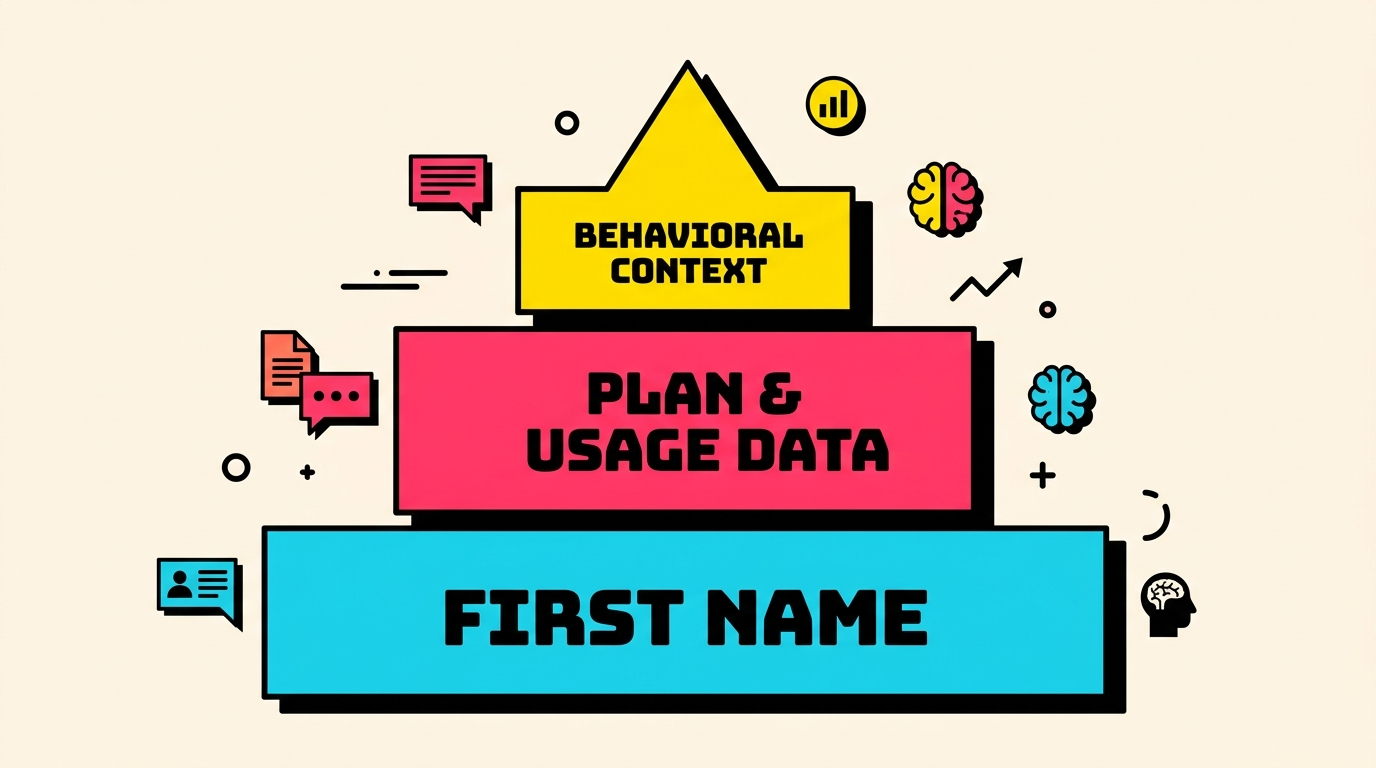
Each layer of personalization makes the email feel less like a system notification and more like a message from someone who knows the customer. And that perceived relevance directly drives opens.
Here's the key insight: personalization in the subject line matters more than personalization in the body. The body only matters if the email gets opened. So put your best personalization into the subject and preview text.
Subject line examples with deep personalization:
- "[Name], your Pro team's access expires Thursday"
- "Your 847 API calls this month are at risk"
- "14 months in, and we have a billing hiccup"
The preview text (the snippet shown after the subject line in most email clients) is equally important. Treat it as a second subject line. Don't waste it with "This is an automated message" or your company address. Use it to reinforce curiosity or urgency.
We've covered the psychology behind why dunning tone matters. Personalization is the practical implementation of those psychological principles.
5. Segment Your Dunning Emails by Failure Reason
Not all failed payments are the same. An expired card is fundamentally different from an insufficient funds decline, which is different from a fraud flag. Yet most SaaS companies send the exact same dunning email regardless of the decline reason.
This is a massive missed opportunity for improving open rates and recovery rates alike.
Why segmentation improves opens:
When the subject line and preview text are specific to the problem, they're more relevant. And relevance drives opens.
- Expired card: "Your card ending in 4242 expired. Takes 30 seconds to update."
- Insufficient funds: "Quick heads up: your payment needs attention" (softer, less embarrassing)
- Processing error: "Tech hiccup on our end. Your payment needs a retry."
- Card declined (generic): "Something went wrong with your payment. Can we help?"
Each of these hits a different emotional register. The expired card message is factual and action-oriented because the customer just needs to update their details. The insufficient funds message is deliberately gentle because you don't want to embarrass anyone. The processing error message takes responsibility, which builds trust.
Implementation is straightforward if you use Stripe. Every failed charge returns a decline code. Map the most common codes to email templates:
| Decline Category | Codes | Email Tone |
|---|---|---|
| Expired | expired_card | Direct, action-focused |
| Funds | insufficient_funds | Gentle, no blame |
| Auth required | authentication_required | Helpful, explain 3DS |
| Hard decline | stolen_card, lost_card | Neutral, offer support |
| Soft decline | try_again_later, issuer_not_available | Reassuring, "we'll retry" |
For a deep dive on what each code means and how to handle it, check the complete guide to Stripe decline codes.
Most dunning tools let you set up conditional email flows based on metadata. If yours doesn't, this alone might be worth switching tools.
6. Design for the Inbox Preview, Not the Email Body
Here's something most SaaS teams get backwards: they spend hours designing beautiful HTML dunning emails with branded headers, colorful buttons, and polished layouts. Then they wonder why open rates are low.
The problem? None of that design work is visible until after the email is opened. And your open rate is determined by exactly three things the customer sees before opening:
- Sender name (covered above)
- Subject line (covered above)
- Preview text (the first 40-130 characters of visible text)
The preview text is the most neglected element in dunning emails. By default, most email clients pull it from the first line of the email body. If your email starts with "Hi [Name]," your preview text becomes "Hi John," which tells the customer nothing useful.
How to optimize preview text:
Set it explicitly using a hidden preheader in your email HTML. Every modern ESP and dunning tool supports this. Make the preview text complement your subject line:
- Subject: "Quick question about your account"
Preview: "Your card ending in 4242 needs updating. Takes 30 seconds." - Subject: "[Name], your Pro plan access is paused"
Preview: "We tried to charge your Visa but it didn't go through. Here's how to fix it." - Subject: "Something needs your attention"
Preview: "Your $99/mo payment failed. Your team's access continues for 7 more days."
The preview text should answer the implicit question: "Why should I open this?" Give the customer enough information to understand the stakes, but not so much that they don't need to open the email.
Also worth noting: plain text emails often outperform HTML emails for dunning. They feel more personal, load faster, and don't get caught in image-blocking or promotional tab filters. Test both, but don't assume your beautifully designed template is performing better.
7. Create Urgency Without Triggering Spam Filters
Urgency drives action. But in dunning emails, there's a fine line between "your service might be interrupted" and "URGENT: ACT NOW OR LOSE EVERYTHING." The first motivates. The second gets flagged as spam, and spam means zero open rate.
Words and phrases that trigger spam filters:
- "URGENT" (especially in all caps)
- "Act now"
- "Final warning"
- "Account suspended" (when it isn't actually suspended yet)
- Excessive exclamation marks
- ALL CAPS subject lines
How to create urgency that passes filters and feels genuine:
- Specific deadlines: "Your access continues until March 28" is better than "Act now"
- Countdowns: "5 days to update your payment" is specific and not spammy
- Consequence framing: "Your team will lose access to shared dashboards" is concrete
- Social proof: "Most customers fix this in under a minute" (normalizes the action)
The key is to be honest about consequences and timelines. If you cancel accounts after 14 days of failed payment, say that. Clearly. With a specific date. Manufactured urgency ("This is your LAST CHANCE") damages trust and deliverability.
Deliverability is the hidden factor in dunning email open rates. If your emails land in spam or the Promotions tab, your open rate craters regardless of how good your subject line is. Keep your dunning emails:
- Short (under 200 words for the first email)
- Text-heavy (minimal images)
- From a warmed-up domain
- Authenticated (SPF, DKIM, DMARC all passing)
- Sent at reasonable volume (not bulk-blasting)
If you're tracking your revenue recovery rate, watch the deliverability metrics alongside open rates. A sudden drop in opens often means a deliverability problem, not a content problem.
Putting It All Together: The High-Open-Rate Dunning Sequence
Applying all seven strategies, here's what a best-practice dunning sequence looks like:
Email 1 (Day 0-1, business hours)
- From: "Alex from [YourApp]"
- Subject: "[Name], quick heads up about your payment"
- Preview: "Your Visa ending in 4242 didn't go through. Takes 30 seconds to fix."
- Body: 3-4 sentences. What happened, one-click update link, timeline.
- Tone: Casual, helpful, zero blame.
Email 2 (Day 3)
- From: "Alex from [YourApp]"
- Subject: "Still having trouble with your payment?"
- Preview: "Your Pro plan ($99/mo) payment is 3 days overdue. Your data is safe."
- Body: Acknowledge they're busy. Reiterate consequences. Offer help.
- Tone: Understanding but slightly more urgent.
Email 3 (Day 8)
- From: "[YourApp] Support"
- Subject: "[Name], your account will be paused on [Date]"
- Preview: "We want to keep you. Here's what happens next and how to fix it in 30 seconds."
- Body: Clear deadline. Specific consequences. Direct link.
- Tone: Direct, honest, still respectful.
Final Notice (Day 11)
- From: "Alex from [YourApp]"
- Subject: "We don't want to lose you, [Name]"
- Preview: "Your Pro plan cancels in 3 days. One click to keep everything."
- Body: Emotional appeal + practical action. Last chance.
- Tone: Genuine, personal.
Each email in this sequence is designed to stand alone (not everyone reads the series) while escalating appropriately. The subject lines are conversational, the preview text adds context, and the timing respects the customer's inbox patterns.
The Compound Effect of Better Open Rates
Let's run the numbers on what improving dunning email open rates actually means for revenue.
Assume you have 1,000 failed payments per month, with an average subscription value of $75/month:
- At 25% open rate (industry average): 250 customers see the email. If 40% of openers click and 60% of clickers recover, that's 60 recovered customers = $4,500/month recovered.
- At 50% open rate (achievable with these strategies): 500 customers see the email. Same click and recovery rates = 120 recovered customers = $9,000/month recovered.
That's an extra $4,500/month, or $54,000/year, from the same customer base, the same product, and the same payment recovery flow. You're just getting more people to read the email.
And this compounds. Customers who successfully recover become retained customers who pay you every month going forward. The lifetime value of those 60 extra recovered customers per month adds up fast.
Start With What You Can Measure
Before changing anything, establish your baseline. Check your current dunning email open rates, click rates, and recovery rates. If you don't know these numbers, that's your first problem to solve.
Most ESP dashboards and dunning tools report open rates per email in a sequence. Export a month of data and calculate:
- Overall dunning sequence open rate
- Open rate per email in the sequence
- Open rate by day of week
- Open rate by failure type (if segmented)
Then implement one change at a time. Subject line first (biggest impact). Then sender identity. Then timing. Measure the impact of each before stacking the next change. This prevents confusion about what's actually working.
If you're not sure where your payment recovery stands overall, start with a baseline assessment. Run a free churn audit to see where your Stripe account is leaking revenue, then apply these dunning email strategies to plug the gaps.
Related Posts

7 Failed Payment Segments Every Stripe Team Should Track
Stripe vs Chargebee: Which Handles Failed Payments Better
How healthy is your Stripe account?
Get a free churn health report. Find pending cancellations, failed payments, and expiring cards putting your MRR at risk.
Run Free Audit