How to Calculate Your Involuntary Churn Rate (With Formula)

Every SaaS founder obsesses over churn. But most are tracking the wrong number.
When a customer cancels their subscription, it shows up in your churn metrics. But here's what doesn't get tracked properly: customers who wanted to stay but churned anyway because their payment failed.
That's involuntary churn. And if you're not measuring it separately, you're flying blind.
Involuntary churn is hidden revenue leakage. Unlike voluntary churn (where customers actively decide to leave), involuntary churn happens because of payment failures — expired cards, insufficient funds, outdated billing information. These customers didn't want to leave. They just... fell through the cracks.
The good news? Once you know your involuntary churn rate, you can actually fix it. But first, you need to calculate it correctly.
What Is Involuntary Churn Rate (And Why It Matters)
Involuntary churn rate measures the percentage of customers you lose due to failed payments — not because they chose to cancel.
It's different from your overall churn rate in a critical way: involuntary churn is preventable. You can't convince someone to stay if they've decided your product isn't for them. But you absolutely can recover a failed payment if the customer still wants to be a customer.
Here's why this metric matters:
- It's actionable: Unlike voluntary churn (which requires fixing product-market fit, pricing, or customer success), involuntary churn can be reduced with dunning emails, payment retries, and card updater services
- It's often underestimated: Most SaaS companies lose 20-40% of their total churn to payment failures, but they don't track it separately
- It's expensive: According to industry benchmarks, the average SaaS business loses 9% of MRR annually to failed payments alone
- It compounds: If you're losing 2% of customers each month to failed payments, that's 24% annually — and it's growing as your customer base grows
Before you can reduce involuntary churn, you need to measure it. Let's break down exactly how to calculate your involuntary churn rate.
The Standard Involuntary Churn Rate Formula
The basic formula for calculating involuntary churn rate is straightforward:
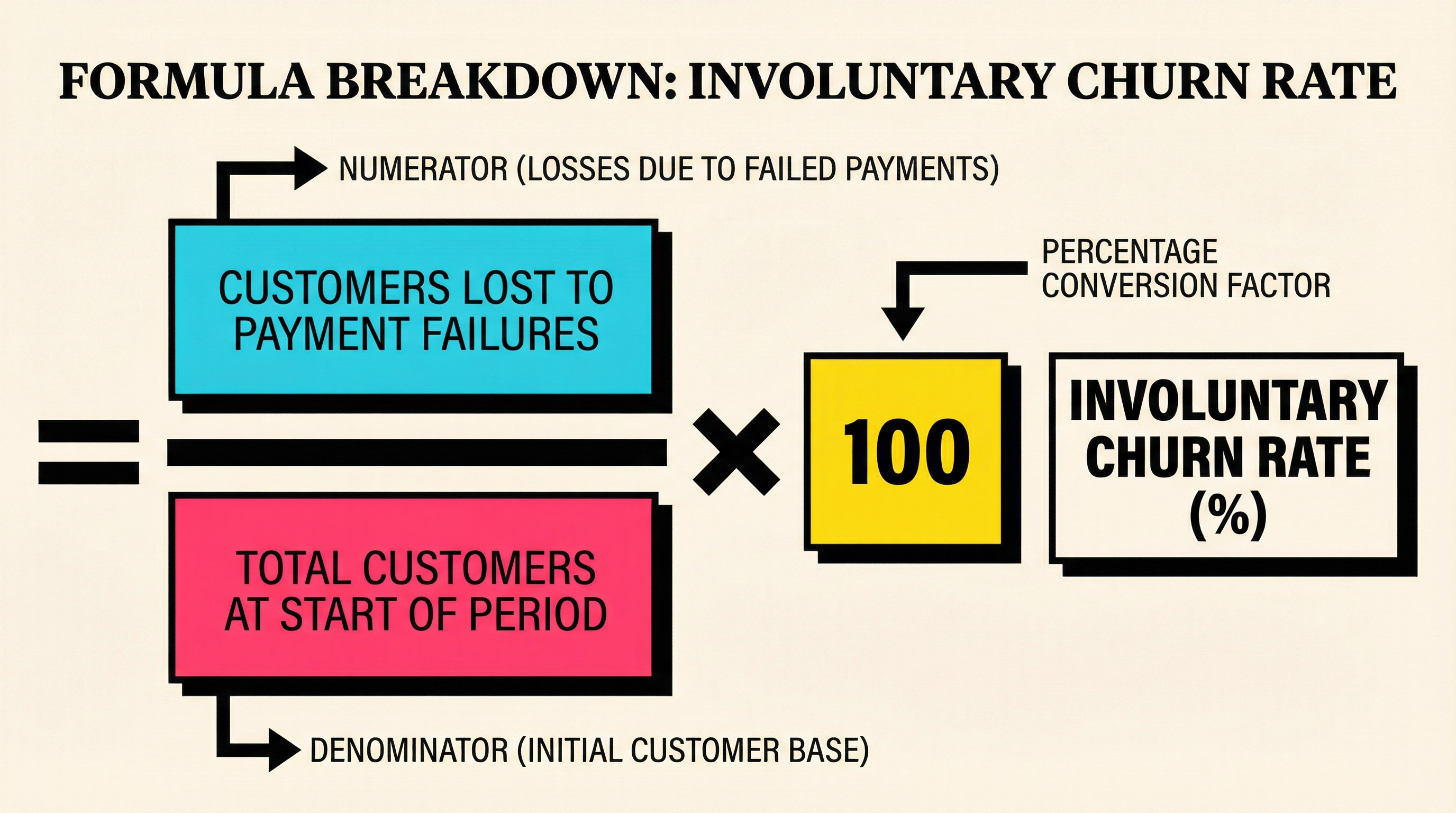
Involuntary Churn Rate = (Customers Lost to Payment Failures ÷ Total Customers at Start of Period) × 100
But the devil is in the details. Let's unpack this.
What Counts as "Customers Lost to Payment Failures"?
This is where most people get tripped up. A customer should only count as involuntary churn if:
- Their subscription ended (not just paused or in a grace period)
- Due to a failed payment (not a voluntary cancellation)
- During the measurement period (usually a month or cohort)
In Stripe, this typically means customers whose subscriptions moved to canceled or unpaid status after exhausting all retry attempts — not customers who manually canceled via your billing portal.
What's the "Start of Period" Number?
Use the total active, paying customers at the beginning of your measurement period. If you're calculating monthly involuntary churn for February, use the customer count on February 1st.
Don't include:
- Trial users who haven't converted
- Canceled customers from previous periods
- New customers added during the period (we'll address them in a moment)
Step-by-Step: How to Calculate Your Involuntary Churn Rate
Let's walk through a real example using Stripe data.
Step 1: Define Your Measurement Period
Start with a clear time window. Most SaaS companies track churn monthly, so let's use February 2026 as our example.
- Start date: February 1, 2026
- End date: February 28, 2026
Step 2: Count Active Customers at Period Start
Go to Stripe (or your billing system) and pull the count of active subscriptions on February 1st.
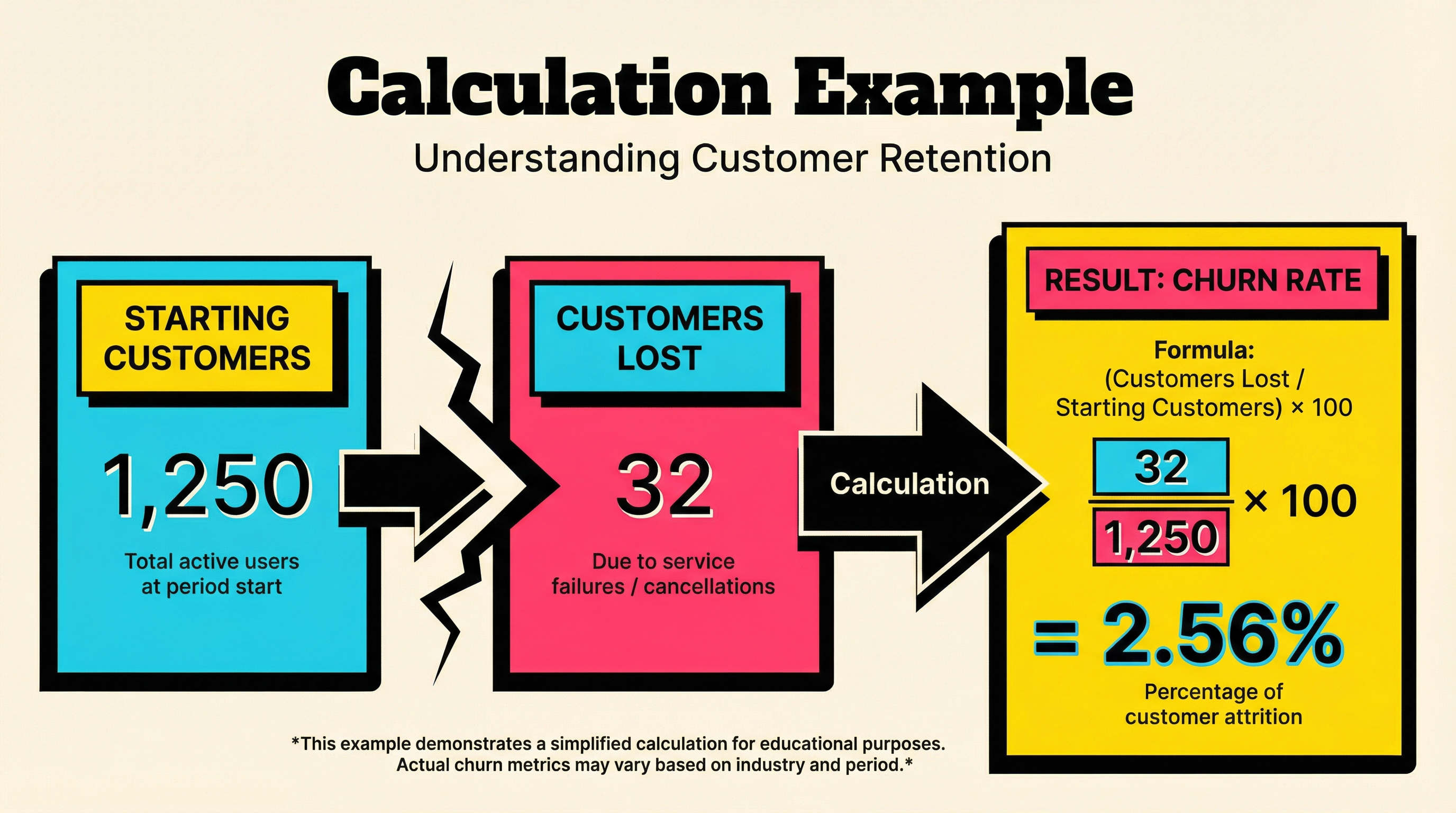
For this example, let's say you had 1,250 active paying customers on February 1st.
Step 3: Identify Failed Payment Cancellations
Now pull a list of all subscriptions that:
- Were active on February 1st
- Ended between February 1-28
- Ended due to payment failure (not manual cancellation)
In Stripe, you can filter by:
- Status changed to
canceledorunpaid - Cancellation reason =
payment_failedor similar - Exclude subscriptions where
cancel_at_period_end = true(those are voluntary)
Let's say you lost 32 customers to failed payments in February.
Step 4: Apply the Formula
Involuntary Churn Rate = (32 ÷ 1,250) × 100 = 2.56%
That's your monthly involuntary churn rate for February.
But here's where it gets interesting: is 2.56% good or bad? We'll cover benchmarks in a moment, but first, let's look at a more sophisticated way to measure this.
Cohort-Based vs Monthly Calculation Methods
The example above uses period-based calculation — measuring churn over a calendar month. But there's another method that's often more accurate: cohort-based calculation.
Period-Based Calculation (What We Just Did)
- Measures churn within a fixed calendar period (e.g., February)
- Easier to track month-over-month
- Good for high-level dashboards
- Can miss nuances in customer lifecycle timing
Cohort-Based Calculation (More Accurate)
- Groups customers by signup month and tracks their churn over time
- Shows churn patterns based on customer age
- Reveals if newer customers churn faster than older ones
- Better for diagnosing root causes
Here's how cohort-based involuntary churn works:
- Group customers by signup cohort (e.g., all customers who signed up in January 2026)
- Track how many from that cohort fail payments in their 1st month, 2nd month, 3rd month, etc.
- Calculate churn rate for each cohort separately
For example:
- January 2026 cohort: 500 customers signed up
- By end of February, 15 of those 500 were lost to payment failures
- Cohort involuntary churn rate: (15 ÷ 500) × 100 = 3%
Cohort analysis is more work to set up, but it reveals patterns like:
- "Our involuntary churn spikes in month 3" (maybe that's when trial cards expire)
- "Customers who signed up before our Stripe integration churn 2x more" (legacy billing issues)
For most SaaS businesses, start with period-based, then layer in cohort analysis once you have enough data.
Common Mistakes When Calculating Involuntary Churn
Here are the biggest traps I see founders fall into:
Mistake #1: Mixing Voluntary and Involuntary Churn
If your dashboard just shows "total churn," you're lumping together two completely different problems. A customer who cancels because your product sucks is not the same as a customer whose card expired.
Solution: Separate these metrics in your reporting. Track total churn, voluntary churn, and involuntary churn as distinct KPIs.
Mistake #2: Including New Customers in the Denominator
Don't calculate churn as (customers lost ÷ average customers during period). This inflates your denominator if you're growing, making churn look artificially low.
Solution: Always use customers at the start of the period in your denominator.
Mistake #3: Counting Paused Subscriptions as Churned
Some billing systems put failed-payment customers into a "grace period" or "past due" status before canceling them. If you count these as churned too early, you'll overstate involuntary churn.
Solution: Only count a customer as involuntary churn once their subscription is fully canceled (after all retry attempts have failed).
Mistake #4: Ignoring Revenue-Based Churn
Customer count churn is useful, but revenue churn tells a different story. Losing 10 customers on your $10/month plan is not the same as losing 10 customers on your $500/month plan.
Solution: Calculate both:
- Customer involuntary churn rate: customers lost ÷ total customers
- MRR involuntary churn rate: MRR lost to payment failures ÷ total MRR
If your MRR churn is higher than customer churn, you're losing bigger accounts to payment failures. That's a red flag.
Mistake #5: Not Tracking Recovery Rate
Knowing your involuntary churn rate is step one. But if you're running dunning campaigns or payment retries, you also need to track how many failed payments you recover.
Recovery Rate = (Recovered Customers ÷ Total Payment Failures) × 100
If 50 payments fail in a month and you recover 20 of them, your recovery rate is 40%. The other 32 became involuntary churn (using our earlier example).
Tracking both metrics — involuntary churn rate AND recovery rate — gives you the full picture.
What's a Good Involuntary Churn Rate?
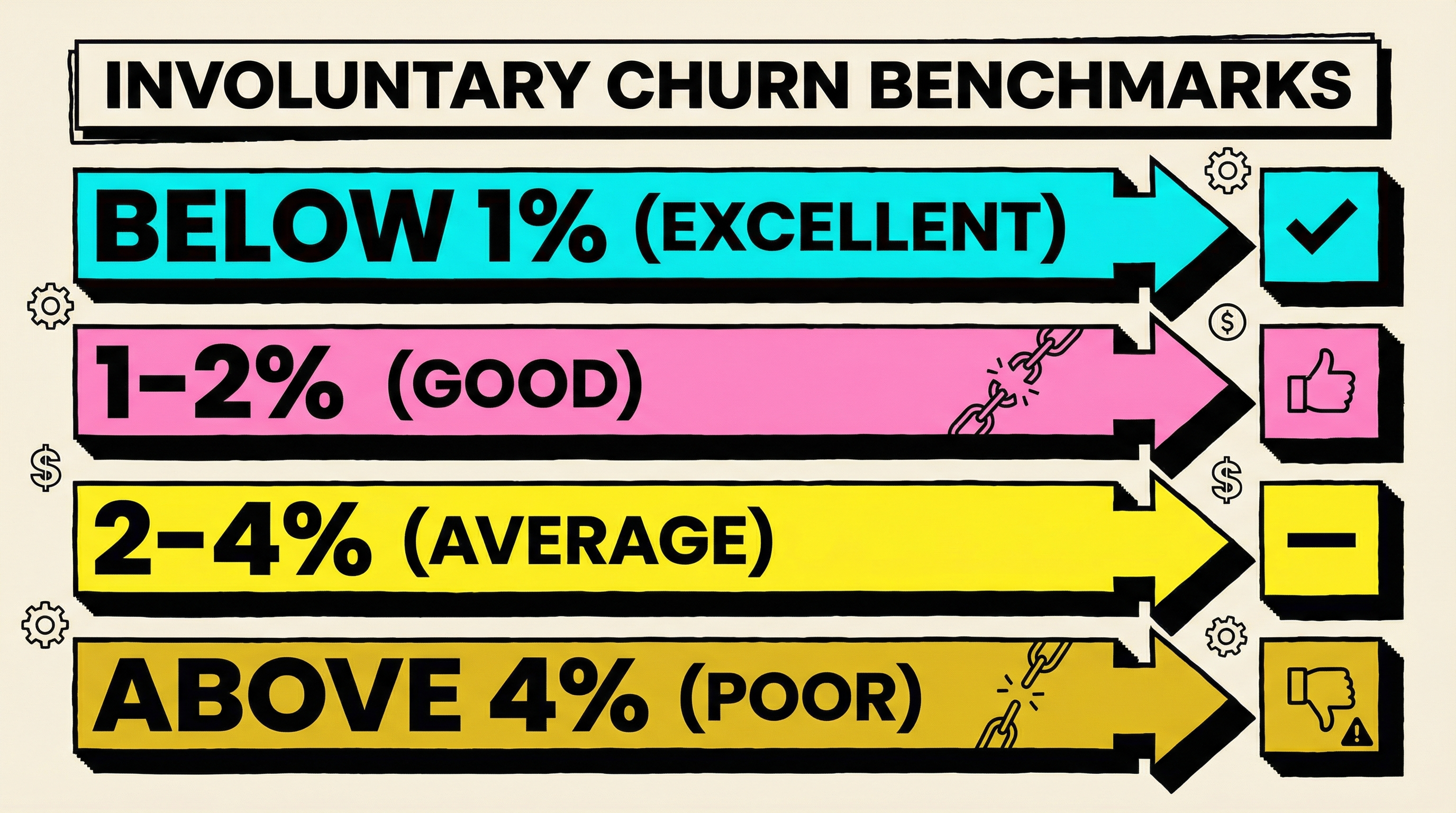
Context matters, but here are industry benchmarks:
- Below 1% monthly: Excellent. You have solid payment infrastructure and effective dunning.
- 1-2% monthly: Good. There's room for improvement, but you're not hemorrhaging revenue.
- 2-4% monthly: Average. This is where most SaaS companies land. You should prioritize reducing this.
- Above 4% monthly: Poor. You're losing significant MRR to preventable payment failures.
Annualized, even a 2% monthly involuntary churn rate means you're losing roughly 24% of customers per year to payment failures. For a company with $1M ARR, that's $240K in preventable churn.
Your benchmark also depends on:
- Customer segment: B2C SaaS tends to have higher involuntary churn (3-5%) than B2B (1-2%)
- Price point: Lower-priced plans ($10-50/month) see more payment failures than enterprise plans
- Geography: Some regions have higher card decline rates than others
- Payment methods: Credit cards fail more often than ACH or wire transfers
If you want to see how your involuntary churn rate compares to similar SaaS businesses, check out industry-specific churn benchmarks.
How to Track This Metric Over Time
Calculating your involuntary churn rate once is useful. Tracking it over time is where the real insights come from.
Here's how to build a sustainable tracking system:
Step 1: Automate Data Collection
Manually pulling Stripe reports every month is painful. Instead:
- Use Stripe's Data Pipeline or export to your data warehouse
- Set up a dashboard in Metabase, Mode, or Looker
- Tag cancellations with a reason (voluntary vs involuntary) automatically via webhooks
If you're using Stripe, listen for the customer.subscription.deleted webhook and check the cancellation_details.reason field. If it's payment_failed, tag it as involuntary.
Step 2: Track Both Customer and Revenue Churn
Build two charts:
- Monthly involuntary customer churn rate (customers lost ÷ total customers)
- Monthly involuntary MRR churn rate (MRR lost ÷ total MRR)
If these diverge, you're losing customers of different sizes at different rates.
Step 3: Segment by Key Attributes
Don't just track aggregate churn. Break it down by:
- Plan tier: Are $10/month customers churning faster than $100/month customers?
- Signup date: Is involuntary churn higher in months 1-3 vs months 12+?
- Payment method: Are certain card types or banks declining more often?
- Geography: Are customers in certain countries experiencing more failures?
These segments reveal where to focus your dunning and recovery efforts.
Step 4: Correlate with Recovery Efforts
If you launch a new dunning email campaign or switch to Stripe's Smart Retries, measure the impact:
- What was your involuntary churn rate before the change?
- What is it now?
- How much MRR did you save?
Most payment recovery tools are worth it if they reduce involuntary churn by even 20-30%. The ROI is usually 10x or more.
Step 5: Set a Target and Review Quarterly
Pick a realistic target based on your current rate:
- If you're at 4%, aim for 3% within 90 days
- If you're at 2%, aim for 1.5%
Review progress every quarter. If you're not improving, dig into the data:
- Which decline codes are most common? (See Stripe decline codes explained)
- Are your dunning emails being opened?
- Are customers updating their payment methods when prompted?
Where to Go From Here
Now that you know how to calculate your involuntary churn rate, here's what to do next:
- Pull your data and calculate it using the formula above
- Compare to benchmarks — is your rate above or below industry average?
- Identify root causes — which decline codes, customer segments, or billing flows are driving failures?
- Implement recovery tactics — dunning emails, Smart Retries, card updater services (see tools to reduce involuntary churn)
- Track progress monthly — measure the impact of your changes
If you're losing more than 2% of customers monthly to payment failures, you're leaving serious money on the table. The difference between a 4% and 2% involuntary churn rate on a $1M ARR business is $240K per year. That's real revenue.
The good news? Unlike voluntary churn (which is hard to fix), involuntary churn is a technical problem with known solutions. You just need to measure it, understand it, and systematically reduce it.
Want to see exactly how much involuntary churn is costing you? Run a free churn audit at churnbot.co/audit. Connect your Stripe account, and we'll calculate your involuntary churn rate, recovery rate, and show you exactly where the revenue leakage is happening — no guesswork required.
Related Posts
Stripe Do Not Honor Recovery: What SaaS Teams Should Do Next

7 Payment Recovery KPIs Every Stripe Team Should Track

7 Failed Payment Segments Every Stripe Team Should Track
How healthy is your Stripe account?
Get a free churn health report. Find pending cancellations, failed payments, and expiring cards putting your MRR at risk.
Run Free Audit