10 Quick Wins to Reduce Failed Payments This Month
Every month, SaaS companies lose between 2% and 5% of their recurring revenue to failed payments. Not cancellations. Not downgrades. Just payments that don't go through.
The frustrating part? Most of these failures are fixable. You don't need a six-month dunning overhaul or an expensive payment recovery platform. You need a handful of targeted fixes you can implement this month.
This isn't a strategy whitepaper. It's a checklist. Ten things you can do right now to reduce failed payments and keep more of the revenue you've already earned.
Let's get into it.
1. Enable Stripe's Automatic Card Updater
This is the single easiest win on this list, and most SaaS founders don't even know it exists.
Stripe integrates with card networks (Visa, Mastercard) through a service called the Account Updater. When a customer's card gets reissued with a new number or expiration date, the card network automatically pushes the updated details to Stripe. Stripe then updates the payment method on file without the customer lifting a finger.
Here's the catch: it only works for customers stored as Stripe Customers with saved payment methods. If you're doing one-off charges or not saving cards properly, you miss out entirely.
What to do this week:
- Verify your Stripe integration saves cards as reusable payment methods (not single-use tokens)
- Check your Customer objects in Stripe to confirm payment methods are attached
- Review your expired card decline rates to see how big this problem is for you
The Account Updater typically recovers 20-30% of card-on-file failures before they even happen. That's revenue you never have to chase.
2. Add Pre-Dunning Emails 7 Days Before Renewal
Most dunning sequences start after a payment fails. That's too late. By the time a charge bounces, you're already in recovery mode, fighting an uphill battle against card networks, customer inattention, and bank fraud algorithms.
Pre-dunning flips the script. A simple email 7 days before renewal that says "Your subscription renews on [date], and we'll charge the card ending in [last 4]" does three things:
- Reminds customers with expired or cancelled cards to update their payment method
- Gives customers who want to cancel a graceful exit (which means they won't dispute the charge later)
- Reduces the surprise factor that triggers "do not honor" declines from issuing banks
SaaS companies that add pre-dunning emails typically see a 10-15% reduction in first-attempt payment failures. That's not a rounding error. On $50K MRR, that's $5K-$7.5K annually that never enters your recovery funnel.
What to do this week:
- Set up a transactional email triggered 7 days before each subscription renewal
- Include the last four digits of the card on file and a direct link to update payment details
- Keep it short. One paragraph. One CTA. No upsells.
3. Retry Failed Payments on Optimal Days
Not all retry schedules are created equal. If you're retrying failed payments every 24 hours for 7 days straight, you're doing it wrong.
Payment success rates vary significantly by day of the week and time of month. Here's what the data shows:
- Paydays matter. In the US, the 1st and 15th of each month see the highest payment success rates. In the UK, it's typically the last working day of the month.
- Weekdays beat weekends. Tuesday through Thursday consistently outperform Saturday and Sunday for retry success.
- Morning retries win. Charges attempted between 6 AM and 10 AM in the customer's local timezone have higher approval rates than afternoon or evening attempts.
Stripe's Smart Retries use machine learning to optimize retry timing automatically. If you're on Stripe Billing, make sure Smart Retries are enabled. If you're managing subscriptions manually, build retry logic that accounts for these patterns.
For a deeper comparison of retry approaches, check out our breakdown of Stripe Smart Retries vs custom retry logic.
What to do this week:
- If on Stripe Billing: confirm Smart Retries are enabled in your billing settings
- If managing retries manually: adjust your schedule to target the 1st, 15th, and mid-week days
- Stop retrying on weekends unless you have data showing otherwise
4. Fix Your Payment Failure Webhooks
You can't reduce failed payments if you don't know they're happening in real time. Too many SaaS companies discover payment failures days or weeks later when they finally check their Stripe dashboard.
Webhooks are the fix. Stripe fires events for every payment lifecycle stage, and you should be listening to the ones that matter:
invoice.payment_failed— The critical one. Fires when a subscription payment fails.customer.subscription.updated— Catches status changes (active to past_due, past_due to unpaid).payment_method.automatically_updated— Tells you when the Account Updater refreshes a card.charge.failed— Fires for any failed charge, including one-off invoices.
At minimum, you need invoice.payment_failed piped into your notification system. Slack, email, PagerDuty, whatever your team monitors. The faster you know about a failure, the faster you can act.
For the full list of payment-related webhooks worth monitoring, see our guide to Stripe webhooks for payment health.
What to do this week:
- Audit your webhook endpoints in Stripe Dashboard > Developers > Webhooks
- Ensure
invoice.payment_failedis subscribed and actively processing - Add a Slack or email alert for every failed payment so your team sees them same-day
5. Reduce Involuntary Downgrades with Grace Periods
When a payment fails, what happens to the customer's access? If you immediately downgrade or cancel them, you've just turned a billing issue into a customer service crisis.
Grace periods give customers time to fix their payment method before losing access. The right grace period length depends on your pricing and audience:
- $10-$50/mo plans: 7-14 day grace period. These customers are less likely to check email urgently.
- $100+/mo plans: 3-7 day grace period. Higher-value customers tend to respond faster, and you want to signal urgency.
- Annual plans: 14-21 day grace period. The stakes are higher (a full year of revenue), so give them room.
During the grace period, the customer keeps full access. You send escalating emails. And Stripe continues retrying the payment. This combination recovers 30-50% of initially failed payments without any manual intervention.
What to do this week:
- Check your subscription logic: does a failed payment immediately cancel or downgrade?
- If yes, add a grace period (start with 7 days for monthly plans)
- Make sure your dunning emails clearly state when access will be revoked
6. Send an SMS for High-Value Failed Payments
Email open rates for dunning messages hover around 20-25%. That means 75-80% of customers with failed payments never see your recovery email. For high-value subscriptions, that's a lot of revenue sitting in unread inboxes.
SMS cuts through the noise. Text messages have a 98% open rate and most are read within 3 minutes. You don't need to SMS every failed payment, but for customers on plans above a certain threshold, it's worth the cost.
A simple SMS template:
"Hi [Name], your [Product] payment of $[amount] didn't go through. Update your card here: [link]. Questions? Reply to this text."
Keep it short. Include a direct link to your payment update page. And make sure you have SMS consent (most subscription terms of service cover transactional messages, but check with your legal team).
What to do this week:
- Identify your top 20% of customers by MRR
- Set up SMS alerts for failed payments above your chosen threshold
- Use a service like Twilio or Postmark for transactional SMS
7. Optimize Your Payment Update Page
You've sent the dunning email. The customer clicked the link. They land on your "update payment method" page. And then... they bounce.
This happens more often than you'd think. Common problems with payment update pages:
- Too many steps. If the customer has to log in, navigate to settings, find billing, then update their card, you've lost half of them.
- No context. The page doesn't explain why they're there or what happens if they don't update.
- Broken or slow. The Stripe Elements form takes 5 seconds to load, or the page throws errors on mobile.
- No confirmation. After updating, there's no clear "you're all set" message.
The fix is a dedicated, standalone payment update page. No login required. Just a Stripe-hosted payment link or a minimal page with Stripe Elements, a clear explanation ("Your last payment didn't go through. Update your card below to keep your account active."), and instant confirmation.
What to do this week:
- Test your payment update flow on mobile (where 60%+ of email opens happen)
- Measure the conversion rate from dunning email click to successful card update
- If conversion is below 40%, rebuild the page as a standalone, no-login-required flow
8. Segment Your Retry Strategy by Decline Code
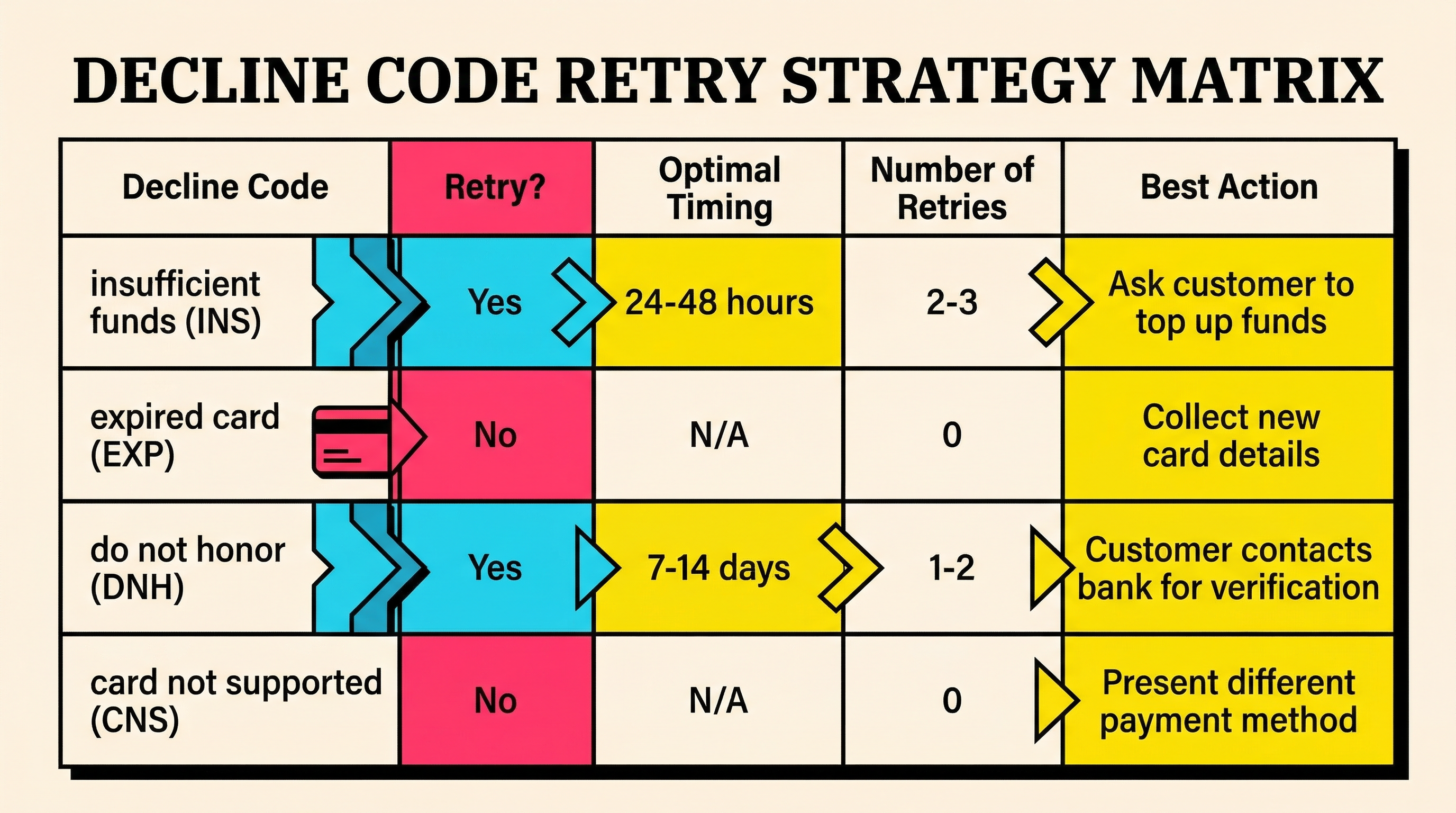
Not all payment failures are the same. A card declined for "insufficient funds" needs a completely different recovery approach than one declined for "expired card" or "do not honor."
Here's how to think about segmentation:
Insufficient funds: Retry in 2-3 days (payday timing matters). These customers want to pay but don't have the balance right now. Multiple retries work well here.
Expired card: Don't retry. The card is dead. Send an immediate email asking the customer to update their payment method. Retrying just burns through your retry budget and can trigger Stripe's rate limits.
Do not honor: This is the bank saying no. Retry once after 48 hours. If it fails again, contact the customer directly. Persistent retries on "do not honor" can flag your Stripe account for elevated decline rates.
Card not supported / Currency not supported: These are configuration issues, not transient failures. Don't retry. Fix the underlying issue (add the currency, update your Stripe configuration).
Understanding your decline code distribution is the first step. Check your Stripe decline code breakdown to see what each code means and how to respond.
What to do this week:
- Pull your last 90 days of failed payments from Stripe and categorize by decline code
- Identify your top 3 decline codes by volume
- Adjust your retry schedule for each category (or stop retrying where it doesn't help)
9. Implement Backup Payment Methods
Here's a pattern most SaaS companies overlook entirely: asking customers for a backup payment method at signup or during onboarding.
The logic is simple. If the primary card fails, you charge the backup. No emails. No retries. No waiting. The payment just works.
This is standard practice in industries like insurance and utilities, but SaaS has been slow to adopt it. The concerns are usually around friction at signup ("won't this reduce conversions?"). And yes, asking for two cards during initial signup is probably too aggressive. But there are better moments:
- After the first successful renewal. The customer is committed. A prompt like "Add a backup payment method to avoid service interruptions" converts at 15-25%.
- During an upgrade. When a customer upgrades their plan, ask for a backup as part of the billing update flow.
- After a failed payment recovery. Once a customer updates their card after a failure, ask them to add the old card (if it's still valid) as a backup.
SaaS companies with backup payment methods on file see 20-35% fewer payment failures reaching the dunning stage. That's a massive reduction in recovery effort.
What to do this week:
- Add a "backup payment method" field to your billing settings page
- Write a post-first-renewal email asking customers to add a backup card
- If you use Stripe, use the PaymentMethod API to store multiple methods per customer
10. Run a Monthly Failed Payment Audit
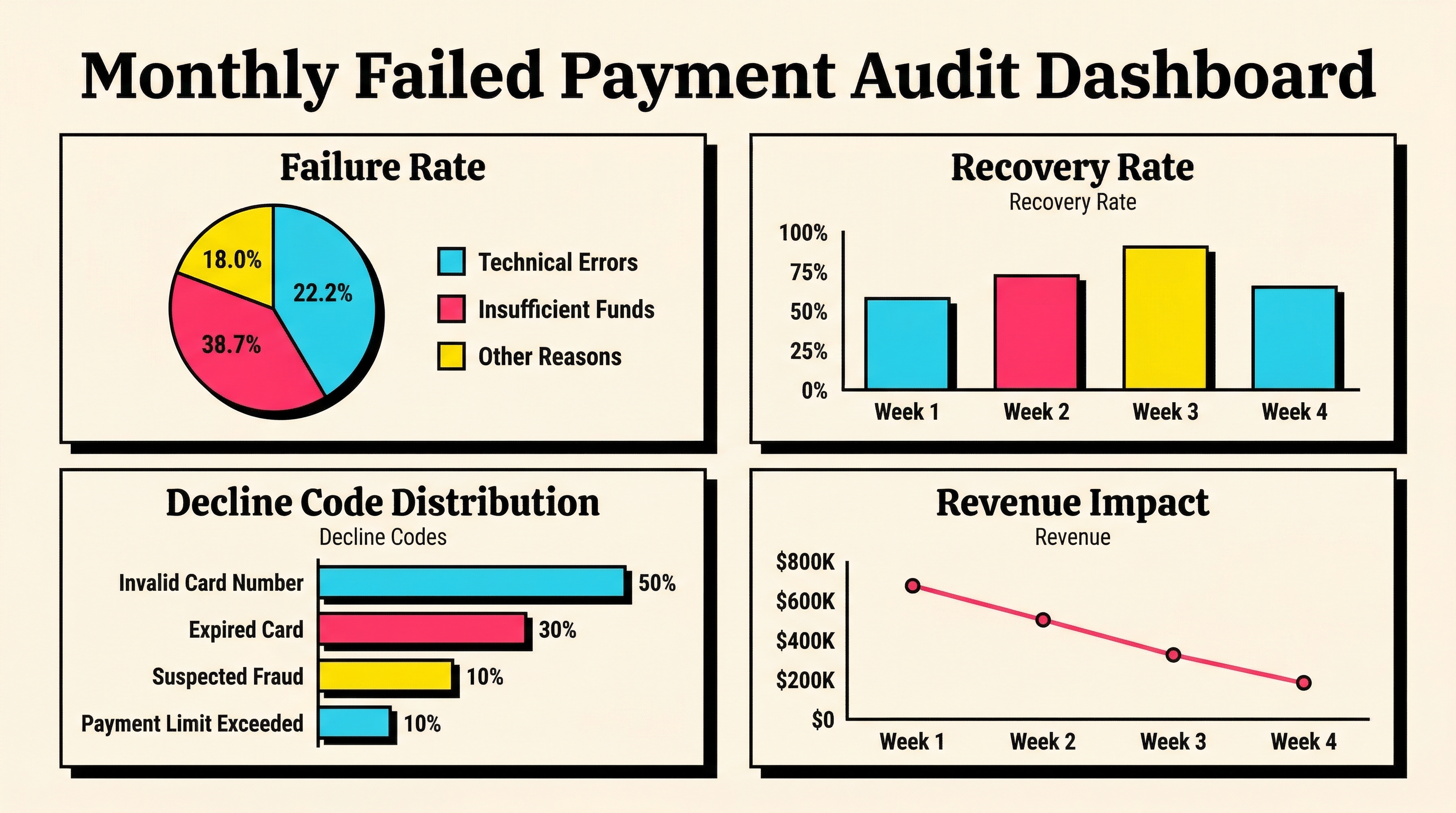
All the tactics above work better when you're tracking the results. A monthly failed payment audit takes 30 minutes and gives you the data to prioritize your next moves.
Here's what to check each month:
Overall failure rate. Total failed payment attempts divided by total payment attempts. Healthy SaaS companies sit between 2-5%. Above 5% means something structural needs fixing.
Recovery rate. Of the payments that initially failed, what percentage were eventually recovered (via retries, dunning, or manual outreach)? Best-in-class is 50-70%. Below 30% means your recovery process has gaps.
Decline code trends. Are you seeing more "insufficient funds" than last month? More "expired card"? Trends tell you where to focus. A spike in expired cards might mean you're not leveraging the Account Updater effectively.
Time to recovery. How many days does it take, on average, to recover a failed payment? If it's longer than 7 days, your dunning cadence might be too slow.
Revenue impact. Total MRR lost to permanently failed payments (not recovered within your grace period). This is your involuntary churn number. Track it monthly and set a target to reduce it by 10-20% each quarter.
You don't need a fancy dashboard for this. A spreadsheet works. Pull the data from Stripe, run the numbers, and look for patterns. The companies that reduce failed payments consistently are the ones that measure consistently.
What to do this week:
- Block 30 minutes on your calendar for a monthly payment audit
- Pull your current failure rate and recovery rate from Stripe
- Set a baseline and a target for next month
The Compound Effect of Small Fixes
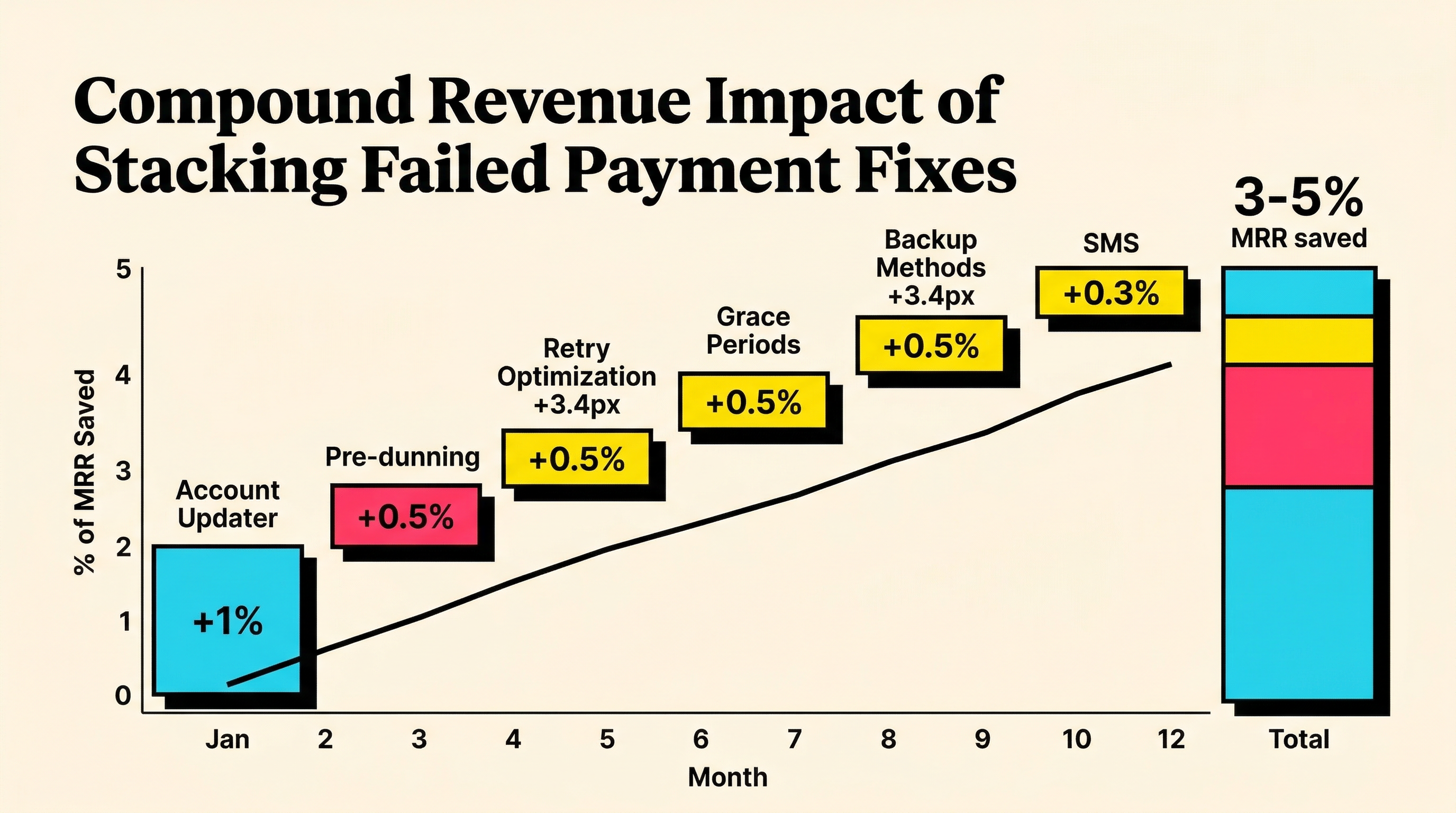
None of these ten wins is revolutionary on its own. Enabling the Account Updater might save you 1% of MRR. Adding pre-dunning emails might save another 0.5%. Optimizing your retry schedule, another 0.5%.
But stack them together and you're looking at a 3-5% MRR improvement from reducing failed payments alone. On $100K MRR, that's $36K-$60K per year. On $500K MRR, it's $180K-$300K.
The math is simple: every percentage point of failed payments you prevent is pure profit. You've already spent the money to acquire that customer. You've already delivered the product. The only thing standing between you and that revenue is a billing issue that, more often than not, has a straightforward fix.
Start with the wins that match your biggest problems. If your top decline code is "expired card," start with the Account Updater and pre-dunning emails. If it's "insufficient funds," focus on retry timing. If you don't know your decline code breakdown, start with the audit.
Find Your Biggest Revenue Leaks in 2 Minutes
Not sure where to start? ChurnBot's free churn audit scans your Stripe account and shows you exactly where failed payments are costing you revenue, which decline codes are hitting you hardest, and where the quick wins are.
It takes 2 minutes. No credit card required.
Related Posts
Stripe Do Not Honor Recovery: What SaaS Teams Should Do Next

7 Failed Payment Segments Every Stripe Team Should Track
How healthy is your Stripe account?
Get a free churn health report. Find pending cancellations, failed payments, and expiring cards putting your MRR at risk.
Run Free Audit