How to Read Your Stripe Failed Payment Data Like a Pro
Your Stripe dashboard is trying to tell you something. Every day, failed payment data flows in — decline codes, retry attempts, customer payment methods — and most founders scroll past it without realizing they're ignoring a treasure map to recovered revenue.
Here's the reality: analyzing your Stripe failed payment data properly can reveal exactly where you're losing money and how to get it back. But Stripe doesn't hand you the insights on a silver platter. You need to know what to look for, where to find it, and how to interpret it.
This guide walks you through reading your Stripe failed payment data like someone who actually cares about their bottom line.
Where to Find Your Failed Payment Data in Stripe
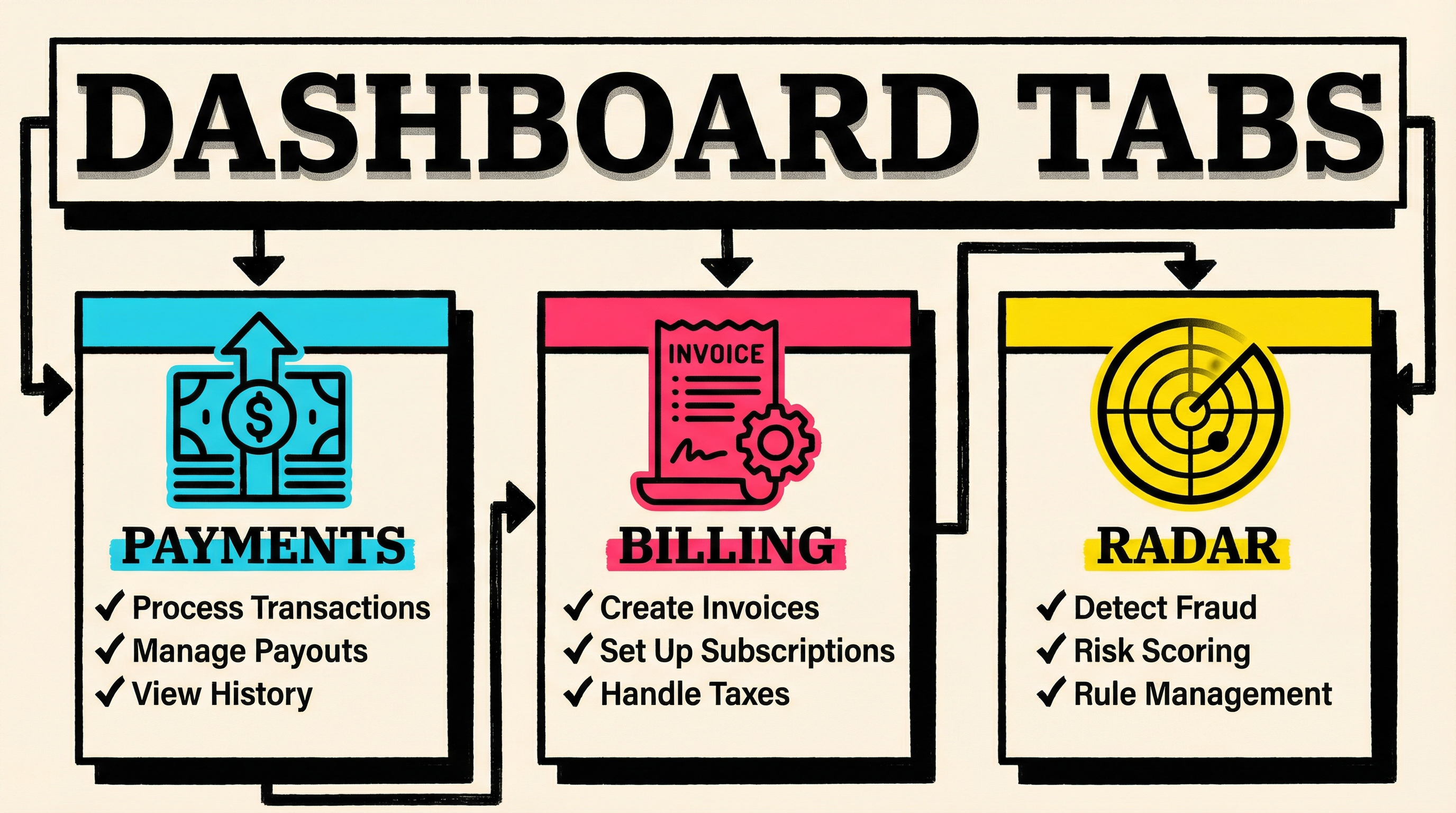
Stripe stores failed payment information across multiple locations in the dashboard, and each one serves a different purpose.
The Payments Tab
Navigate to Payments > All payments and filter by status: "Failed." This gives you the raw list of every failed charge. You'll see:
- Payment date and time
- Amount attempted
- Customer name/email
- Payment method (last 4 digits)
- Decline code
- Whether it was a subscription renewal or one-off charge
This is your starting point, but don't stop here. The Payments tab shows what failed, not why or what happens next.
The Billing Tab (Subscriptions)
If you're running a subscription business (which you likely are), head to Billing > Subscriptions and filter by status: "Past due" or "Unpaid."
This view shows:
- Which subscriptions are at risk of cancellation
- How many retry attempts have been made
- When the next retry is scheduled
- The subscription's total value (crucial for prioritizing recovery)
A $500/month customer with a failed payment deserves more attention than a $10/month one. This tab lets you triage.
The Radar Tab (Fraud & Blocks)
Some "failed" payments aren't actually failed — they're blocked. Navigate to Radar > Reviews to see charges that Stripe's fraud detection flagged.
Legitimate customers get blocked more often than you think, especially if they:
- Use a VPN
- Travel internationally
- Use a virtual card
- Have unusual purchasing patterns
If you see patterns here, you might need to adjust your Radar rules. A strict fraud filter protects you from chargebacks but costs you revenue if it's rejecting good customers.
Understanding Decline Codes (The Most Important Column)
Every failed payment comes with a decline code. This is Stripe's way of telling you why the payment failed — and more importantly, whether you can do anything about it.
Stripe's decline codes fall into three categories: recoverable, unrecoverable, and action required.
Recoverable Decline Codes
These are temporary issues that often resolve themselves with retries:
insufficient_funds — The customer's account doesn't have enough money right now. This is the most common decline code, accounting for 30-40% of all failed payments. Retrying in 3-7 days often succeeds because people get paid, transfer money, or clear up overdrafts.
do_not_honor — A vague code that usually means the issuing bank blocked the charge for an unspecified reason. It's often temporary. Retry in 72 hours.
issuer_not_available / try_again_later — The card network had a temporary technical issue. Retry within 24 hours.
generic_decline — The bank declined without giving a reason. Could be fraud prevention, could be a system glitch. Worth retrying once.
Unrecoverable Decline Codes
These won't be fixed by retrying:
card_declined — A hard decline from the bank. The card is blocked, the customer hit their limit, or the bank flagged the merchant. Retrying won't help — you need the customer to update their payment method.
expired_card — Self-explanatory. The card is past its expiration date. You need a new card. Proactive card expiry management should have caught this before the payment failed.
stolen_card / lost_card / fraudulent — The card was reported as compromised. Retrying won't work and might get you flagged. Contact the customer immediately and request a new payment method.
incorrect_cvc / incorrect_zip — The customer entered wrong details during signup. This shouldn't happen on recurring charges unless something went very wrong. Contact the customer.
Action Required Codes
These require you or the customer to do something:
authentication_required — The bank requires 3D Secure authentication (SCA). Common in the EU. You need to trigger an authentication flow.
card_velocity_exceeded — The customer made too many purchases in a short time. This often happens with trials converting to paid. Wait 24 hours and retry, or ask the customer to contact their bank.
withdrawal_count_limit_exceeded — Daily transaction limit reached. Retry the next day.
Knowing which category a decline code falls into tells you whether to retry, pause, or reach out to the customer.
Reading Retry Patterns (The Hidden Revenue Leak)
Stripe's Smart Retries system automatically reattempts failed subscription payments, but understanding how and when it retries is critical.
Default Retry Schedule
Out of the box, Stripe retries failed subscription payments on this schedule:
- Immediate retry (within seconds of the initial failure) if the decline code suggests it might succeed
- 3 days later
- 5 days later
- 7 days later
- Subscription canceled (if all retries fail)
That gives you about 2 weeks to recover the payment. After that, the subscription ends and the customer is gone.
Where Founders Go Wrong
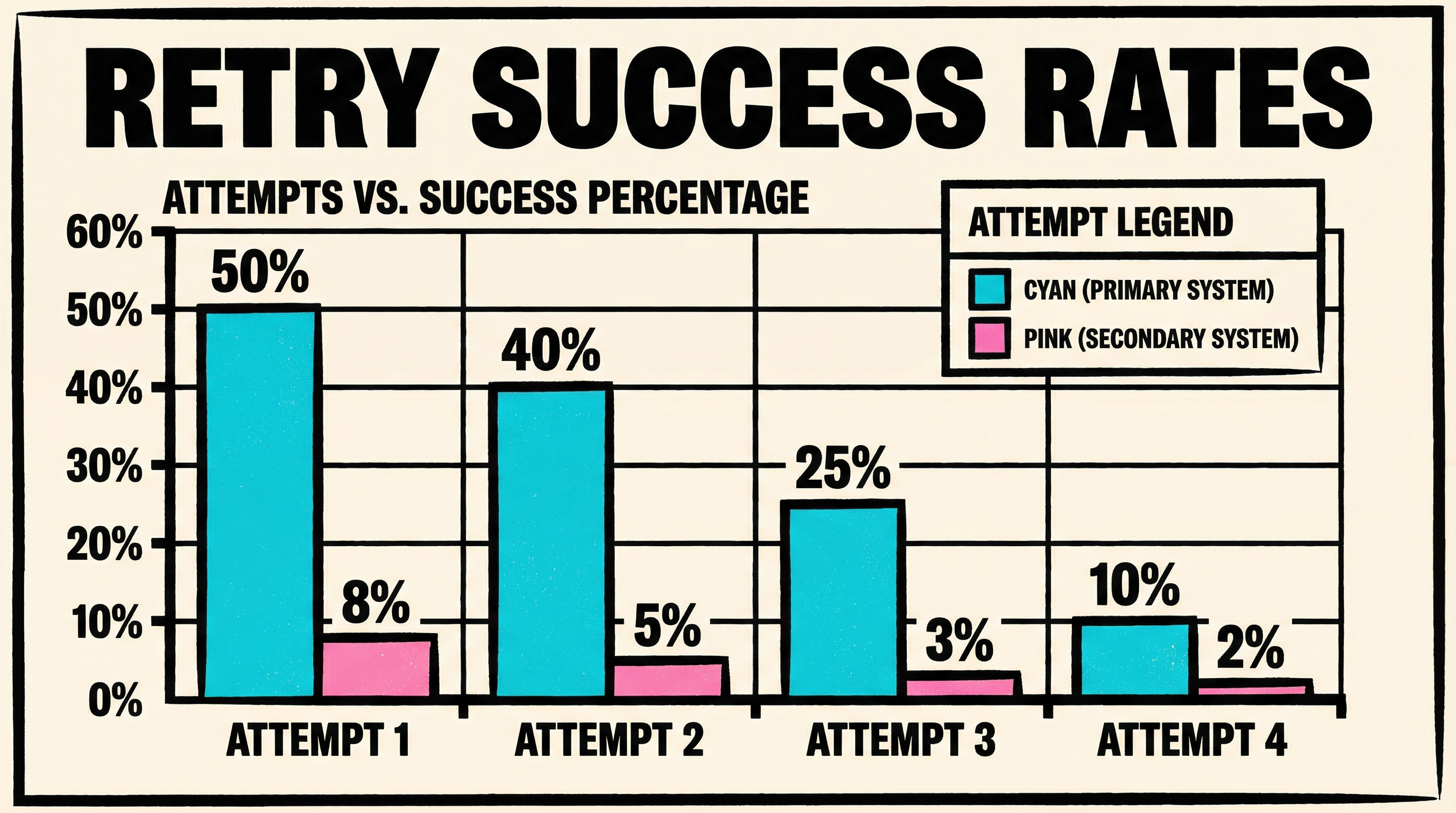
Most founders never look at their retry success rates. Here's what you should be tracking:
Retry success rate by attempt number — Are most recoveries happening on retry #1, #2, or #3? If retry #4 never works, you're wasting time and annoying customers with unnecessary attempts.
Retry success rate by decline code — Some decline codes (like insufficient_funds) have high retry success rates (40-60%). Others (like card_declined) almost never recover. If you're retrying unrecoverable codes, you're burning goodwill for nothing.
Time to recovery — How long does it take for a retry to succeed? If most recoveries happen within 3 days, but you're retrying for 14 days, you're leaving customers in limbo unnecessarily.
You can export this data from Stripe using the API or by downloading CSV reports from the Payments tab. Filter by "succeeded" payments with a previous_payment_intent field — that tells you it was a retry.
Analyzing Failure Rates by Cohort
Aggregate failure data is useful, but cohort-level analysis is where you find gold.
Failure Rate by Payment Method Type
Break down your failed payments by card type:
- Debit vs credit — Debit cards fail 2-3x more often than credit cards (usually due to insufficient funds). If 80% of your customers use debit, you'll have higher failure rates.
- Card brand — Visa, Mastercard, Amex, and Discover all have different decline patterns. Some industries see higher Amex failures; others see more Visa issues.
- Virtual cards — Privacy.com, Revolut, and other virtual cards often have strict spending limits and fraud controls. They fail more frequently.
If you notice a specific payment method type failing disproportionately, you might adjust your payment page to encourage higher-success methods (e.g., "We recommend using a credit card for uninterrupted service").
Failure Rate by Plan Tier
Compare failure rates across your pricing tiers:
- Lower-tier plans often have higher failure rates because they attract price-sensitive customers who may have tighter budgets.
- Higher-tier plans typically have lower failure rates and higher recovery rates (customers are more invested).
If your $200/month plan has a 5% failure rate but your $20/month plan has a 15% rate, that's not random. Budget-conscious customers use debit cards, have lower cash reserves, and are more likely to churn voluntarily when a payment fails.
This insight helps you decide where to invest in recovery efforts. A 10% improvement in recovery on high-value plans has a bigger revenue impact than a 20% improvement on low-tier plans.
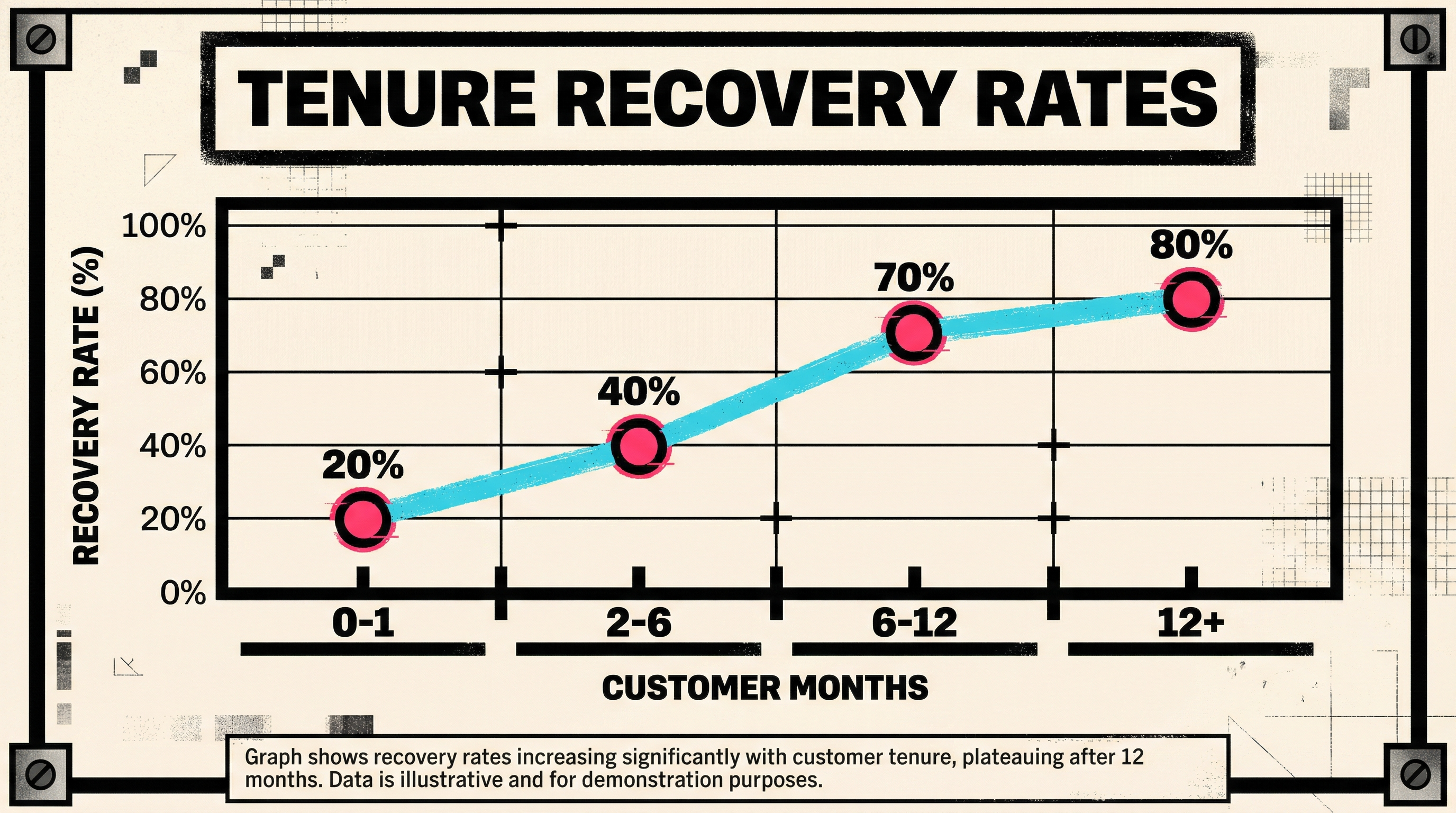
Failure Rate by Customer Tenure
How long has the customer been subscribed?
- First payment failures (month 0-1) — Often due to trial abuse, incorrect payment details, or buyer's remorse. Recovery rates are low.
- Early-stage failures (month 2-6) — Usually legitimate customers with temporary card issues. Recovery rates are moderate.
- Long-term customer failures (6+ months) — Often expired cards or changed banking details. Recovery rates are high because these customers want to stay.
Your dunning strategy should differ based on tenure. New customers might get one polite email. Long-term customers deserve a phone call.
Exporting and Analyzing Stripe Data Properly
The Stripe dashboard is great for spot-checking, but serious analysis requires exporting data.
Using Stripe Sigma (If You Have It)
Stripe Sigma is a SQL-based reporting tool available on the Advanced plan ($100/month add-on). It gives you direct SQL access to your Stripe data.
Here's a sample query to pull failed payment data with decline code breakdown:
SELECT
  date_trunc('day', created) AS failure_date,
  charge_failure_code AS decline_code,
  COUNT(*) AS failure_count,
  SUM(amount) / 100.0 AS total_failed_revenue
FROM charges
WHERE status = 'failed'
  AND created >= '2026-02-01'
GROUP BY 1, 2
ORDER BY 1 DESC, 3 DESC;
This shows you which decline codes are costing you the most money, not just which ones appear most frequently.
Using CSV Exports (If You Don't Have Sigma)
Go to Payments > All payments, filter by "Failed," and export to CSV. Open it in Google Sheets or Excel.
Key columns to analyze:
- Created (UTC) — When the payment failed
- Amount — How much revenue you lost
- Decline code — Why it failed
- Customer email — Who failed
- Invoice — Which subscription or product
Create a pivot table:
- Rows: Decline code
- Values: Count of failures, Sum of amounts
- Sort by: Sum of amounts (descending)
This tells you which decline codes are your biggest revenue leak.
Using the Stripe API (For Programmatic Analysis)
If you're technical (or have a developer), use the Stripe API to pull failed payment data programmatically:
import stripe
import pandas as pd

stripe.api_key = 'sk_live_...'

failed_charges = stripe.Charge.list(
    limit=100,
    status='failed',
    created={'gte': 1675209600}  # Unix timestamp for Feb 1, 2026
)

data = [{
    'date': charge.created,
    'amount': charge.amount / 100,
    'decline_code': charge.failure_code,
    'customer': charge.customer
} for charge in failed_charges.auto_paging_iter()]

df = pd.DataFrame(data)
print(df.groupby('decline_code').agg({'amount': ['count', 'sum']}))
This lets you build custom dashboards, set up alerts, and track trends over time.
Setting Up Alerts for Critical Failures
Reading your Stripe failed payment data reactively is better than nothing, but proactive monitoring is better.
Stripe Webhooks for Real-Time Alerts
Set up a webhook listener for these events:
invoice.payment_failed— A subscription payment failedcharge.failed— Any charge failedcustomer.subscription.updated(status = past_due) — A subscription is now at risk
When these events fire, send yourself a Slack/Discord/email alert. For high-value customers, get notified immediately so you can reach out before they churn.
Example webhook logic:
if (event.type === 'invoice.payment_failed') {
  const invoice = event.data.object;
  const customerValue = invoice.amount_due / 100;

  if (customerValue > 200) {
    // High-value customer — alert immediately
    sendSlackAlert(`🚨 Payment failed for $${customerValue}/mo customer`);
  }
}
Weekly Digest Emails
Set up a weekly summary email that shows:
- Total failed payment count and revenue
- Top 3 decline codes by volume and by revenue
- Customers with multiple failed retries (at-risk churn)
- Change vs. last week (trending up or down?)
This keeps failed payments on your radar without overwhelming you with noise.
Common Mistakes When Reading Stripe Data
Mistake #1: Ignoring Low-Dollar Failures
A $10 failed payment feels trivial, but if you have 100 of them per month, that's $1,000 in lost MRR. Over a year, that's $12,000. Understanding how failed payments destroy MRR at scale is critical for long-term retention.
Mistake #2: Treating All Retries the Same
Retrying insufficient_funds makes sense. Retrying stolen_card wastes everyone's time. Stripe's Smart Retries are smart, but not perfect. Review your retry logic and adjust based on decline code patterns.
Mistake #3: Not Tracking Recovery ROI
If you're spending $500/month on a dunning tool but only recovering $300/month in failed payments, you're losing money. Track recovery rate, recovery speed, and net recovered revenue after costs.
Mistake #4: Looking at Data in Isolation
Your Stripe failed payment data doesn't exist in a vacuum. Cross-reference it with:
- Customer support tickets — Are customers emailing about payment issues before you even notice?
- Churn surveys — Are people saying "pricing" when the real issue was a failed payment they didn't notice?
- Lifecycle emails — Are your dunning emails being opened and clicked?
Failed payments are part of a bigger retention story. Read them in context.
Next Steps: Turn Data Into Action
You now know how to read your Stripe failed payment data like a pro. Here's what to do with it:
- Identify your top 3 decline codes by revenue impact — These are your biggest levers for recovery.
- Set up failure rate tracking by cohort — Payment method, plan tier, and customer tenure.
- Review your retry strategy — Are you retrying the right failures at the right intervals?
- Build alerts for high-value failures — Don't let $500/month customers slip away silently.
- Audit your dunning emails — Are you contacting customers effectively when payments fail?
If you want a head start, run a free churn audit on your Stripe account. You'll get a breakdown of your failed payment patterns, decline code distribution, and recovery opportunities — in about 60 seconds.
Because the best time to start reading your Stripe data like a pro was six months ago. The second-best time is right now.
Related Posts


The SaaS Billing Compliance Checklist for 2026
Stripe Do Not Honor Recovery: What SaaS Teams Should Do Next
How healthy is your Stripe account?
Get a free churn health report. Find pending cancellations, failed payments, and expiring cards putting your MRR at risk.
Run Free Audit