8 Retention Metrics Every SaaS Founder Should Track Weekly

Most SaaS founders check their metrics monthly. Some do it quarterly. And then they wonder why churn sneaks up on them like a slow leak in a tire they never bothered to check.
Weekly metric tracking is not about obsessing over numbers. It is about pattern recognition. A monthly review gives you a snapshot. A weekly rhythm gives you a trendline. And trendlines are what separate founders who react from founders who anticipate.
Here are eight retention metrics you should be pulling into your dashboard every single week, why each one matters, and what the numbers are actually telling you.
1. Net Revenue Retention (NRR)
Net revenue retention measures how much revenue you keep and grow from your existing customer base, including expansions, contractions, and churn. An NRR above 100% means your existing customers are generating more revenue over time even without new sales.
How to calculate it: Take your starting MRR from existing customers, add expansion revenue, subtract contraction and churned revenue, then divide by starting MRR. Multiply by 100.
Weekly benchmark: Top-performing SaaS companies maintain NRR between 110% and 130%. If yours drops below 100% for two consecutive weeks, something is breaking. Either your expansion motion stalled or churn is accelerating.
What to watch for: NRR is a lagging indicator at the monthly level, but tracking it weekly lets you catch downward trends 2-3 weeks earlier. Pay special attention to the ratio between expansion and contraction. If contraction is growing faster than expansion, you have a product-value problem, not a sales problem.
For a deeper look at how NRR connects to your overall growth story, check out our guide on net revenue retention explained.
2. Gross Revenue Churn Rate
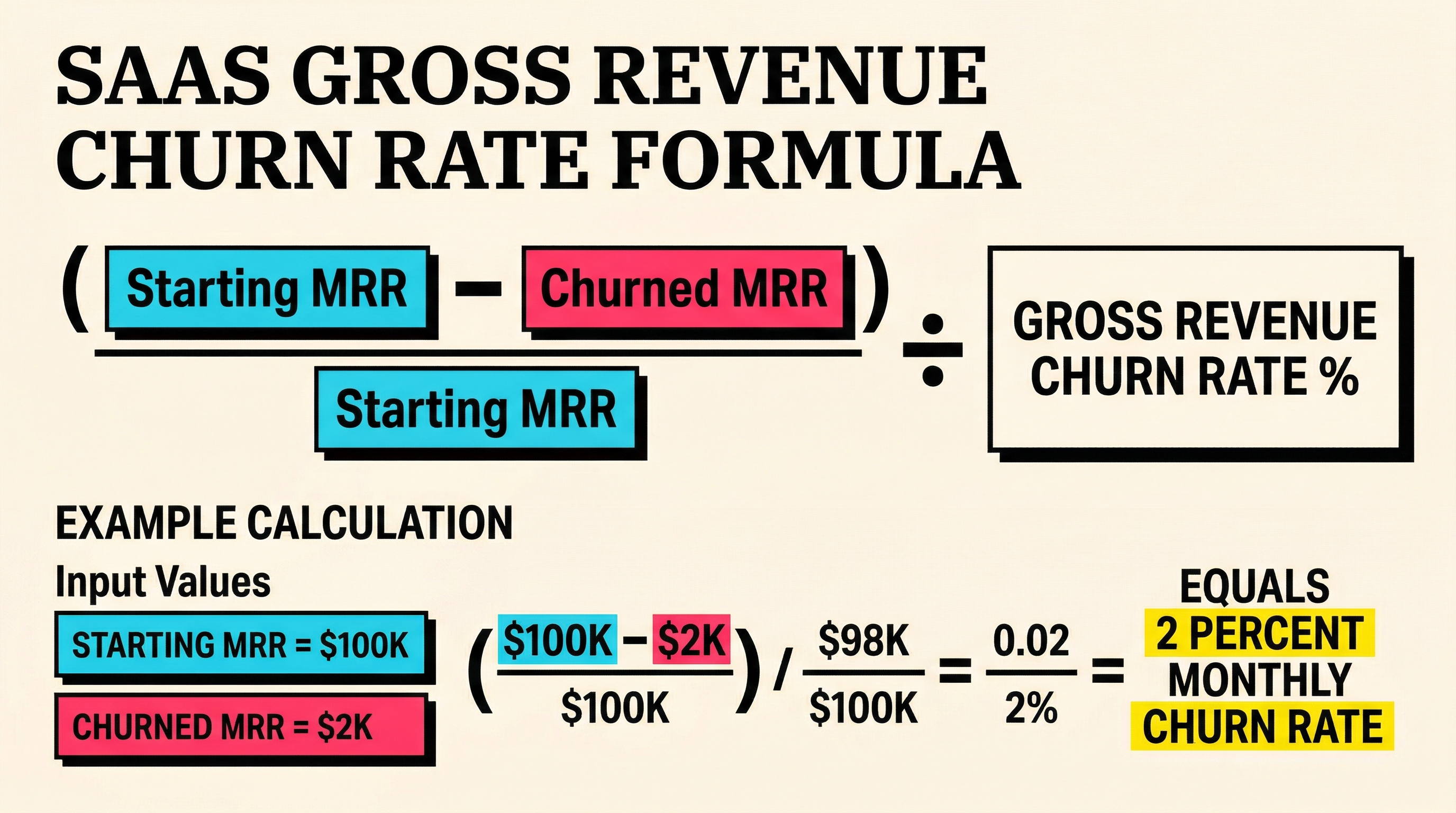
While NRR tells you the net picture, gross revenue churn isolates how much revenue you are losing before accounting for any expansion. This is the raw damage number.
How to calculate it: Divide churned MRR by the starting MRR for the period. Express as a percentage.
Weekly benchmark: Healthy SaaS companies keep weekly gross revenue churn below 0.5% (roughly 2% monthly). If you are seeing 1% or more per week, you are on a trajectory to lose half your revenue base in a year.
What to watch for: Spikes. Gross churn tends to be lumpy. A single enterprise customer leaving can spike your weekly number dramatically. Track the rolling 4-week average alongside the raw weekly figure to separate noise from signal.
The important thing about gross churn is that it forces you to acknowledge the full scope of revenue loss before expansion masks it. Many founders hide behind strong NRR while ignoring that their gross churn is creeping upward. Understanding how your MRR dashboard can mislead you about churn is critical for honest metric tracking.
3. Logo (Customer) Churn Rate
Revenue churn tells you about dollars. Logo churn tells you about customers. Both matter, but they tell different stories.
Losing one $10,000/month customer has the same revenue impact as losing twenty $500/month customers. But twenty departures signal a systemic product or experience problem. One departure might just be a budget cut.
How to calculate it: Divide the number of customers lost during the period by total customers at the start. Express as a percentage.
Weekly benchmark: Aim for weekly logo churn below 0.3% for B2B SaaS. Consumer and SMB products run higher, typically 0.5-1% weekly.
What to watch for: The gap between logo churn and revenue churn. If logo churn is high but revenue churn is low, you are losing small accounts. That might be fine, or it might mean your product is not sticky at the entry level. If logo churn is low but revenue churn is high, you are losing big accounts, which is usually more urgent.
4. Involuntary Churn Rate
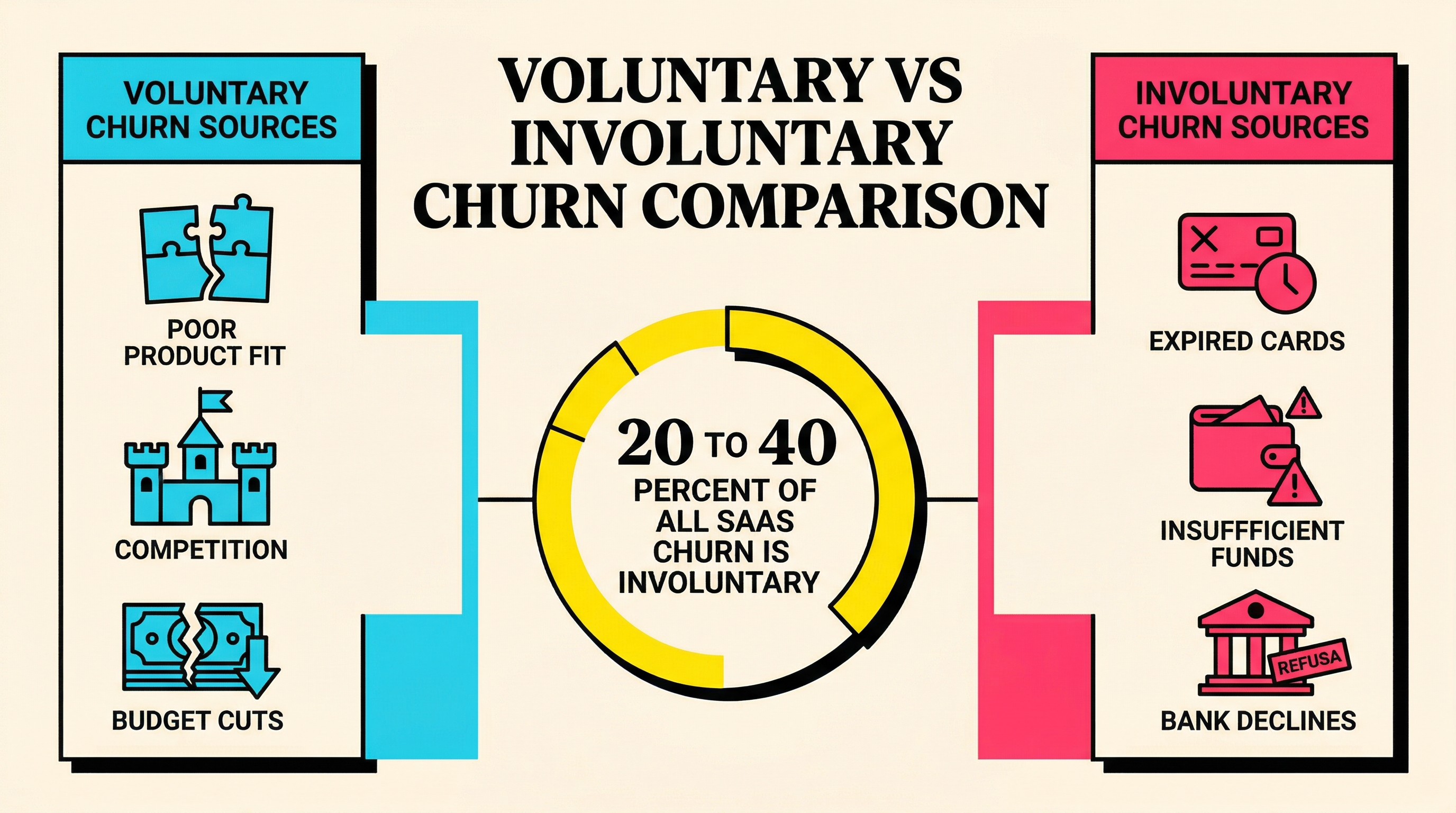
This is the metric that separates fixable churn from existential churn. Involuntary churn happens when customers lose access because their payment fails, not because they chose to leave. Industry data consistently shows that 20-40% of all SaaS churn is involuntary.
How to calculate it: Count customers (or MRR) lost specifically due to failed payments and expired cards during the period. Divide by total customers (or MRR) at the start.
Weekly benchmark: If involuntary churn accounts for more than 30% of your total churn, you have a payment recovery problem that is very solvable. Most SaaS companies can recover 30-70% of involuntary churn with proper dunning and retry logic.
What to watch for: Patterns in the decline codes. Are you seeing clusters of "insufficient funds" on specific days (hint: payroll cycles)? Spikes in "expired card" around certain months? These patterns unlock timing-based recovery strategies that can dramatically improve your numbers.
If you are not already tracking the split between voluntary and involuntary churn, start this week. It is the single most actionable distinction in churn analysis. Our breakdown of voluntary vs involuntary churn covers the mechanics in detail.
5. Payment Recovery Rate
Once you know your involuntary churn rate, the next question is: how much of it are you recovering? Payment recovery rate measures the percentage of failed payments that you successfully collect on after the initial failure.
How to calculate it: Divide the number (or value) of recovered payments by total failed payments during the period. Express as a percentage.
Weekly benchmark: Without any recovery system, you will recover roughly 15-25% of failed payments through Stripe's built-in retries alone. With active dunning (emails, SMS, in-app nudges), best-in-class teams recover 50-70%.
What to watch for: Recovery rate by attempt number. Most recoveries happen on the second or third retry. If your recovery rate is flat after the first retry, your timing or messaging is off. Also track recovery rate by decline code type. "Insufficient funds" recovers at much higher rates than "card reported stolen." Understanding how Stripe decline codes work helps you prioritize which failures to target first.
6. Expansion Revenue as a Percentage of New MRR
This one often gets overlooked in weekly reviews, but it is a powerful health signal. Expansion revenue (upgrades, add-ons, seat additions) from existing customers should be a meaningful share of your total new MRR each week.
How to calculate it: Divide expansion MRR by total new MRR (new customers plus expansion). Express as a percentage.
Weekly benchmark: In a healthy SaaS business past product-market fit, expansion should account for 30-50% of new MRR. If it is below 20%, your existing customers are not finding enough value to grow their usage.
What to watch for: The trend matters more than the absolute number. Declining expansion revenue often precedes a churn spike by 4-8 weeks. Customers stop expanding before they leave. This makes it one of the best leading indicators of future retention problems.
When expansion slows down, dig into the segments. Is it a specific plan tier? A particular customer cohort? A feature that stopped being valuable? The answers usually point to product or pricing issues you can address before the churn materializes.
7. Active Usage Rate (WAU/MAU Ratio)
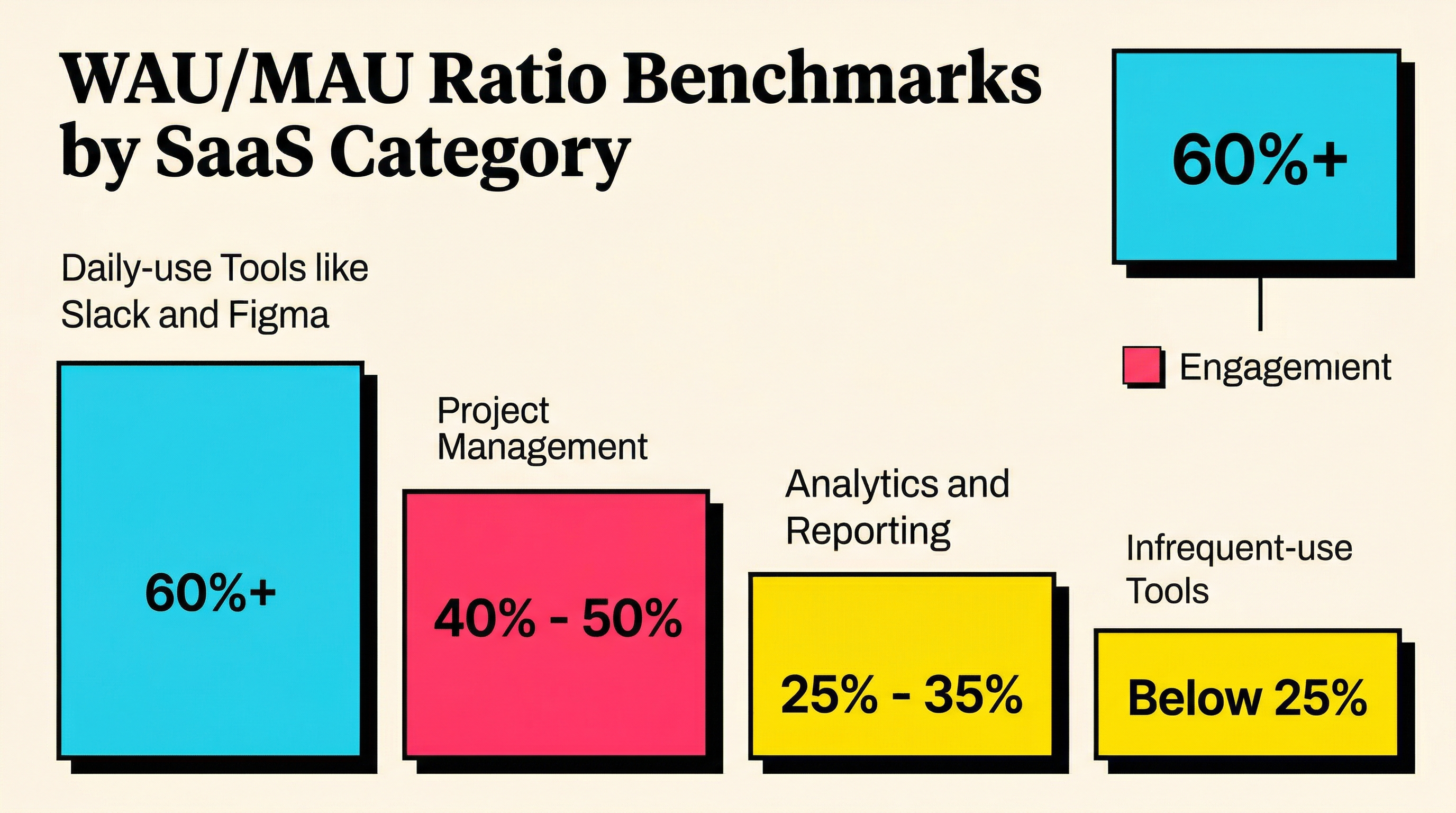
Retention metrics built on revenue data are important, but they are lagging indicators. By the time revenue churn shows up, the customer already decided to leave weeks ago. Usage data gives you a leading view.
The WAU/MAU ratio (weekly active users divided by monthly active users) tells you what percentage of your monthly user base is engaged on a weekly basis. It is a stickiness measure.
How to calculate it: Divide the number of users active in the past 7 days by the number of users active in the past 30 days. Express as a percentage.
Weekly benchmark: A WAU/MAU ratio above 40% indicates strong engagement for most B2B SaaS products. Above 60% is exceptional (think daily-use tools like Slack or Figma). Below 25% suggests your product is used infrequently, which correlates with higher churn risk.
What to watch for: Declining WAU/MAU for specific customer segments or cohorts. If your newest cohort has a noticeably lower ratio than older ones, your onboarding might be failing to build habits. If a previously engaged segment starts dropping, something changed in their workflow or your product.
Pair this metric with your logo churn data. Accounts with WAU/MAU below 20% for three consecutive weeks are at very high risk of churning within the next 60 days. That gives you a window to intervene.
8. Time to Value for New Customers
Time to value (TTV) measures how long it takes a new customer to reach their first meaningful outcome with your product. This is a forward-looking retention metric. Customers who reach value quickly retain at dramatically higher rates.
How to calculate it: Define your "aha moment" or key activation milestone. Measure the median time from signup to that milestone across new customers each week.
Weekly benchmark: This varies wildly by product, but the trend is what matters. If TTV is increasing week over week, your onboarding is degrading. If TTV is decreasing, your activation improvements are working. Best-in-class SaaS products aim for value delivery within the first session or first 24 hours.
What to watch for: The correlation between TTV and 30/60/90-day retention. Segment your customers by TTV bucket (e.g., under 1 day, 1-3 days, 3-7 days, 7+ days) and compare retention rates. This will show you exactly where the drop-off happens and help you prioritize onboarding improvements.
Also watch for the percentage of new signups that never reach the activation milestone at all. These "zero value" customers are almost guaranteed to churn, and they represent your biggest onboarding opportunity.
Putting It All Together: Your Weekly Retention Dashboard
Tracking these eight SaaS retention metrics individually is useful. Tracking them together is powerful. Here is how to structure your weekly review in three blocks:
Revenue health (5 minutes):
- NRR: trending up or down?
- Gross revenue churn: any spikes this week?
- Expansion revenue share: customers growing or stagnating?
Customer health (5 minutes):
- Logo churn: systemic losses or isolated incidents?
- Involuntary churn: how much is payment-related?
- Payment recovery rate: are you capturing what you can?
Engagement health (5 minutes):
- WAU/MAU: engagement trending up or down by segment?
- TTV: new customers activating faster or slower?
Fifteen minutes per week. That is all it takes to stay ahead of churn instead of reacting to it.
The key is consistency. A single week's numbers are a data point. Four weeks of data is a trend. Twelve weeks is a pattern you can act on with confidence. Build the habit and the insights will compound.
The Metrics That Pay for Themselves
Of these eight metrics, involuntary churn and payment recovery rate are unique because they represent revenue you are already entitled to. These are customers who want to keep paying you. Their card just failed.
Improving payment recovery from 25% to 50% on a $100K MRR base with 3% monthly involuntary churn recovers an additional $750/month, or $9,000/year, with zero customer acquisition cost. For most SaaS businesses, optimizing payment recovery is the highest-ROI retention activity you can do.
If you have not audited your Stripe account for failed payment patterns and recovery opportunities, that is the fastest way to find revenue you are leaving on the table. Run a free churn audit to see exactly where your involuntary churn stands and what is recoverable.
The metrics will tell you the story. But only if you are reading them every week.
Related Posts
Stripe Insufficient Funds Recovery: A Playbook for SaaS Teams
Stripe Do Not Honor Recovery: What SaaS Teams Should Do Next

7 Failed Payment Segments Every Stripe Team Should Track
How healthy is your Stripe account?
Get a free churn health report. Find pending cancellations, failed payments, and expiring cards putting your MRR at risk.
Run Free Audit