5 SaaS Metrics That Predict Churn Before It Happens

Most SaaS founders track churn after it happens. They watch MRR drop, count cancelled subscriptions, and react to the damage. But by the time a customer churns, you've already lost the battle.
The reality? Churn doesn't appear out of nowhere. It sends signals weeks or even months before a customer cancels. The trick is knowing which SaaS churn metrics to watch—and what they're actually telling you.
In this guide, we'll walk through five metrics that act as early warning systems for churn. These aren't vanity numbers. They're predictive signals that give you time to intervene before revenue walks out the door.
1. Payment Retry Success Rate
Why It Matters
When a payment fails, most SaaS platforms retry it automatically. But here's what most founders miss: your retry success rate is a direct predictor of involuntary churn.
If your retry logic is weak—or nonexistent—you're letting revenue slip through the cracks. According to industry benchmarks, failed payments account for 20-40% of total SaaS churn. That's not a customer deciding to leave. That's a billing error you failed to recover.
What to Track
- Retry success rate: Percentage of failed payments that eventually succeed
- Time to successful retry: How long it takes to recover a payment
- Retry attempt count: How many attempts before giving up
A good retry success rate sits between 60-75%. Anything below 50% means you're leaving serious money on the table.
How to Improve It
Stripe's Smart Retries adjust timing based on card issuer patterns, but you can do better with custom retry logic:
- Retry within 24 hours for insufficient funds (customers often get paid daily)
- Wait 3-5 days for expired cards (gives customers time to update)
- Space retries out for "card declined" errors (hitting the same card too fast triggers fraud alerts)
If you're not tracking this metric at all, start with a free churn audit at churnbot.co/audit to see where your retry logic stands.
2. Decline Code Distribution
Why It Matters
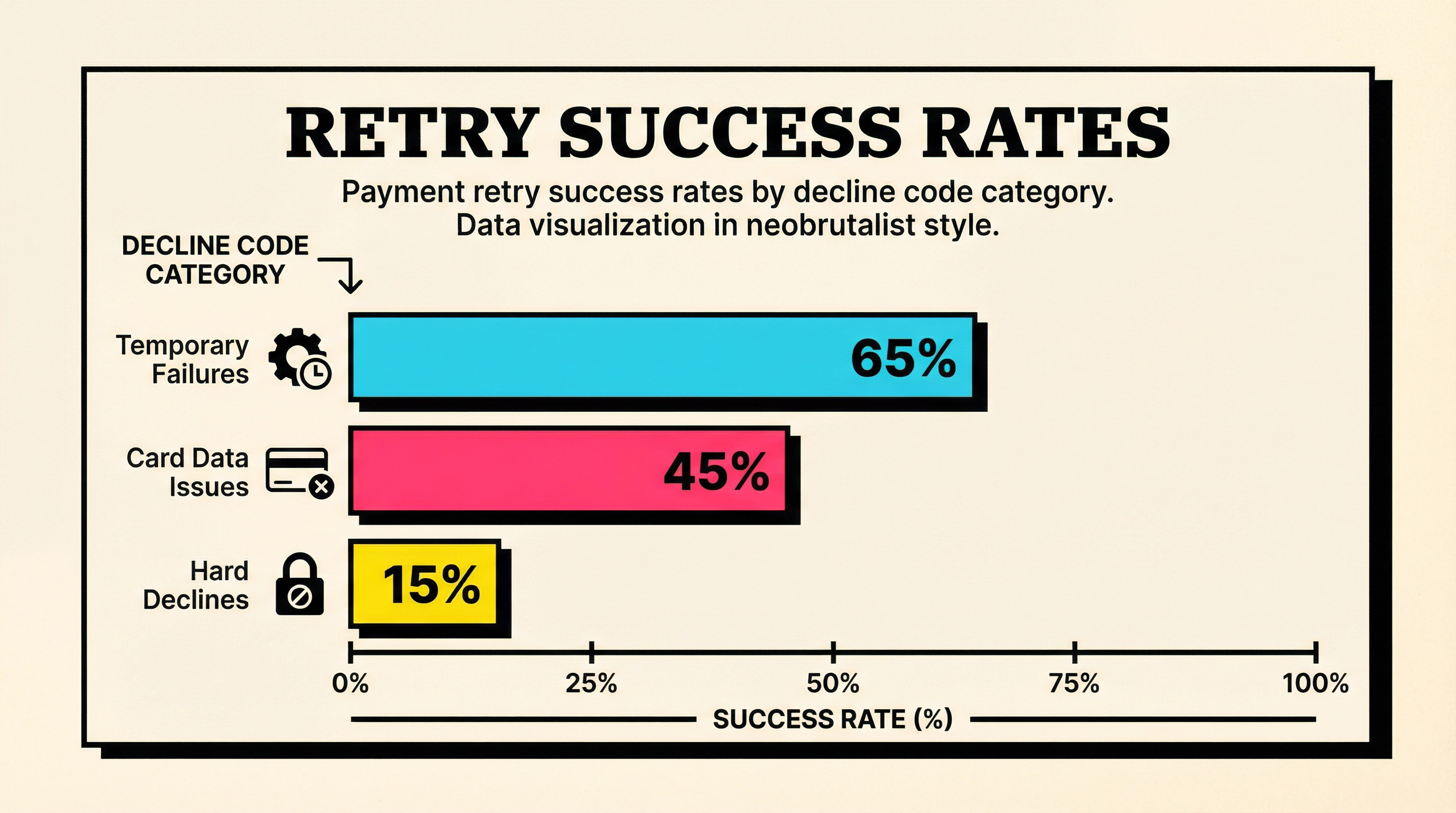
Not all payment failures are created equal. Some decline codes signal temporary issues (insufficient funds, issuer downtime). Others point to permanent problems (expired cards, closed accounts).
If you're treating all failures the same way, you're wasting time retrying payments that will never succeed—and giving up too early on payments that would.
What to Track
Break down your failed payments by decline code. Focus on these categories:
- Temporary failures:
insufficient_funds,try_again_later,issuer_not_available - Card data issues:
expired_card,incorrect_cvc,invalid_expiry_month - Hard declines:
card_declined,do_not_honor,fraudulent
If expired cards account for more than 15% of your failures, you have a card updater problem. If insufficient funds dominate, your retry timing is likely off.
How to Use It
Segment your dunning emails by decline code. A customer with an expired card needs a different message than one with insufficient funds.
For example:
- Expired card: "Your payment method expired—update it in 30 seconds"
- Insufficient funds: "We'll retry your payment in 3 days. Need to adjust your billing date?"
- Do not honor: "Your bank declined this charge. You may need to contact them directly."
Want to see how your decline codes break down? Learn how Stripe decline codes work and what each one means for recovery.
3. Card Expiry Forecast
Why It Matters
Here's a churn time bomb most founders ignore: card expiry dates.
Credit cards expire. Debit cards expire. And when they do, the next billing attempt fails. This is 100% predictable, 100% preventable, and still accounts for 10-15% of involuntary churn across the industry.
The worst part? Customers often don't realize their card expired until after their subscription gets cancelled. By then, they've mentally moved on.
What to Track
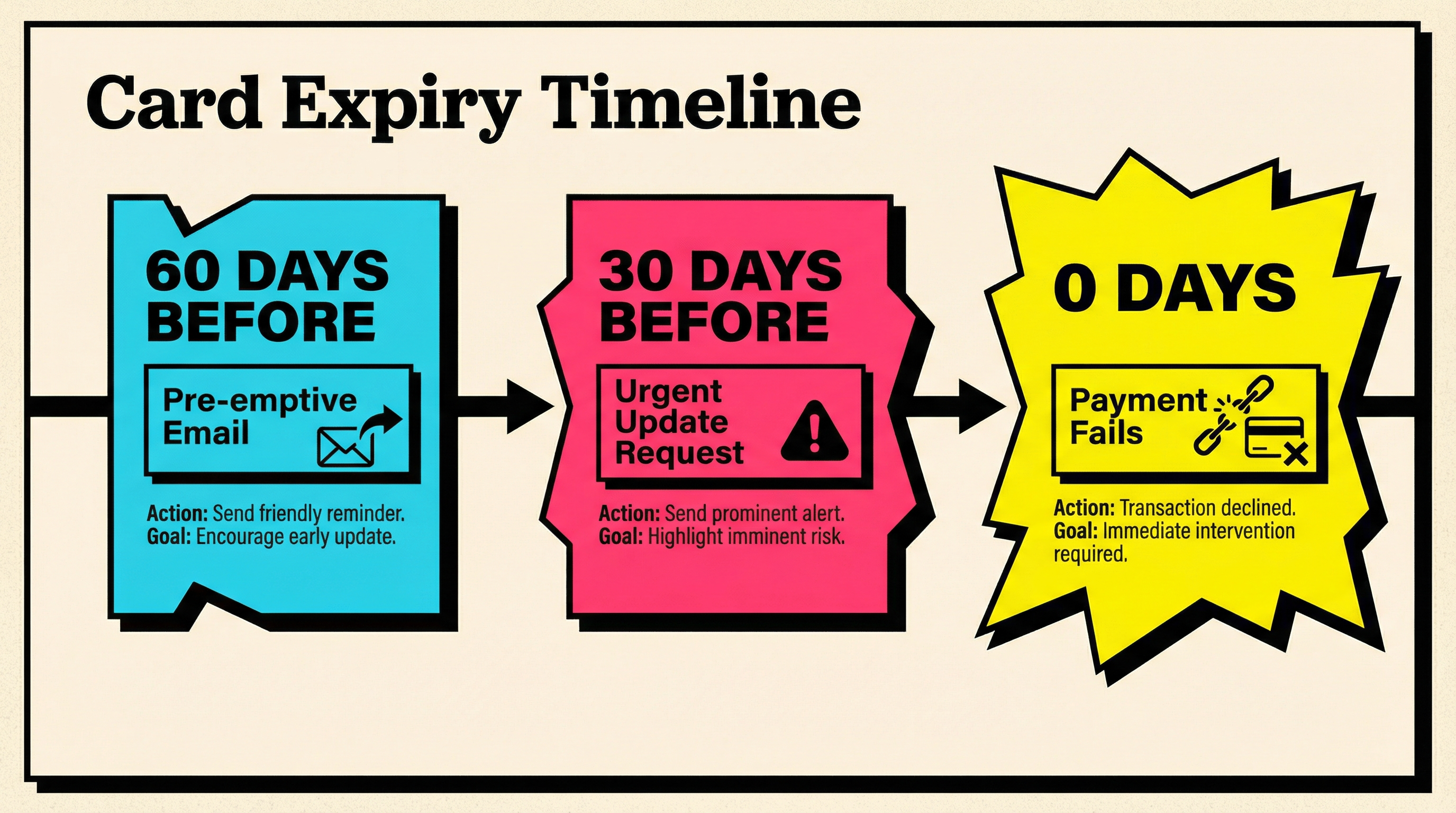
- Cards expiring in the next 30 days: High-priority intervention window
- Cards expiring in the next 60 days: Pre-emptive outreach window
- Percentage of active customers with cards expiring this quarter: Your exposure level
If more than 8% of your active customers have cards expiring this month and you're not reaching out proactively, you're about to lose revenue.
How to Prevent Expiry Churn
Don't wait for the payment to fail. Send a pre-dunning email 30 days before expiry:
Subject: "Action needed: Your payment method expires soon"
Body: "Your card ending in 1234 expires on March 15. Update your payment method now to avoid service interruption: [Update Card]"
Even better: use Stripe's automatic card updater (if you're on the right plan) to refresh expiry dates without customer action. But don't rely on it 100%—it only works for participating card networks.
4. Gross Revenue Churn vs Net Revenue Churn
Why It Matters
Most SaaS dashboards show net revenue churn—the revenue you lost minus expansion revenue from upgrades. That's useful for board meetings, but terrible for diagnosing problems.
Net revenue churn hides the truth. You could be bleeding customers left and right, but as long as your expansion revenue masks it, everything looks fine. Until it doesn't.
Gross revenue churn tells you how much revenue walked out the door before accounting for expansion. It's the raw damage number.
What to Track
- Gross MRR churn rate: Revenue lost from cancellations and downgrades as a % of starting MRR
- Net MRR churn rate: Gross churn minus expansion revenue
- Churn composition: What % is voluntary vs involuntary
If your gross churn is above 5% monthly (60% annually), you have a retention problem. If your net churn is negative but gross churn is climbing, you're in danger—expansion revenue won't cover you forever.
The Red Flag
When gross churn trends up while net churn stays flat or negative, you're masking a problem with growth. It works until:
- Your expansion revenue slows (economic downturn, market saturation)
- Your churn accelerates (product-market fit issues surface)
- Both happen at once (you're in trouble)
Track both metrics. Celebrate negative net churn, but fix gross churn like your business depends on it—because it does.
5. Failed Payment Resolution Time
Why It Matters
Speed matters in payment recovery. The longer a payment sits in a failed state, the less likely it is to get resolved.
Here's why: customers don't monitor their billing dashboard. They don't notice a failed payment until:
- You send them a dunning email (if you send one)
- Their account gets downgraded or paused
- They try to use the product and can't
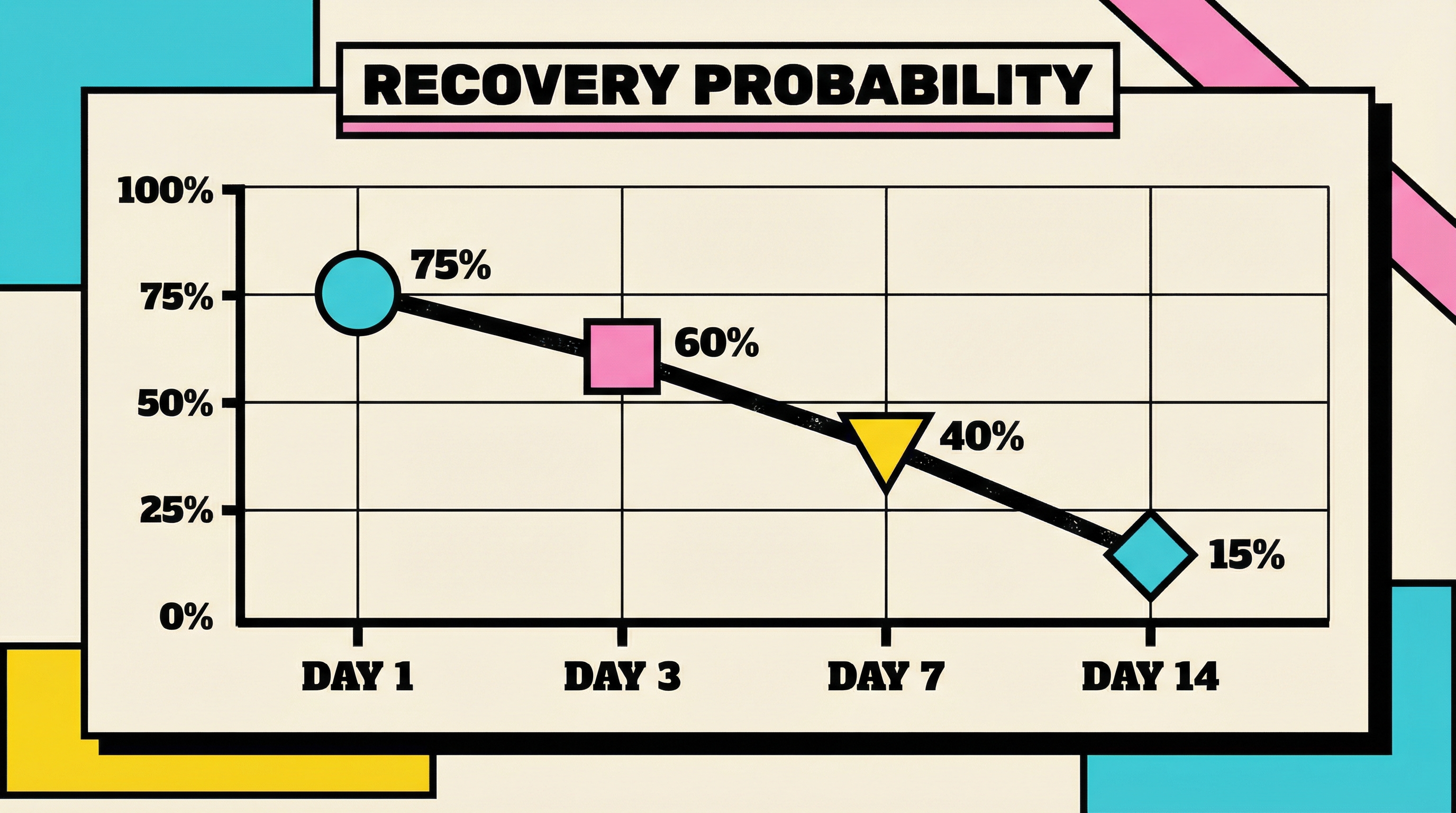
Every day a payment sits unresolved, the probability of recovery drops. After 7 days, you're fighting an uphill battle. After 14 days, most customers have mentally cancelled.
What to Track
- Average time to resolution: How long it takes from first failure to successful payment
- Resolution rate by day: What % of failures get resolved within 1 day, 3 days, 7 days, 14 days
- Abandoned failures: Payments that never get resolved before account cancellation
Best-in-class SaaS companies resolve 40% of failed payments within 24 hours, 60% within 3 days, and 75% within 7 days.
How to Accelerate Resolution
The faster you notify customers, the faster they act. Here's the cadence that works:
- Day 0 (failure): Immediate email with clear CTA to update payment method
- Day 1: In-app notification (banner or modal)
- Day 3: Second email with simplified messaging
- Day 5: SMS (if you have phone numbers on file)
- Day 7: Final email before account suspension
Don't wait for Stripe's retry schedule to save you. Proactive communication beats passive retries every time.
For a deeper look at how failed payments compound over time, read how failed payments silently destroy your MRR.
Putting It All Together: The Churn Prevention Dashboard
Tracking these five metrics individually helps. Tracking them together gives you a complete picture of churn risk across your business.
Here's what your dashboard should show:
- Payment retry success rate — Are you recovering failed payments efficiently?
- Decline code distribution — What's causing failures, and are you treating each type correctly?
- Card expiry forecast — How many customers are at risk next month?
- Gross vs net revenue churn — Are you masking retention problems with expansion?
- Failed payment resolution time — How fast are you getting customers back to good standing?
If any of these metrics is trending in the wrong direction, you have a leak. And unlike voluntary churn (which takes months to fix through product improvements), involuntary churn can be patched in days with the right tooling and processes.
Start With the Biggest Leak
Most SaaS businesses have one dominant churn driver:
- If retry success rate is below 50%, fix your retry logic first
- If card expiry is above 15% of failures, implement pre-dunning emails
- If resolution time is above 5 days on average, tighten your dunning cadence
Fix the biggest leak first. Then move to the next one.
Your Next Step
These five metrics are predictive, not reactive. They tell you where churn is coming from before it wrecks your MRR. But tracking them manually is a nightmare—stitching together Stripe data, calculating retry rates, forecasting expiries, segmenting by decline code.
That's why ChurnBot exists. Run a free churn audit at churnbot.co/audit and see exactly where your Stripe account is leaking revenue. You'll get a breakdown of your retry success rate, decline code distribution, and expiry forecast in under 60 seconds.
Because the best time to fix churn is before it happens.
Related Posts
Stripe Insufficient Funds Recovery: A Playbook for SaaS Teams
Stripe Do Not Honor Recovery: What SaaS Teams Should Do Next

7 Failed Payment Segments Every Stripe Team Should Track
How healthy is your Stripe account?
Get a free churn health report. Find pending cancellations, failed payments, and expiring cards putting your MRR at risk.
Run Free Audit