5 Warning Signs Your Stripe Account Is Leaking Revenue

Every SaaS founder obsesses over acquisition. New signups, conversion rates, top-of-funnel growth. But while you're watching the front door, revenue is quietly slipping out the back. Your Stripe account is leaking money, and most founders don't notice until the damage is already done.
Involuntary churn, the kind caused by failed payments rather than deliberate cancellations, accounts for 20-40% of all SaaS churn. That's not a rounding error. For a company doing $50K MRR, that could mean $10-20K walking out the door every month without a single customer choosing to leave.
Here are five warning signs that your Stripe account is leaking revenue right now, and what to do about each one.
1. Your Payment Failure Rate Is Above 5%
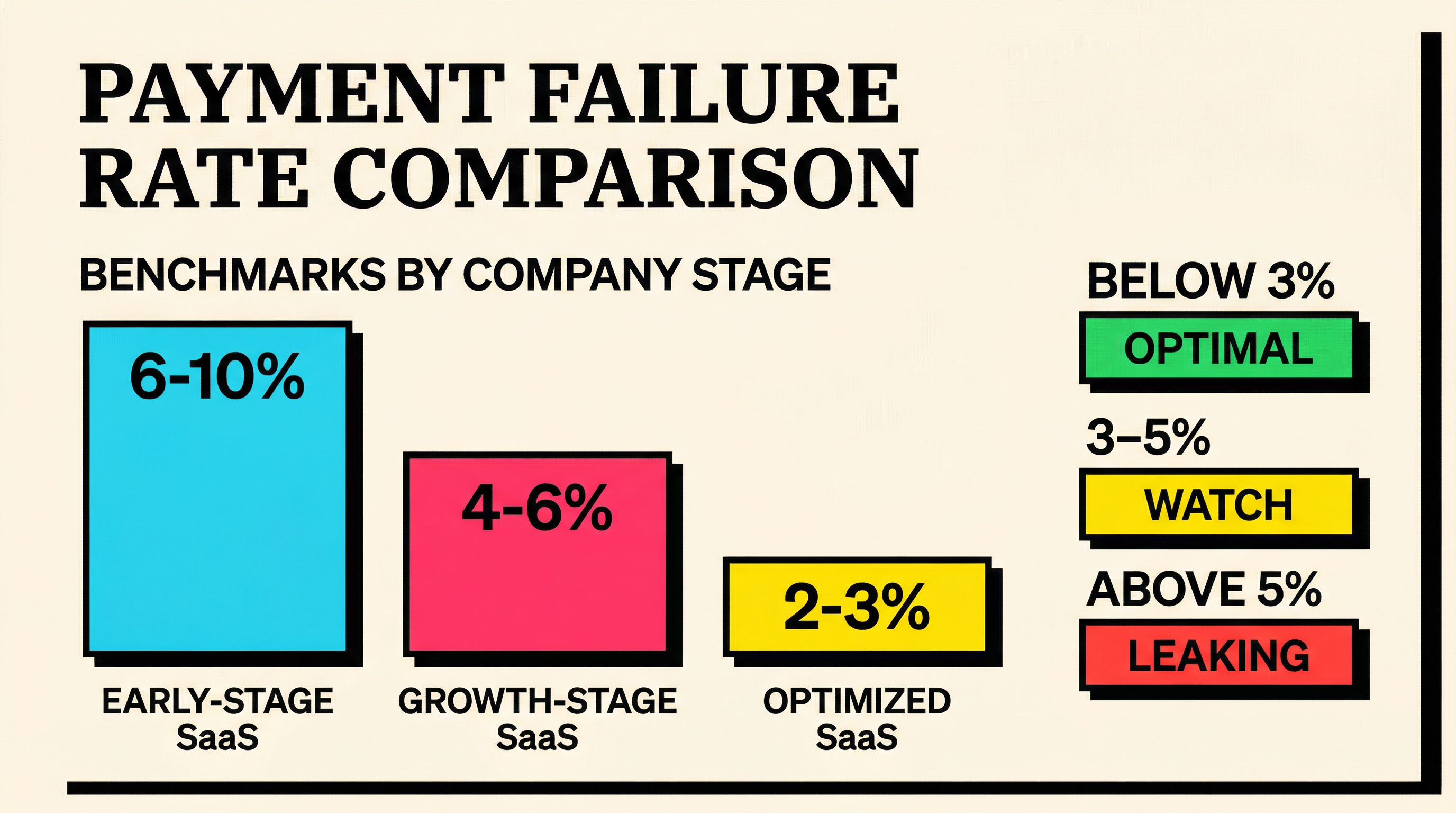
The first and most obvious signal: your payments are failing more often than they should.
Stripe processes billions of transactions, and across the platform, the average payment failure rate sits around 4-8% for subscription businesses. But "average" isn't the target. Well-optimized SaaS companies keep their failure rates below 3%. If yours is above 5%, you're leaking revenue.
How to Check This
Pull up your Stripe Dashboard and navigate to Payments > All payments. Filter by status: failed. Compare the count against your total payment attempts for the past 30 days.
Better yet, use the Stripe API to calculate it precisely:
Total failed charges / Total charge attempts × 100 = Payment failure rateWhat a High Failure Rate Tells You
A failure rate above 5% usually points to one or more of these problems:
- Expired cards: Customers haven't updated their payment details, and Stripe's automatic card updater didn't catch them all
- Insufficient funds: Billing timing doesn't align with when customers have money available
- Network errors: Temporary issues between Stripe, the card network, and the issuing bank
- Hard declines: The issuing bank is flat-out refusing the charge (fraud flags, closed accounts, stolen cards)
Each of these requires a different response. Expired cards need proactive outreach before the expiry date. Insufficient funds often respond well to retry timing changes. Network errors usually resolve with smart retries. Hard declines need immediate customer communication.
The Revenue Impact
Let's put numbers to it. If you process 1,000 subscription payments per month at an average of $100 each, and your failure rate is 8% instead of 3%, that's an extra 50 failed payments. At $100 each, that's $5,000 in monthly revenue at risk. Over a year, $60,000.
Not all of those will churn. Some will recover through retries, some through customer action. But without a deliberate recovery process, industry data suggests you'll permanently lose 30-50% of failed payments to involuntary churn. That's $18,000-$30,000 annually from a 5-point gap in failure rates.
2. You're Retrying Payments at the Wrong Time
Stripe has built-in Smart Retries that use machine learning to pick optimal retry times. But here's what most founders don't realize: Smart Retries aren't enabled by default for all configurations, and they don't solve every scenario.
If you're on Stripe Billing, Smart Retries are part of the package. If you're managing subscriptions through the API with custom logic, you might be retrying on a fixed schedule, like every 3 days for 2 weeks. That's better than nothing, but it's leaving money on the table.
Signs Your Retry Strategy Is Broken
- Retries happen at the same time of day as the original attempt. If the original charge failed at 2 AM because the customer's bank flagged an overnight transaction, retrying at 2 AM won't help.
- You retry the same number of times regardless of decline code. A "do_not_honor" decline has different retry economics than an "insufficient_funds" decline. The first might never recover through retries alone. The second often recovers within a few days.
- Your recovery rate on retries is below 15%. Well-optimized retry logic recovers 25-40% of failed payments. If you're below 15%, your timing or strategy needs work.
What Good Retry Logic Looks Like
The best approach combines several signals:
- Decline code analysis. Route different decline types to different retry strategies. Soft declines (network errors, insufficient funds) get aggressive retries. Hard declines (stolen card, closed account) get immediate customer outreach instead.
- Time-of-day optimization. Retry during business hours in the customer's timezone. Charges processed between 9 AM and 5 PM local time have measurably higher success rates.
- Day-of-week awareness. Retries on Tuesdays through Thursdays outperform weekends and Mondays. This correlates with payroll cycles and bank processing patterns.
- Progressive backoff. First retry after 24 hours, second after 48 hours, third after 5 days. This gives the underlying issue (insufficient funds, temporary bank hold) time to resolve.
You can review the specific decline codes Stripe returns and build your retry logic around them.
3. You Have No Pre-Dunning Process
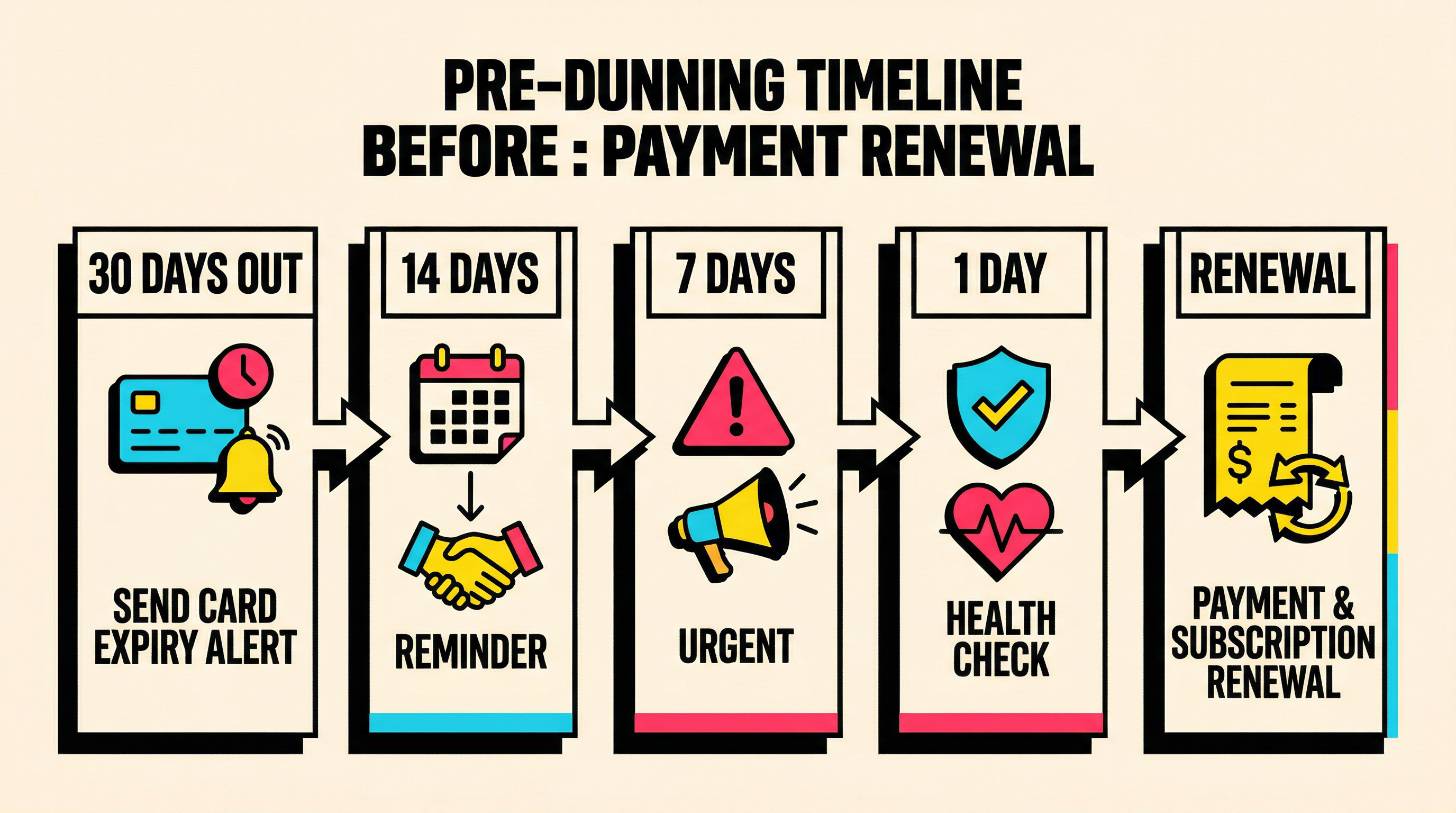
Dunning is what happens after a payment fails. Pre-dunning is what happens before. Most SaaS companies invest heavily in dunning sequences (email after email asking customers to update their card) but do nothing to prevent the failure in the first place.
This is backwards. Preventing a failed payment is dramatically cheaper and more effective than recovering from one.
What Pre-Dunning Looks Like
Card expiry alerts. Stripe tells you when a customer's card is about to expire. A simple email 30 days before expiry, asking the customer to update their payment method, prevents the failure entirely. A second reminder at 14 days, and a final one at 7 days. This alone can reduce card-related failures by 40-60%.
Payment method health checks. Before a renewal date, run a $0 authorization (or $1 auth + immediate void) to verify the card is still valid. If it fails, you have time to contact the customer before the actual charge attempt.
Billing date flexibility. Some customers consistently fail on the 1st of the month (when rent, utilities, and other bills hit). Offering to move their billing date to mid-month can eliminate recurring insufficient funds declines.
Multiple payment methods. Encourage customers to add a backup payment method. If the primary card fails, Stripe can automatically fall back to the secondary one. This is simple to implement through the Stripe Customer Portal.
The Pre-Dunning Gap
If you're not doing any of this, you have a pre-dunning gap. Every payment failure that could have been prevented but wasn't is pure revenue leakage. It also damages customer experience, because nobody enjoys getting "your payment failed" emails, especially when the problem was preventable.
Check your payment recovery benchmarks to see how your pre-dunning efforts compare to industry standards.
4. Your Dunning Emails Get Ignored
So a payment fails, and you send a dunning email. The customer ignores it. You send another one. Ignored again. After 3-4 attempts over 2-3 weeks, the subscription cancels.
This is the default experience for most SaaS companies, and it's terrible.
Why Dunning Emails Fail
Generic messaging. "Your payment failed. Please update your card." This reads like a system notification, not a message from a company the customer is paying money to. There's no urgency, no empathy, no clear action path.
Wrong channel. Email open rates for transactional messages hover around 20-30%. That means 70-80% of your dunning emails aren't even being read. If email is your only dunning channel, you're reaching maybe a quarter of affected customers.
Too many emails, too little variety. Sending the same template four times doesn't help. Each touchpoint should escalate the urgency and try a different angle. First email: friendly heads-up. Second: explain what they'll lose. Third: offer help (maybe their card was stolen, maybe they need to switch payment methods). Fourth: final warning before cancellation.
No direct update link. Every dunning email should include a one-click link to update payment information. Not a link to your login page. Not a link to your settings page. A direct link to the payment update form. Stripe's Customer Portal or a hosted invoice link handles this well.
What High-Performing Dunning Looks Like
The best dunning sequences combine:
- Multi-channel outreach: Email + in-app notification + SMS for high-value customers
- Personalized messaging: Reference the customer's plan, what they'll lose access to, and how long they've been a customer
- Escalating urgency: From "heads up" to "action needed" to "last chance" over 14-21 days
- Friction-free updates: One-click payment update links in every message
- Human fallback: For high-value accounts, a personal email or call from the team after automated attempts fail
The difference between a mediocre dunning sequence and a great one is typically 15-25 percentage points in recovery rate. On a base of 100 failed payments per month at $100 average, that's $1,500-$2,500 in additional monthly recovered revenue.
5. You Don't Track Involuntary Churn Separately
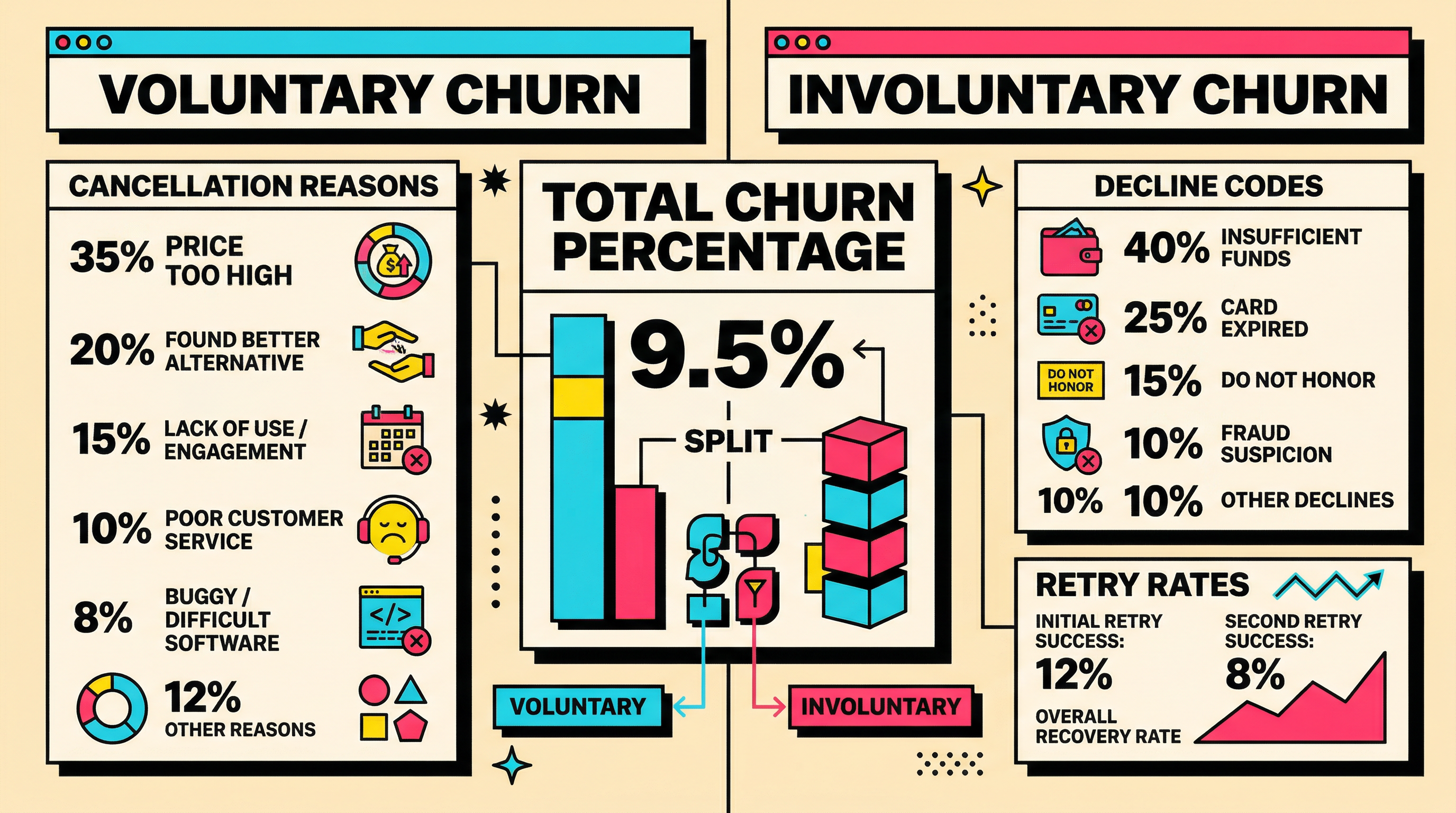
This is the most insidious warning sign because it's structural, not operational. If your analytics dashboard shows one churn number, lumping voluntary and involuntary churn together, you're flying blind.
Here's why this matters: voluntary and involuntary churn have completely different causes, completely different solutions, and completely different economics.
Voluntary Churn
Customers who actively decide to leave. They found a competitor, outgrew your product, had a bad experience, or no longer need what you offer. Fixing this requires product improvements, better onboarding, competitive positioning.
Involuntary Churn
Customers who leave because their payment failed and wasn't recovered. They never made a conscious decision to cancel. The billing system cancelled them. Fixing this requires payment infrastructure, retry logic, dunning sequences, and pre-dunning processes.
Why Separating Them Matters
If your total churn rate is 5% monthly, and you don't know the split, you might invest everything in product improvements and customer success. But if 2% of that 5% is involuntary churn, you're ignoring the cheapest, most recoverable portion of your churn problem.
Reducing involuntary churn from 2% to 1% has the same impact on your business as reducing voluntary churn from 3% to 2%. But the involuntary fix is almost always faster, cheaper, and more predictable.
How to Track It in Stripe
Stripe doesn't natively separate voluntary from involuntary churn in its dashboard. You need to build this yourself or use a tool that does it for you.
The basic approach:
- Voluntary cancellation: Customer clicks "cancel" or your team manually cancels. Tag these as voluntary in your database.
- Involuntary cancellation: Subscription status moves to
past_due→canceledafter exhausting retry attempts, without the customer initiating cancellation. Tag these as involuntary. - Track both monthly. Calculate each as a percentage of your starting subscriber count.
Once you have this split, you can make informed decisions about where to invest. Most SaaS companies are surprised to find involuntary churn makes up a larger share than they assumed.
You can use the involuntary churn rate formula to calculate your exact number.
The Compounding Cost of Inaction
Revenue leakage doesn't just cost you this month's lost payments. It compounds.
A customer lost to involuntary churn isn't just one month's revenue. It's their entire remaining lifetime value. If your average customer stays for 18 months at $100/month, every involuntary churn event costs you up to $1,800 in future revenue.
Multiply that across 20 involuntary churn events per month, and you're looking at $36,000 in lifetime value walking out the door every month. Over a year, that's $432,000 in revenue your business should have earned but didn't.
And that's before considering the acquisition cost you already spent to win those customers. The CAC is sunk. The LTV is gone. The economics get ugly fast.
What to Do Next
If you recognized any of these warning signs, here's the priority order for fixing them:
- Start tracking involuntary churn separately. You can't fix what you can't measure. Get this number isolated within the next week.
- Audit your retry logic. Are you using Stripe Smart Retries? If not, enable them. If you're using custom logic, check your recovery rates against the benchmarks above.
- Implement pre-dunning. Card expiry alerts are the quickest win. You can set these up in a day with Stripe webhooks listening for
customer.source.expiring. - Overhaul your dunning emails. Add direct payment update links, escalating urgency, and at least one non-email channel.
- Monitor your payment failure rate weekly. Make it a dashboard metric that you actually look at alongside MRR and growth.
The good news: involuntary churn is one of the most fixable problems in SaaS. Unlike product-market fit issues or competitive threats, payment recovery is a mechanical problem with mechanical solutions. Every dollar you recover goes straight to your bottom line.
If you want to see exactly where your Stripe account is leaking revenue, run a free churn audit. It takes two minutes to connect your Stripe account and get a breakdown of your failed payments, decline codes, and recovery opportunities.
Related Posts

7 Failed Payment Segments Every Stripe Team Should Track
How to Analyze Your Payment Recovery Funnel
The Complete Toolkit for Managing Failed Payments
How healthy is your Stripe account?
Get a free churn health report. Find pending cancellations, failed payments, and expiring cards putting your MRR at risk.
Run Free Audit