5 Dunning Email Subject Lines That Double Recovery Rates
The subject line of your dunning email is the entire game. If nobody opens it, your carefully crafted recovery message, your polished payment update link, your perfectly timed retry schedule: all worthless.
Most SaaS companies spend weeks building dunning flows and approximately zero minutes thinking about subject lines. The result? Open rates hovering around 15-20%, which means 80% of your failed payment customers never even see your recovery message.
Here are five dunning email subject lines that consistently outperform generic alternatives, why they work, and how to adapt them for your billing flow.
Why Subject Lines Matter More in Dunning Than Marketing
Marketing emails compete for attention. Dunning emails compete for action. The difference is critical.
When a subscription payment fails, you have a narrow window to recover it. Industry data from 2025-2026 shows that payment recovery rates drop by roughly 50% after the first 72 hours. Every hour your dunning email sits unopened in someone’s inbox is revenue slipping away.
The average SaaS company loses 9-12% of MRR to involuntary churn annually. Of that, studies suggest 30-50% is recoverable with proper dunning. But “proper dunning” starts with getting the email opened.
Here is what makes dunning subject lines different from regular email marketing:
No luxury of A/B testing at scale. You are not sending to 50,000 subscribers. You are sending to the small percentage of customers whose payments failed this month. Sample sizes are small, so every open counts.
Urgency is real, not manufactured. Marketing emails create artificial urgency (“Sale ends tonight!”). Dunning emails have genuine urgency: the customer’s service will be interrupted. Lean into that truth without being manipulative.
The reader does not know they have a problem. Most failed payments are not the customer’s fault. Their card expired, their bank flagged the charge, or their credit limit was temporarily hit. They are not ignoring you. They just do not know anything is wrong.
Subject Line 1: “Your [Product] subscription needs attention”
Why it works: It is personal and direct without being alarming. The word “needs” creates mild urgency. “Attention” implies something the customer should care about, not something they did wrong.
Open rate lift: This style of subject line typically sees 35-45% open rates in dunning contexts, roughly double the generic “Payment failed” approach.
What to avoid: Do not say “Your payment failed.” That framing puts blame on the customer and triggers defensiveness. Even though the payment did fail, the customer rarely caused it. Framing it as “needs attention” keeps them on your side.
Variations to test:
- “Quick update on your [Product] account”
- “Your [Product] subscription needs a small update”
- “[First name], your account needs attention”
The key principle: make it about their account, not about a failed transaction. Customers care about their service continuing. They care less about the mechanics of why it might stop.
Subject Line 2: “We could not process your latest payment”
Why it works: It uses “we” as the subject. The company could not process the payment, not “your payment failed.” This subtle shift in responsibility removes blame from the customer and frames it as a shared problem to solve.
Open rate lift: Blame-neutral framing consistently outperforms accusatory framing by 25-40% in email engagement studies. When recipients do not feel accused, they are more likely to open and act.
The psychology: Cognitive bias research shows that people avoid information that makes them feel guilty or responsible. If your subject line implies “you messed up,” the natural response is to avoid the email entirely. By making the company the subject (“We could not...”), you remove that avoidance trigger.
Variations to test:
- “We had trouble processing your payment”
- “We were unable to charge your card on file”
- “There was an issue with your latest payment”
One important note: avoid passive voice that feels evasive. “A payment was not processed” sounds like a system error notification, not a message from a company that cares about the customer’s experience.
Subject Line 3: “Action needed: update your payment to keep [Product]”
Why it works: It combines a clear action (“update your payment”) with a clear consequence (“to keep [Product]”). The reader knows exactly what they need to do and exactly what is at stake.
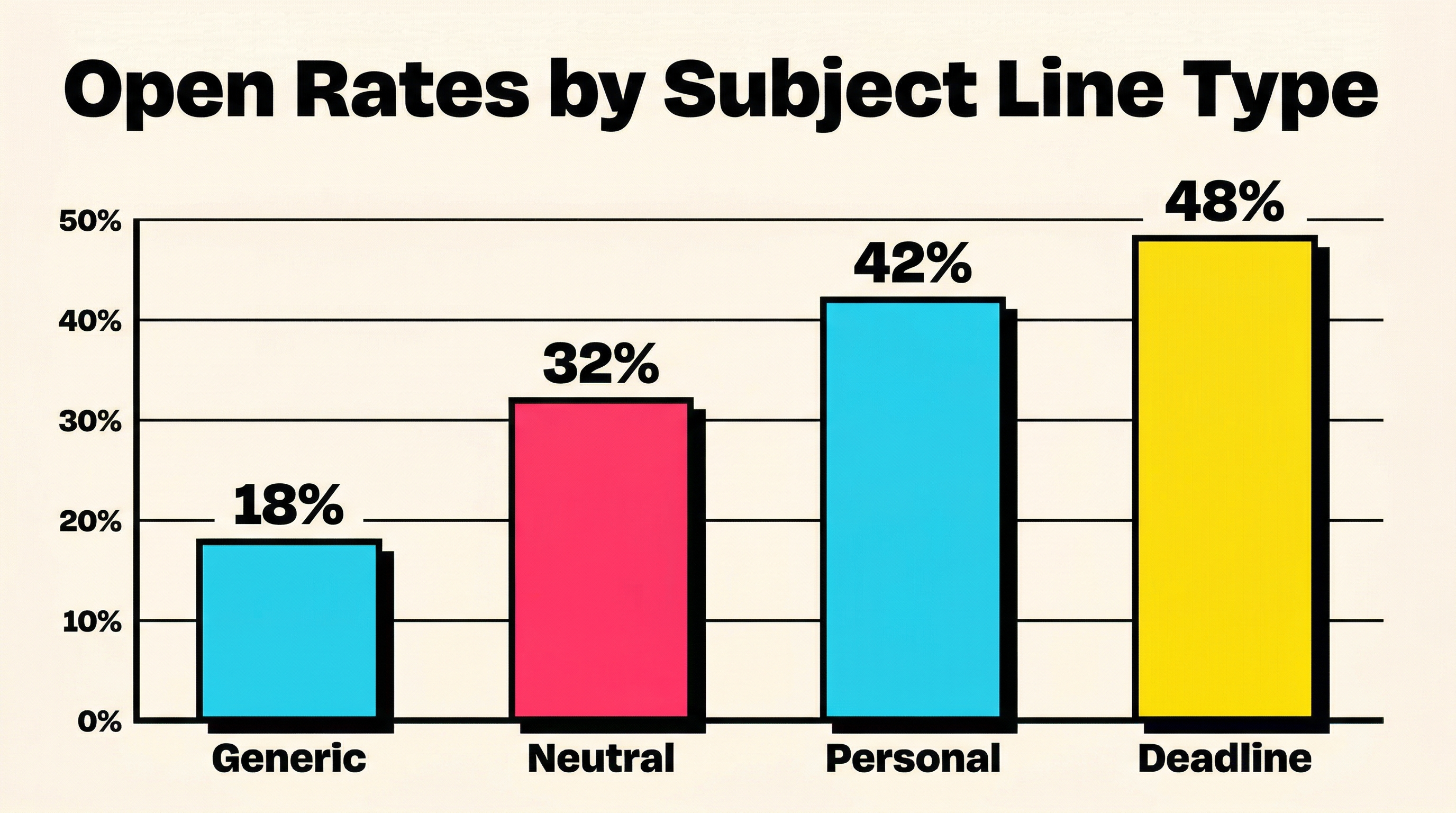
Open rate lift: Subject lines with explicit calls to action in the subject itself see 20-30% higher click-through rates than those that delay the CTA to the body. The subject line pre-qualifies intent.
When to use this: This works best as a second or third dunning email, not the first. The first email should be softer (Subject Line 1 or 2). By the second attempt, adding urgency is appropriate because the customer genuinely needs to act.
Variations to test:
- “Update your card to keep your [Product] access”
- “Action required: your [Product] subscription”
- “Keep your [Product] account active: update payment”
Critical detail: Always include the product name. Generic subject lines like “Update your payment method” could be from any service. Including the product name helps recipients immediately identify which service is affected and creates a personal connection.
Subject Line 4: “[First name], your card ending in [last 4] needs updating”
Why it works: Specificity builds trust and cuts through noise. When a customer sees their name and the last four digits of their card, they immediately know this is a legitimate, relevant message, not spam. It also tells them exactly which card is the problem, reducing friction.
Open rate lift: Personalized subject lines outperform non-personalized ones by 22-30% according to email marketing benchmarks. Adding the card digits on top of the name compounds the effect because it signals “we know which card, so this will be quick to fix.”
Why specificity reduces friction: If a customer has three cards on file across various services, a generic “update your payment” email creates cognitive load. Which card? Which service? The customer has to open the email, read it, figure out the context, then act. By front-loading the card details, you collapse those steps. They know immediately: “Oh, my Visa ending in 4242 needs updating for [Product]. Let me do that now.”
Variations to test:
- “[First name], we need to update the card ending in [last 4]”
- “The card ending in [last 4] on your [Product] account expired”
- “[First name], your Visa ending in [last 4] was declined”
Implementation note: Most billing systems (including Stripe) store the last four digits and card brand. Use them. The small engineering effort to pull these into your email templates pays for itself many times over in recovery rates. If you are using Stripe, the payment_method.card.last4 and payment_method.card.brand fields are readily available through the API or Stripe webhooks for payment monitoring.
Subject Line 5: “Your [Product] access expires in [X] days”
Why it works: This creates genuine urgency with a specific deadline. It shifts the frame from “a payment failed” (past tense, abstract) to “you are about to lose access” (future tense, concrete). Loss aversion is one of the strongest cognitive biases in behavioral psychology, and this subject line activates it directly.
Open rate lift: Deadline-driven subject lines in the dunning context routinely produce 40-55% open rates when the deadline is real and the timeline is short (3-7 days). Longer timelines reduce urgency and lower open rates.
When to use this: This should be your final dunning email before account suspension or cancellation. Using it too early cheapens the urgency. If you send “Your access expires in 30 days” as your first dunning email, the customer will procrastinate. Reserve countdown language for when the deadline is genuinely close (3-7 days).
Variations to test:
- “You have [X] days left on your [Product] subscription”
- “[First name], your [Product] access ends [Day, Date]”
- “Final notice: your [Product] subscription expires [Date]”
The countdown effect: Some SaaS companies send a sequence of these: “7 days,” then “3 days,” then “Tomorrow.” Each escalation reinforces urgency. The data shows the “3 days” and “Tomorrow” emails have the highest conversion rates in the sequence. Consider your dunning email open rate optimization strategy as a progression, not a single touchpoint.
Putting It All Together: The 5-Email Dunning Sequence
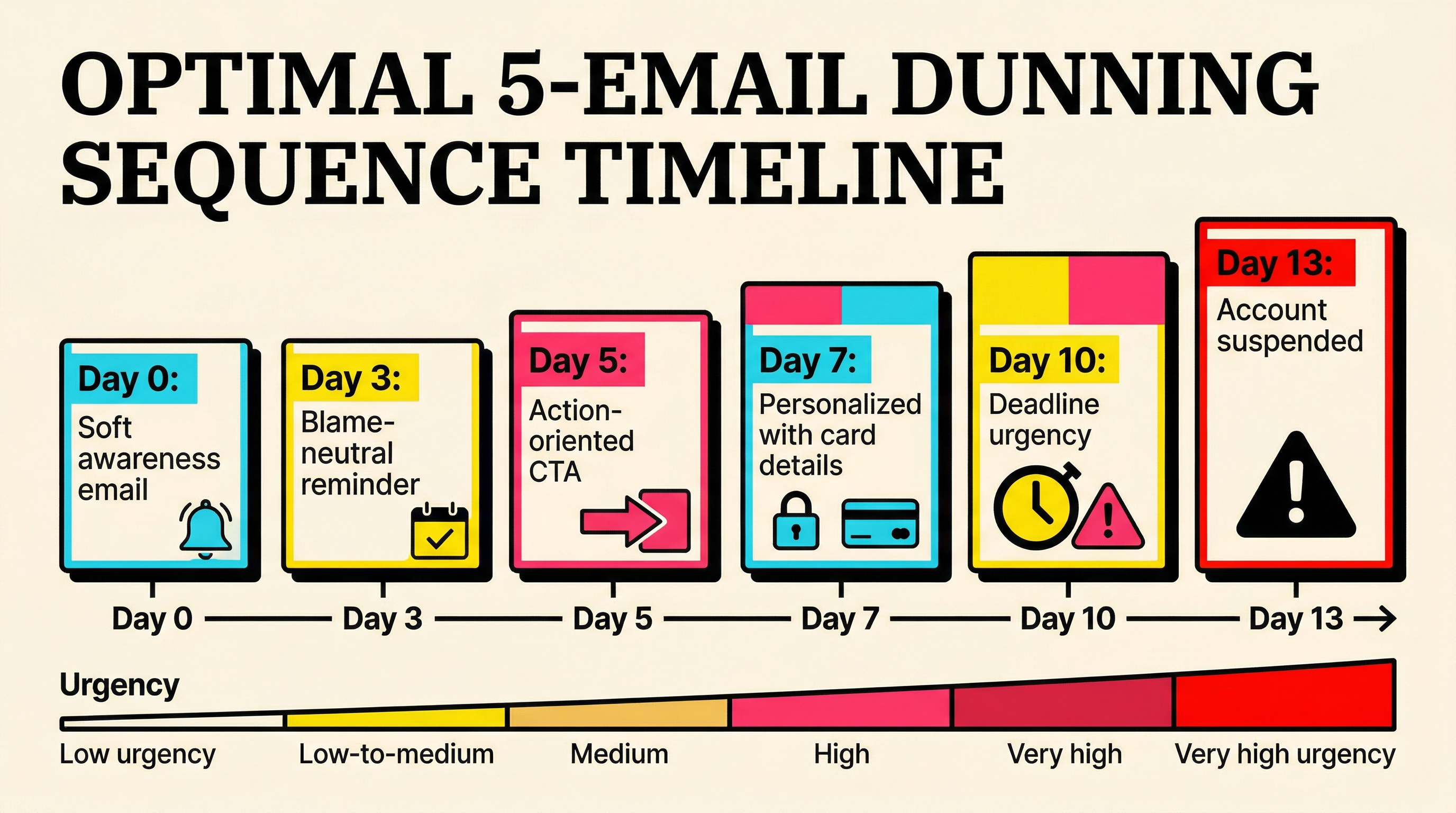
Subject lines work best as part of a structured sequence, not as isolated messages. Here is how to map these five subject lines to a typical recovery timeline:
Email 1 (Day 0, payment fails): “Your [Product] subscription needs attention”
Soft, informational, blame-free. The goal is awareness.
Email 2 (Day 3): “We could not process your latest payment”
Still blame-neutral but slightly more direct. Reminds them the issue persists.
Email 3 (Day 5): “Action needed: update your payment to keep [Product]”
Adds urgency and a clear CTA. The customer now knows inaction has consequences.
Email 4 (Day 7): “[First name], your card ending in [last 4] needs updating”
Maximum personalization. Makes the fix feel quick and specific.
Email 5 (Day 10): “Your [Product] access expires in 3 days”
Final escalation. Loss aversion drives the last group of recoverable customers to act.
This sequence follows a psychological arc: awareness, reminder, urgency, personalization, deadline. Each email serves a distinct purpose, and the subject lines match the emotional register of each stage.
Mistakes That Kill Dunning Open Rates
Even with strong subject lines, several common mistakes can undermine your recovery emails:
Sending from “no-reply@” addresses. Customers are less likely to open emails from addresses they cannot respond to. Use a real address like “billing@” or “support@” that signals a human is on the other end.
Using ALL CAPS or excessive punctuation. “URGENT: YOUR PAYMENT FAILED!!!” triggers spam filters and makes customers feel attacked. Calm, clear subject lines outperform shouting every time.
Being too vague. “Important account update” could mean anything. Customers get dozens of these from various services. Be specific about what happened and what the email is about.
Sending at the wrong time. Dunning emails sent between 10 AM and 2 PM in the customer’s local timezone see the highest open rates. Late-night sends get buried under the morning email avalanche. If you are not segmenting send times by timezone, you are leaving recovery revenue on the table.
Forgetting mobile. Over 60% of email opens happen on mobile devices. Subject lines get truncated around 35-40 characters on most mobile clients. Front-load the important information. “[First name], update your card” is better than “We wanted to let you know that your most recent payment did not go through.”
Measuring What Works
Track these metrics for each subject line variant:
Open rate: The obvious one. But be aware that Apple Mail Privacy Protection and similar features inflate open rates. Look at trends rather than absolute numbers.
Click-through rate: More reliable than open rate. Are people clicking the payment update link? This is the metric that actually correlates with recovered revenue.
Recovery rate: The only metric that truly matters. Which subject line variant leads to the most successfully updated payment methods and recovered subscriptions?
Time to action: How quickly after sending does the customer update their payment? Shorter times indicate stronger urgency in the subject line.
If your billing volume is too small for statistically significant A/B tests, track these metrics over longer periods (quarterly) and compare subject line approaches across cohorts.
Beyond Subject Lines: What Else Affects Recovery
Subject lines get the door open. What is inside the email determines whether the customer acts. A few principles that complement strong subject lines:
One CTA, prominently placed. The email should have one purpose: get the customer to update their payment method. One button, above the fold, impossible to miss.
Show them what they will lose. If the customer has stored data, active projects, or team members on the account, mention it. “Your 47 saved reports and 3 team member accounts are at risk” is more motivating than “Your subscription is at risk.”
Make the fix effortless. Link directly to the payment update page, not the login page. Every extra click between the email and the payment form costs you recoverable customers. Stripe’s Customer Portal or a direct payment method update link can reduce friction dramatically.
Include alternative payment methods. If the customer’s card is the problem, offer alternatives. “You can also pay via bank transfer or add a different card” gives them options instead of a dead end.
The Bottom Line
Dunning email subject lines are not a creative writing exercise. They are a revenue recovery lever. The difference between a 20% open rate and a 45% open rate on a dunning sequence can translate to thousands of dollars in recovered MRR per month, even for relatively small SaaS businesses.
The five subject lines above follow three core principles: remove blame, be specific, and escalate gradually. Apply them as a sequence rather than picking one at random, and track recovery rates (not just open rates) to measure their impact.
If you are unsure where your current dunning performance stands, run a free churn audit to see exactly how much revenue you are losing to failed payments and where your recovery flow has gaps.
Related Posts

7 Failed Payment Segments Every Stripe Team Should Track
The Anatomy of a Failed Payment: What Actually Happens
How healthy is your Stripe account?
Get a free churn health report. Find pending cancellations, failed payments, and expiring cards putting your MRR at risk.
Run Free Audit