6 Hidden Stripe Settings That Reduce Payment Failures

Most SaaS founders know the obvious Stripe levers: turn on subscriptions, send invoice emails, maybe enable Smart Retries and call it a day. The problem is that payment failures usually do not come from the obvious stuff. They come from tiny billing decisions buried in settings, defaults, retry rules, and customer flows that nobody reviews after the initial setup.
If your Stripe dashboard shows a steady stream of failed payments, unpaid invoices, or subscriptions slipping into cancellation, there is a good chance the leak is not caused by some dramatic outage. It is caused by a bunch of small, boring configuration choices that quietly shape how often customers recover.
That is why the best operators treat Stripe settings payment failures as an operating problem, not just a support problem. Small tweaks can change whether a customer updates their card, retries successfully, completes authentication, or disappears.
This guide walks through six hidden Stripe settings that reduce payment failures, plus what each one actually changes in the real world. If you want a broader framework first, review our guides on payment retry timing vs count, Stripe payment method update links, and the full Stripe subscription health audit.

1. Smart Retries are only useful if your retry window matches customer reality
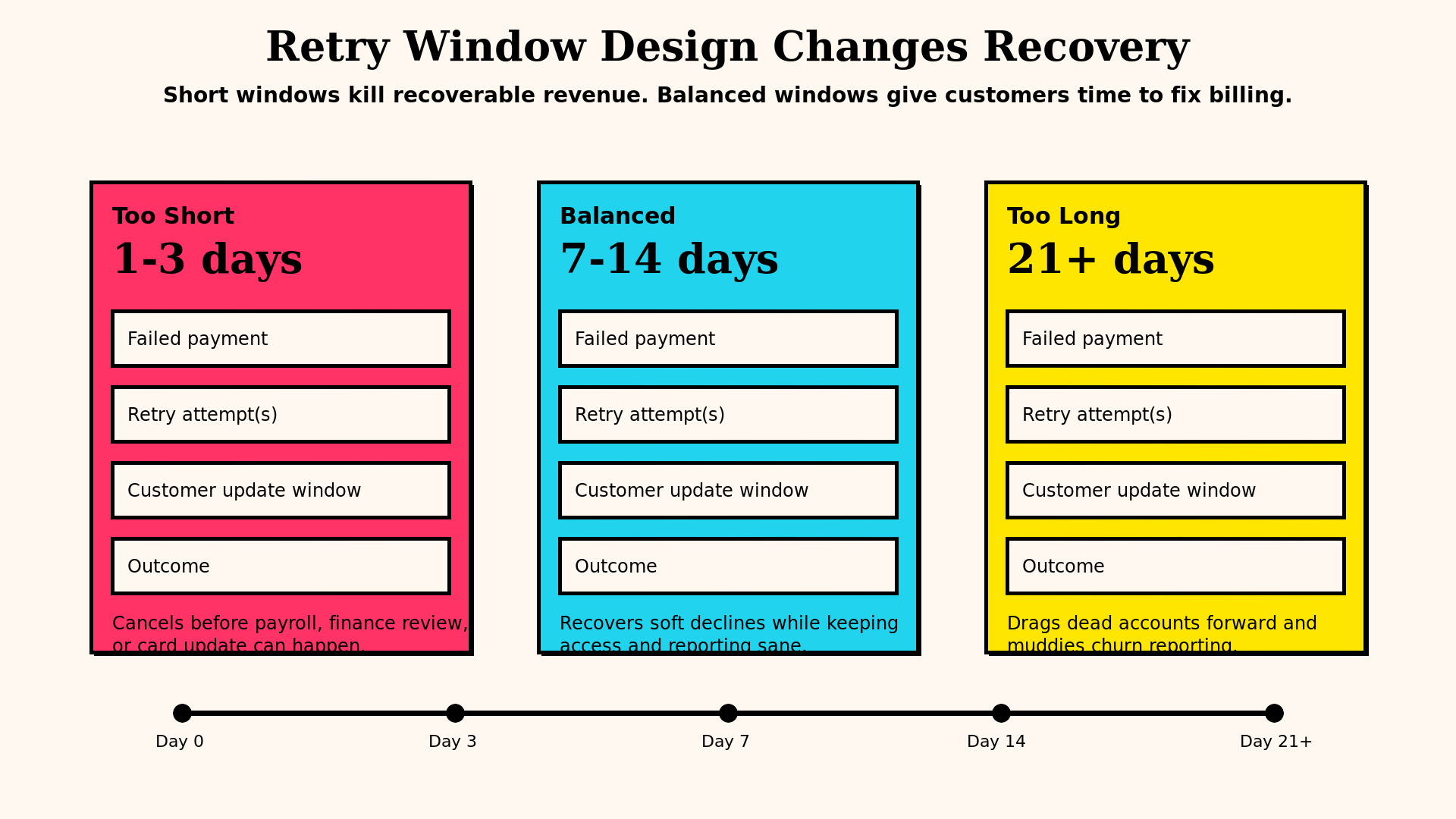
A lot of teams enable Smart Retries and assume Stripe will magically recover everything worth recovering. It helps, but only if the surrounding subscription and dunning setup makes sense.
Retry logic works because many failed payments are temporary. The card balance may change in a few hours. A bank may decline an off-session payment at one moment and approve it later. A payroll cycle may land tomorrow. But if your retry schedule is too aggressive, too short, or mismatched to customer behavior, you burn through recovery attempts before the customer has any chance of becoming payable again.
What to check inside Stripe:
- Whether Smart Retries is enabled at all
- How many retries you allow before marking an invoice uncollectible or a subscription delinquent
- How long the retry window runs before the subscription is cancelled
- Whether the retry cadence differs by customer segment or plan type in your own logic
The hidden problem is not just the retry count. It is the retry horizon. A three-day retry window can be too short for weekly cash flow customers, weekend timing, or bank-side temporary issues. A very long retry window can also be bad if it keeps access alive for accounts that are clearly gone.
A better rule is to align retries with how your customers actually pay. B2B SaaS often benefits from a longer recovery window because finance teams need time to update cards or move budget. Lower-priced self-serve products often need faster escalation because the customer either fixes it quickly or churns.
If you do nothing else, compare recovered invoices by day-since-first-failure. That tells you whether your current setup is ending the process too early. In many SaaS businesses, a meaningful share of recoveries happen after the first 24 hours, which means cutting the sequence short is just self-inflicted churn.
2. Payment method update links work better when the path has almost zero friction
The fastest way to lose a recoverable customer is to make updating payment details feel like admin work.
Stripe gives you several ways to send customers into a payment method update flow, but the default experience is not always the one with the least friction. Teams often bury the link in a generic portal email, route users through login walls, or make them hunt for billing settings after a failed invoice notification.
The setting to pay attention to is not just whether Stripe can collect a new payment method. It is whether your dunning path drops the customer directly into the right action.
That means checking:
- Whether your billing portal configuration makes payment method updates obvious
- Whether your email and in-app notices deep-link to the update flow
- Whether a successful update automatically applies to the open invoice and future invoices
- Whether the customer can update on mobile without getting lost in a general account area
This is where many teams confuse compliance with conversion. Yes, the portal is technically available. No, that does not mean customers are likely to finish the job.
Your best flow is usually the shortest one: customer sees a clear message, clicks once, lands on a secure update screen, submits the new card, and Stripe retries collection. Every extra screen cuts recovery odds.
If your current path feels like “sign in, find settings, click billing, find payment methods, add a card, then hope the invoice retries,” you have built a maze. Mazes create churn.
A clean update path is one of the simplest ways to improve Stripe settings payment failures because it converts confusion into action. If you have not reviewed this recently, start with our walkthrough on Stripe payment method update links.
3. Subscription dunning actions are often harsher than teams realize
One hidden Stripe setting that causes damage fast is what happens after retries are exhausted.
If the end-of-dunning action is too aggressive, you turn recoverable payment issues into permanent churn. Some teams cancel subscriptions immediately after the final retry. Others leave subscriptions active forever and create revenue reporting chaos. Neither extreme is great.
The real job is deciding what Stripe should do when the automated recovery path fails:
- Cancel the subscription
- Mark it unpaid
- Leave the
past_duestate in place
Each choice has consequences.
Immediate cancellation creates a clean ledger, but it can be brutal for customers who would have fixed the issue with one more reminder or a quick message from support. Marking invoices unpaid while leaving the subscription structure intact can preserve account context and make recovery campaigns easier. Leaving everything indefinitely past_due can make dashboards lie and inflate active customer counts.
This is not a purely finance setting. It is a product and retention decision.
A good default for many SaaS teams is to avoid instant hard cancellation unless the business model truly requires it. Give yourself a short but deliberate grace period. Keep access rules aligned with your risk tolerance, but do not let one failed card attempt nuke the customer relationship if the user is otherwise active.
Where teams get burned is forgetting that this setting was chosen months ago during setup, often by whoever happened to be configuring Stripe that week. Nobody revisits it. Then months later the company wonders why failed payments turn into lost logos so quickly.
Review the end-of-dunning action alongside product access rules, CRM triggers, and support notifications. If those systems are misaligned, you will send mixed signals like “your account is cancelled” in one place and “update your card to continue” in another.
4. Card updater and network token support quietly rescue revenue in the background
Some of the best recovery work happens before the customer even sees a failed payment notice.
When cards expire, get reissued, or are replaced after fraud events, Stripe can sometimes update payment credentials behind the scenes through card updater services and network token support. Founders often underestimate how much this matters because it is invisible when it works.
Instead, they notice the problem only when it is not configured well enough and expired cards start stacking up.
The key question is simple: are you making it easy for Stripe to keep payment credentials current without asking the customer to do manual work every time?
That means reviewing:
- Whether automatic card updates are supported for your payment mix
- Whether saved payment methods are attached correctly to customers and subscriptions
- Whether your checkout and billing flows encourage reusable payment credentials instead of one-off collection behavior
- Whether wallet and tokenized methods are part of your mix where appropriate
This is especially important for longer-lived subscriptions. A customer who stays for twelve months will eventually hit card lifecycle events. If your setup depends on that customer manually noticing an expiry notice and taking action at the perfect moment, you are betting retention on human memory. That is a terrible bet.
The cleaner approach is to let Stripe and the card networks do as much of the boring maintenance as possible. Then your dunning flow becomes a fallback, not the primary plan.
If expired cards or “new account information available” style declines show up often in your account, this is one of the first areas worth auditing. It is a hidden setting because nobody sees a dramatic on-off switch, but the downstream effect on payment failure volume can be huge.
5. SCA and off-session authentication settings can block perfectly good customers
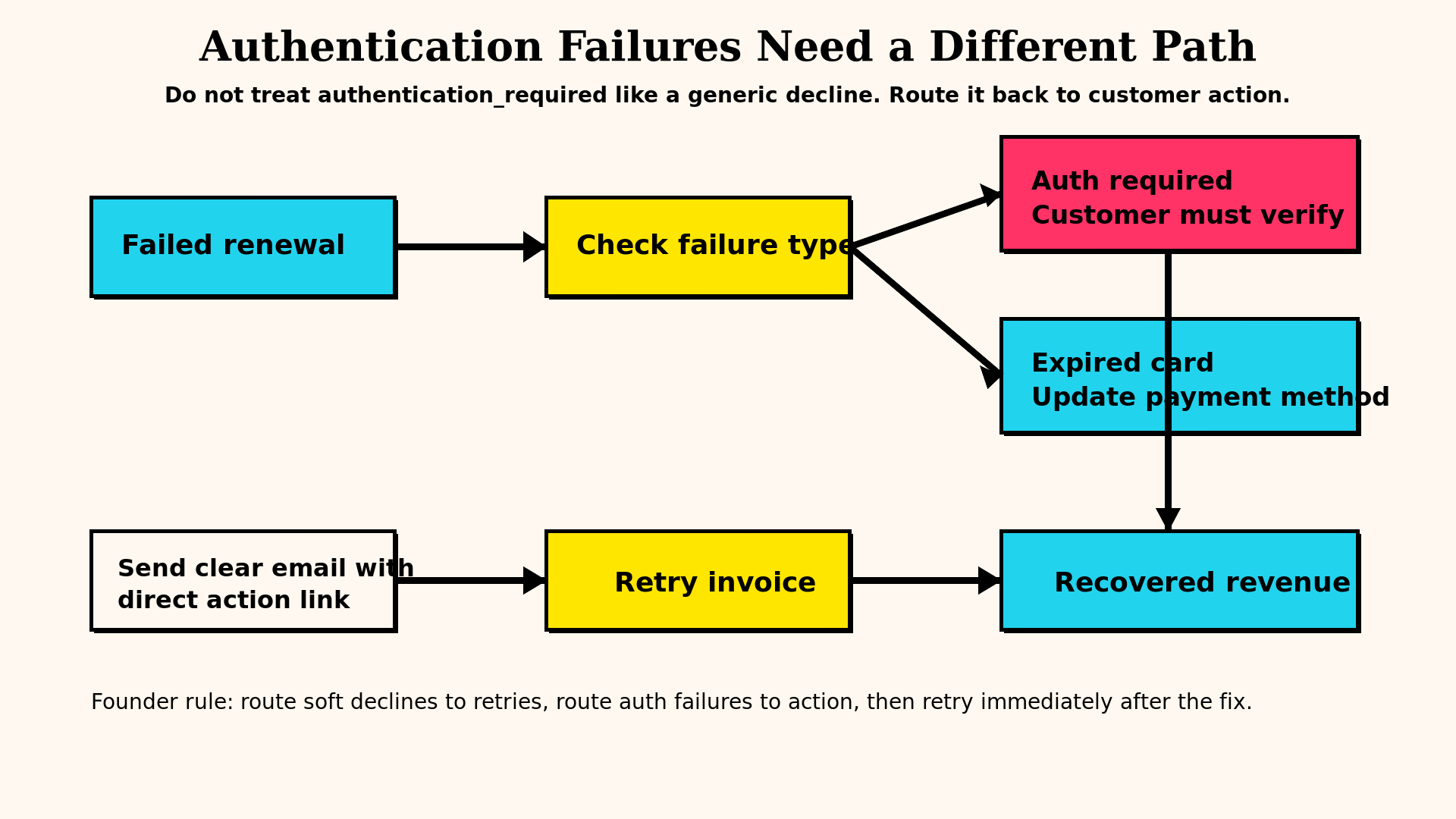
Not every failed payment is about insufficient funds. Sometimes the customer wants to pay, the card is valid, and the charge still fails because the payment needs authentication.
This is where off-session billing, Strong Customer Authentication, and invoice collection settings collide.
If your setup does not handle authentication-required scenarios cleanly, a healthy customer can slip into dunning simply because the system failed to bring them back into an SCA-complete flow. The payment was not impossible. The workflow was broken.
Things to review here:
- Whether subscription sign-up captures mandate and authentication properly for future off-session charges
- Whether failed invoice communications clearly explain when action is required
- Whether the customer can authenticate and pay from the reminder flow without starting over
- Whether your product distinguishes temporary auth failures from true non-payment behavior
A classic mistake is treating authentication_required like a generic decline. It is not. It means the customer likely needs to do something specific. If your emails and billing UI do not reflect that, recovery rates drop for no good reason.
This is also why initial checkout quality matters so much. A rushed sign-up flow can create months of billing friction later. If the first transaction does not set you up well for future off-session renewals, recurring collection becomes fragile.
For SaaS companies with a meaningful European customer base, this is even more important. But honestly, every subscription business should care. Anything that separates “can pay” from “did pay” deserves attention.
6. Invoice finalization, collection method, and email timing shape failure rates more than people expect
One of the least glamorous parts of Stripe is invoice behavior. That is exactly why it gets neglected.
But invoice settings affect whether customers are warned early, whether internal teams can review edge cases, and whether payment attempts happen at sensible times.
The hidden levers include:
- When invoices finalize
- Whether collection is automatic or manual for certain cohorts
- When invoice emails go out relative to the charge attempt
- Whether pre-billing notifications exist for higher-risk accounts
- How renewal timing interacts with customer geography and business hours
Why does this matter? Because timing changes outcomes.
Charging a B2B card at a weird hour on a weekend can behave differently from charging on a weekday morning when the finance team is available to respond. Sending a failed invoice email long after the charge attempt reduces the odds of fast recovery. Finalizing invoices too rigidly can remove room for customer success or finance to intervene on high-value accounts.
You do not need to turn billing into a hand-operated machine. You just need to stop pretending invoice timing is neutral.
For example, if you know a segment of customers regularly pays annual contracts through finance teams, it may be smarter to create a review window before the harshest automated actions kick in. If you run self-serve monthly subscriptions, tighter automation may be fine. The point is that Stripe defaults are generic. Your retention economics are not.
How to audit these settings without wasting a week
Most teams should not start by rewriting their whole billing stack. Start with an audit.
Use this order:
- Pull your top failure reasons for the last 30 to 90 days.
- Group them into temporary declines, expired credentials, authentication issues, and true hard failures.
- Map each group to the setting that most likely influences it.
- Check your retry horizon, update path, dunning endpoint, card updater setup, SCA flow, and invoice timing.
- Compare failed invoice volume to recovered invoice volume after each stage.
- Make one or two changes at a time and watch recovery rate, involuntary churn, and support tickets.
This matters because payment recovery work gets muddy fast if you change five things at once. You want to know which settings actually moved the number.
A simple heuristic helps: if a large share of your failed payments look recoverable, your issue is usually process and configuration. If most failures are true hard declines from low-intent or low-fit customers, then billing settings will help less and customer quality matters more.
Either way, you should know the difference.
What founders usually get wrong
Three mistakes show up again and again.
First, they overfocus on emails and underfocus on system design. Better dunning copy helps, but it will not fix a bad update flow, broken authentication path, or too-short retry window.
Second, they accept Stripe defaults as strategy. Defaults are not strategy. They are a starting point for the average account. Your SaaS is not average.
Third, they treat payment failures as a finance clean-up task instead of a retention lever. That mindset leaves too much money on the floor.
The boring truth is that reducing failed payments usually comes from operational discipline. Review settings. Tighten the customer path. Separate temporary failures from true churn. Let automation do the repetitive work, but make sure the automation is not dumb.
Final takeaway
The best Stripe settings payment failures fixes are rarely flashy. They are small decisions that remove friction, preserve recovery windows, and give good customers a clean path back to paid status.
If you have not reviewed these six areas lately, there is a decent chance your Stripe setup is harsher, slower, or messier than you think. And if that is true, your churn is probably higher than it needs to be.
If you want a quick way to spot revenue leaks in your billing setup, run a free churn audit with the free churn audit tool at https://churnbot.co/audit.
Related Posts

7 Failed Payment Segments Every Stripe Team Should Track

9 Strategies to Stop Losing Customers to Payment Failures
How healthy is your Stripe account?
Get a free churn health report. Find pending cancellations, failed payments, and expiring cards putting your MRR at risk.
Run Free Audit