What Revenue Churn Rate Tells You About Product-Market Fit
Your MRR is growing. New customers are signing up. Things look good on the surface. But underneath, your revenue churn rate is telling a completely different story about whether your product actually fits the market.
Revenue churn rate is one of the most honest metrics in SaaS. Unlike logo churn (which treats a $10/mo customer the same as a $10,000/mo customer), revenue churn measures the actual dollars walking out the door. And when you look at it closely, it reveals whether you have genuine product-market fit or just a leaky bucket with a big hose pointed at it.
What Is Revenue Churn Rate, Exactly?
Revenue churn rate measures the percentage of recurring revenue lost over a given period from cancellations and downgrades. The basic formula:
Revenue Churn Rate = (MRR Lost to Churn + MRR Lost to Downgrades) / Starting MRR × 100
If you started the month with $100,000 in MRR and lost $5,000 to cancellations and another $1,000 to plan downgrades, your gross revenue churn rate is 6%.
Simple enough. But the nuance matters.
There are two flavors you need to track separately:
Gross revenue churn rate counts all revenue losses, period. Cancellations, downgrades, failed payments that never recover. This is the raw damage number.
Net revenue churn rate offsets those losses against expansion revenue from existing customers (upgrades, add-ons, seat increases). If you lost $6,000 but gained $8,000 from expansions, your net revenue churn is actually -2%, meaning you have net negative churn. That is the gold standard.
Most founders track one or neither. You need both. Gross tells you how fast the bucket leaks. Net tells you whether the water level is rising or falling despite the leaks.
Why Revenue Churn Rate Is a Product-Market Fit Signal
Here is the connection most founders miss: revenue churn rate does not just measure retention. It measures whether your customers find enough ongoing value to keep paying.
High revenue churn (above 5% monthly) means customers are actively deciding your product is not worth the money. They evaluated it, used it, and concluded they can live without it. That is the opposite of product-market fit.
Low revenue churn (below 2% monthly) means customers are sticky. They have integrated your product into their workflow, they depend on it, and switching would be painful. That is product-market fit.
But the real insight comes from segmenting your revenue churn rate:
Segment by Customer Size
If your revenue churn is concentrated in smaller accounts while larger accounts retain well, you might have product-market fit for enterprise but not for SMB. Or vice versa. This tells you exactly where to focus.
A common pattern: a SaaS tool has 8% monthly revenue churn in accounts under $100/mo but only 1.5% in accounts over $500/mo. The product works for serious users. The smaller accounts were never a good fit and are dragging the overall number up.
Segment by Acquisition Channel
Customers from organic search who found you by searching for a solution to their specific problem will churn at different rates than customers from a viral Product Hunt launch. Revenue churn by channel reveals which channels bring customers who actually need your product versus those who were just curious.
Segment by Cohort
Track revenue churn by signup month. If your March cohort churns at 4% but your June cohort churns at 2%, something changed. Maybe you improved onboarding. Maybe you added a feature that makes the product stickier. Cohort analysis turns revenue churn from a single scary number into a story about product improvement.
The Revenue Churn Benchmarks That Actually Matter
Generic benchmarks are dangerous because they ignore context. But directional guidance helps:
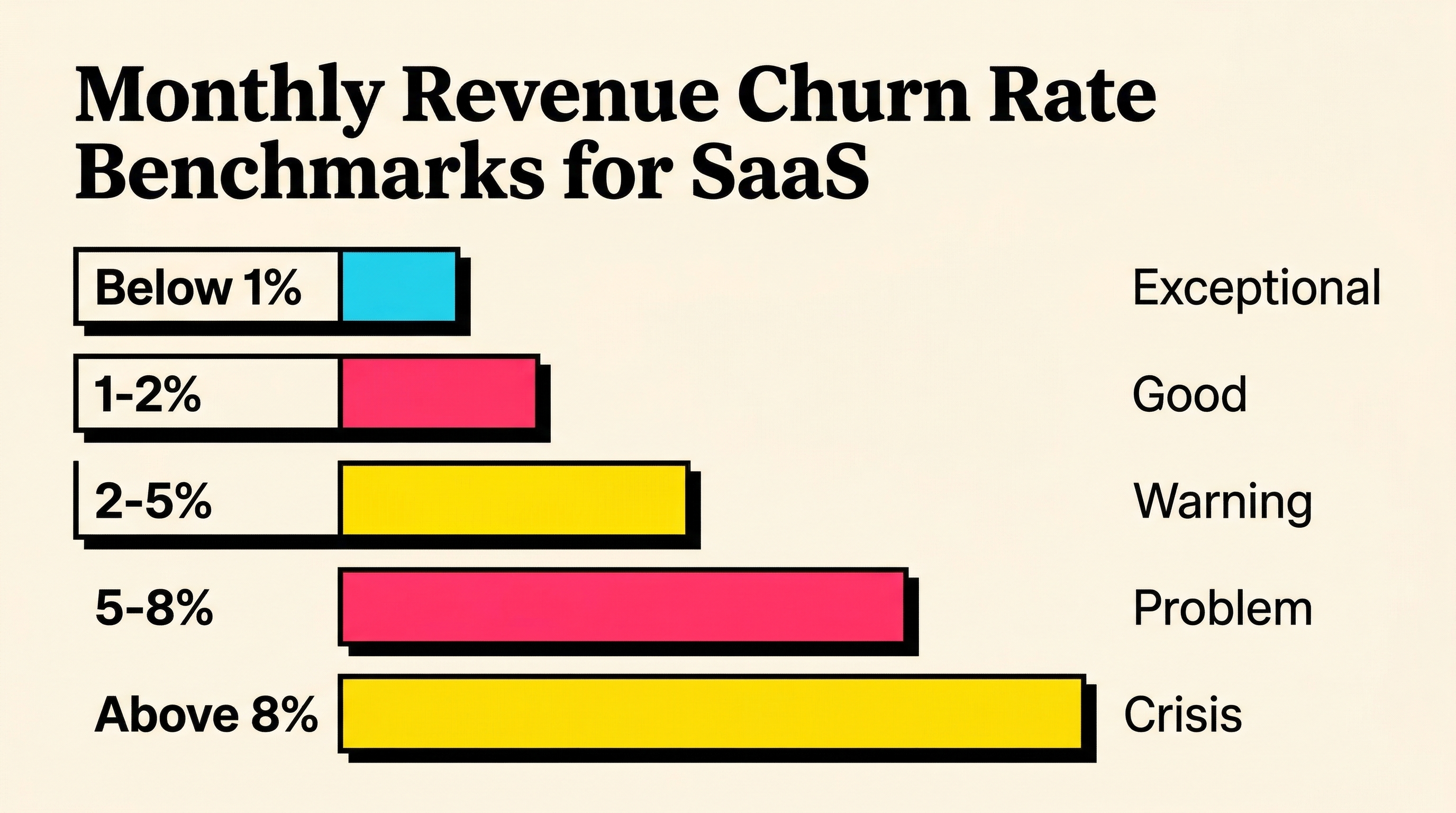
Monthly gross revenue churn rate:
- Below 1%: Exceptional. You have strong product-market fit. Protect it.
- 1-2%: Good. Most successful SaaS companies operate here.
- 2-5%: Warning zone. You have product-market fit for some segments but not others.
- 5-8%: Problem. Customers are not finding enough value. Dig into why.
- Above 8%: Crisis. Growth cannot outrun this level of churn sustainably.
Annual gross revenue churn rate:
- Below 10%: Strong retention.
- 10-20%: Normal for SMB-focused SaaS.
- 20-40%: Common for very small business or consumer-adjacent products.
- Above 40%: The product is not retaining value.
These numbers compound. A 5% monthly churn rate does not mean 60% annual churn. It means you lose roughly 46% of revenue annually (1 - 0.95^12). That compounding effect is why even small improvements in monthly churn create massive long-term impact.
For deeper context on how these numbers relate to other key metrics, the guide on net revenue retention breaks down the relationship between churn, expansion, and growth.
Voluntary vs Involuntary: The Revenue Churn Split You Must Track
Not all revenue churn is created equal. The split between voluntary and involuntary churn changes your entire strategy.
Voluntary revenue churn happens when customers actively decide to leave. They cancel, downgrade, or choose not to renew. This is a product or positioning problem.
Involuntary revenue churn happens when customers who want to stay lose access due to payment failures. Expired cards, insufficient funds, bank declines. This is a mechanical problem with a mechanical solution.
Here is why this split matters for product-market fit assessment: if 40% of your revenue churn is involuntary, your product-market fit is better than the topline number suggests. Those customers did not choose to leave. Their payment method failed and nobody recovered it.
Industry data shows involuntary churn accounts for 20-40% of all SaaS churn. For a company with 5% monthly revenue churn, that means 1-2% is preventable with proper payment recovery workflows. Fix the mechanical problem first, then assess your true voluntary churn rate.
The difference matters. If your "real" voluntary revenue churn is 3% instead of 5%, your product-market fit picture changes significantly.
How to Use Revenue Churn Rate to Find Product-Market Fit
Revenue churn rate is not just a number to track. It is a diagnostic tool. Here is how to use it actively:
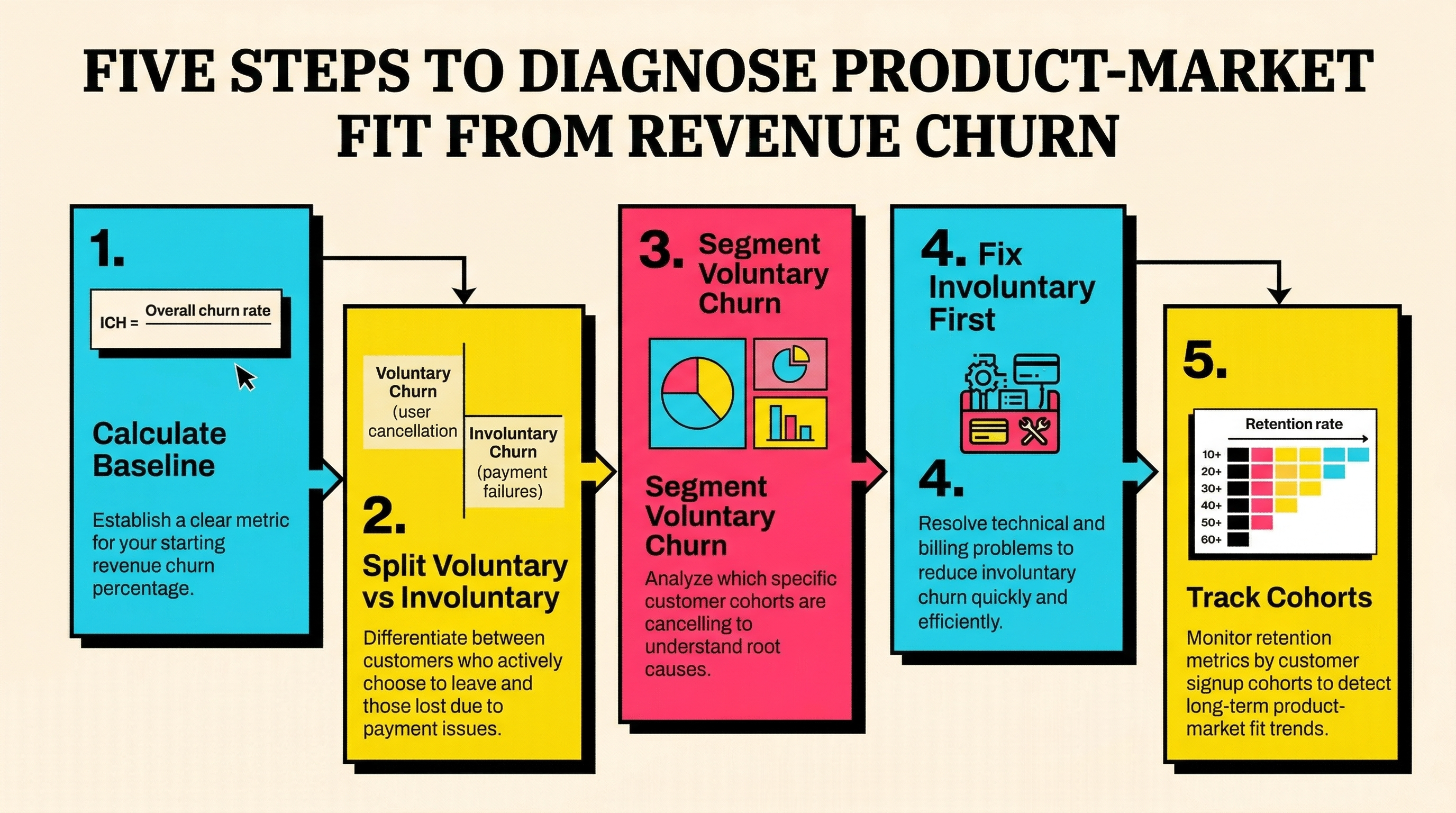
Step 1: Calculate Your Baseline
Pull your last 6 months of data. Calculate monthly gross and net revenue churn for each month. Look for trends. Is it stable? Improving? Getting worse?
If you are using Stripe, you can pull this from your subscription data. Look at customer.subscription.deleted events, invoice failures, and plan changes. If reading Stripe data feels overwhelming, the guide on reading your Stripe failed payment data walks through the key reports.
Step 2: Split Voluntary from Involuntary
Tag every churned dollar as voluntary (customer-initiated cancellation or downgrade) or involuntary (payment failure, card expired, insufficient funds). If you cannot split them cleanly, start by checking your Stripe decline data. Any churn that follows a failed payment without a cancellation request is likely involuntary.
Step 3: Segment the Voluntary Churn
For customers who actively chose to leave, look at:
- Plan tier: Are specific plans churning faster?
- Feature usage: Did churned customers use the core features?
- Time to first value: How long between signup and first meaningful action?
- Support tickets: Did they ask for help and not get it?
Each segment reveals a different product-market fit problem. Low feature usage means onboarding failed. High support tickets before churn means the product is confusing. Plan-specific churn means pricing misalignment.
Step 4: Fix Involuntary Churn First
This is the fastest win. You can cut involuntary revenue churn by 30-70% with:
- Card expiry alerts sent before the card fails
- Smart retry logic that times retries based on decline reason
- Payment method update flows that make it easy for customers to fix their card
- Dunning sequences that are helpful, not hostile
These are mechanical fixes. They do not require product changes. They just require attention.
Step 5: Track the Impact Over Cohorts
As you make changes (product improvements, onboarding changes, involuntary churn fixes), track revenue churn by cohort. New cohorts should show lower churn than older ones if your changes are working.
The cohort view is the clearest signal. If your March cohort has 4% monthly revenue churn and your September cohort has 2%, you have improved product-market fit. The aggregate number might still look bad because old cohorts drag it up, but the trend line is what matters.
Revenue Churn Rate vs Logo Churn Rate: Why Revenue Wins
Logo churn rate counts the percentage of customers lost. Revenue churn rate counts the percentage of revenue lost. They can tell very different stories.
Scenario: You lose 10 customers in a month out of 200. That is 5% logo churn. Sounds bad. But those 10 customers were all on $29/mo plans, totaling $290 lost. Your starting MRR was $50,000. Revenue churn is 0.58%.
The logo churn screams "problem." The revenue churn says "those were not your core customers."
This is why revenue churn rate is the better product-market fit indicator. It weights retention by how much customers are willing to pay. Customers on higher plans have voted with their wallet that the product is worth more. If those customers are staying, you have product-market fit where it counts.
That said, high logo churn in a specific segment might signal an opportunity. Maybe your $29 plan does not deliver enough value. Maybe those customers need different onboarding. Revenue churn tells you where to look. Logo churn by segment tells you what to fix.
The Net Negative Churn Milestone
Net negative revenue churn (where expansion revenue exceeds lost revenue) is the strongest possible product-market fit signal. It means your existing customers are paying you more over time, not less.
To achieve it, you need:
- Low gross revenue churn (the foundation)
- Strong expansion revenue (upsells, seat growth, usage-based growth)
Companies with net negative churn can theoretically grow with zero new customers. Each cohort becomes more valuable over time. This is the dynamic that produces the best SaaS companies.
If your gross revenue churn is 3% monthly but your expansion is 4%, your net churn is -1%. You are growing from within. That is the clearest signal that customers are finding increasing value, which is the definition of product-market fit.
Common Revenue Churn Mistakes
Mistake 1: Only looking at the aggregate number. A 4% revenue churn rate that is 2% voluntary and 2% involuntary requires two completely different strategies. The aggregate hides this.
Mistake 2: Ignoring seasonality. Some SaaS products have natural seasonal patterns. Annual renewals cluster in certain months. Revenue churn spikes in January as companies review budgets. Look at trailing 3-month averages, not single months.
Mistake 3: Not separating contraction from cancellation. A customer downgrading from $500/mo to $200/mo is very different from a customer canceling entirely. The downgrade customer still sees value. The cancellation does not. Lumping them together hides important signals.
Mistake 4: Celebrating low churn without checking expansion. Low churn with zero expansion means customers are satisfied but not growing. That is a retention win but a growth problem. For true product-market fit, you want customers expanding, not just staying.
What to Do Next
Revenue churn rate is a mirror. It reflects back the honest answer to "do customers find ongoing value in this product?"
If the number is high, do not panic. Segment it. Separate voluntary from involuntary. Fix the mechanical problems first (involuntary churn is the cheapest revenue to save). Then dig into the voluntary churn segments to understand which customers are not finding value and why.
If the number is low, protect it. Monitor it by cohort. Watch for creeping increases that signal something changing in your market or product.
Either way, start by understanding where you stand. Run a free churn audit to see exactly how much revenue your Stripe account is losing to failed payments and where the recovery opportunities are. It takes two minutes and gives you the involuntary churn baseline you need to calculate your true product-market fit signal.
Related Posts
10 Early Warning Signs of Growing Payment Failure Risk
Regional Payment Failure Patterns: What the Data Shows

Why Gross Churn Rate Doesn't Tell the Whole Story
How healthy is your Stripe account?
Get a free churn health report. Find pending cancellations, failed payments, and expiring cards putting your MRR at risk.
Run Free Audit