Quick Ratio for SaaS: The Growth Metric You're Ignoring


Every SaaS founder obsesses over MRR. Revenue growth, new logos, expansion revenue. But there's a metric that tells you whether your growth is actually sustainable or just masking a leaky bucket: the SaaS quick ratio.
If you've never calculated yours, you're flying blind. And if you have calculated it but aren't tracking it monthly, you're probably missing the early warning signs of a churn problem that compounds faster than you think.
This post breaks down what the SaaS quick ratio is, how to calculate it, what good looks like, and why it's one of the most underrated metrics in your subscription business.
What Is the SaaS Quick Ratio?
The SaaS quick ratio measures the efficiency of your revenue growth. It compares how much new revenue you're adding against how much you're losing.
The formula:
SaaS Quick Ratio = (New MRR + Expansion MRR) / (Churned MRR + Contraction MRR)
That's it. Four inputs, one number. But that single number tells you more about the health of your business than almost any other metric.
A quick ratio of 4.0 means for every dollar you lose, you add four dollars. A quick ratio of 1.0 means you're running on a treadmill: adding revenue at exactly the same rate you're losing it. Below 1.0 and you're shrinking.
Mamoon Hamid at Social Capital popularized this metric, and their benchmark has become the industry standard: a quick ratio of 4 or higher signals a healthy, efficiently growing SaaS business.
Why Most Founders Ignore It
Most SaaS dashboards show net MRR change. If it's positive, founders assume things are fine. But net MRR hides the composition of your growth.
Consider two companies, both growing net MRR by $10,000/month:
Company A: Adds $12,000, loses $2,000. Quick ratio: 6.0.
Company B: Adds $40,000, loses $30,000. Quick ratio: 1.33.
Same net growth. Wildly different health. Company B is burning through customers at an unsustainable rate. The moment acquisition slows even slightly, they'll be in freefall.
This is exactly why your MRR dashboard can lie to you about churn. Net numbers feel good. Gross numbers tell the truth.
The Four Components, Dissected
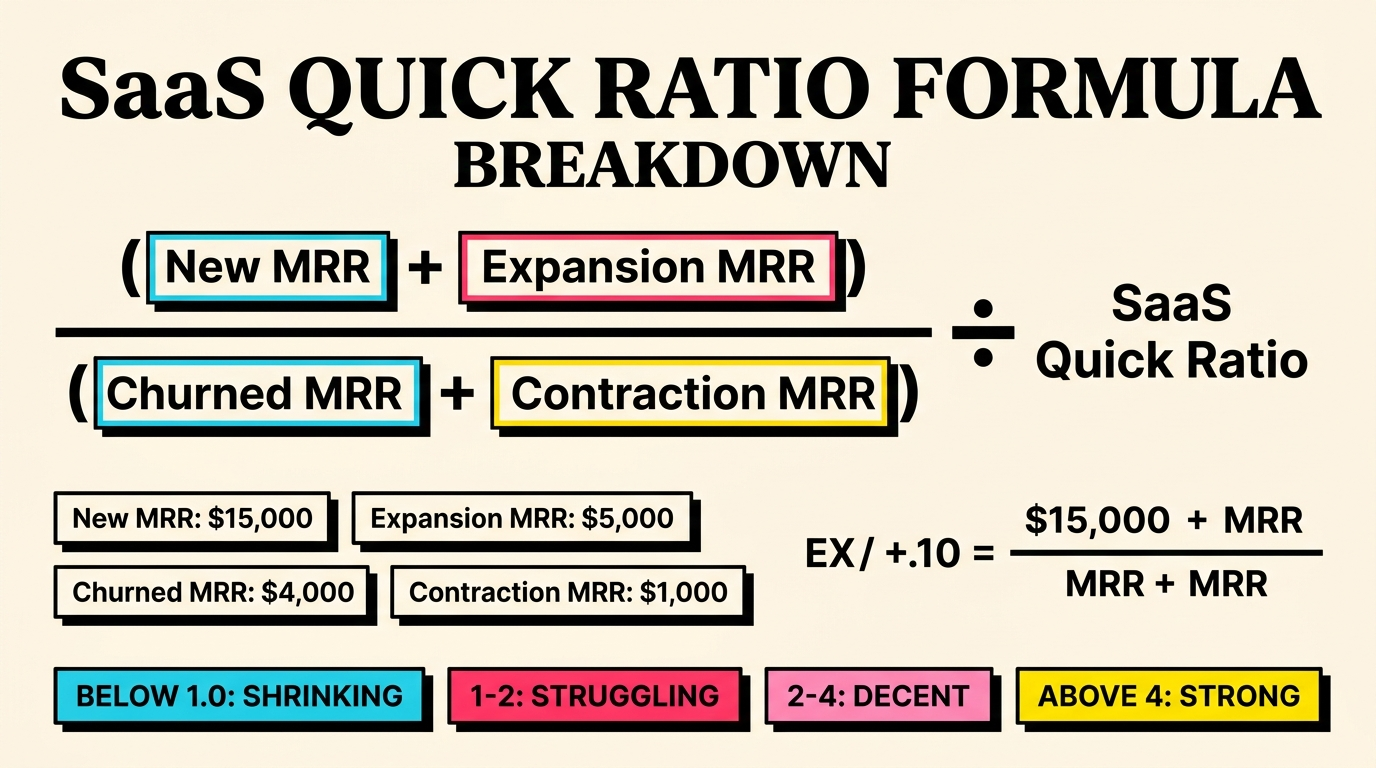
To calculate your SaaS quick ratio accurately, you need clean data on all four revenue streams. Here's what each one means in practice.
New MRR
Revenue from brand-new customers who signed up during the period. This is your acquisition engine. If you're on Stripe, filter for subscriptions with a created date within the month and grab their first invoice amount.
Watch out for: free trial conversions that technically "started" in a prior month, annual plans that show a lump sum (normalize to monthly), and promotional pricing that inflates new MRR temporarily.
Expansion MRR
Revenue increases from existing customers. Plan upgrades, seat additions, usage overages, add-on purchases. This is the growth that costs you almost nothing to acquire.
Expansion MRR is the lever most early-stage founders underutilize. If your expansion rate exceeds your churn rate, you've achieved negative net revenue churn, which is the holy grail of SaaS economics.
Churned MRR
Revenue lost from customers who cancelled entirely. This is the most painful component because it represents complete relationship failure. The customer decided your product isn't worth paying for.
Two types matter here: voluntary churn (the customer actively cancelled) and involuntary churn (their payment failed and they dropped off). That distinction is critical because involuntary churn is almost entirely preventable with the right payment recovery systems.
Contraction MRR
Revenue decreases from existing customers who downgraded. They're still paying, just less. This is often a leading indicator: customers who contract frequently churn within 3-6 months.
Contraction is the canary in the coal mine. If you see contraction MRR climbing, dig into why. Are customers finding they over-provisioned? Is a competitor offering a cheaper tier? Are they pulling back spend before cancelling?
How to Calculate Your Quick Ratio (Step by Step)
Here's the practical workflow for getting this number from your Stripe data.
Step 1: Define Your Period
Monthly is standard. Quarterly smooths out noise for smaller businesses. Weekly is too volatile for most.
Step 2: Pull Your MRR Components
From Stripe, you need:
- New MRR: Sum of first subscription invoices for new customers created this period
- Expansion MRR: Sum of positive MRR changes for existing customers (upgrades, seat additions)
- Churned MRR: Sum of MRR from subscriptions that moved to
canceledstatus - Contraction MRR: Sum of negative MRR changes for customers who are still active but paying less
If you're using Stripe Billing, the invoice.paid and customer.subscription.updated webhooks give you most of this. For manual tracking, export your subscription data and compare month-over-month per customer.
Step 3: Run the Formula
Quick Ratio = (New MRR + Expansion MRR) / (Churned MRR + Contraction MRR)
Example with real numbers:
- New MRR: $8,500
- Expansion MRR: $2,200
- Churned MRR: $1,800
- Contraction MRR: $700
Quick Ratio = ($8,500 + $2,200) / ($1,800 + $700) = $10,700 / $2,500 = 4.28
That's a healthy ratio. For every dollar lost, this business adds $4.28.
Step 4: Track the Trend
One month's quick ratio is a snapshot. The trend over 6-12 months tells you whether your business is getting healthier or sicker. A declining quick ratio, even if still above 4.0, demands attention.
Quick Ratio Benchmarks: What Good Looks Like
Industry benchmarks vary by stage and segment, but here's what the data shows:
- Above 4.0: Strong, efficient growth. Investor-grade.
- 2.0 to 4.0: Decent growth, but churn is dragging. Room for improvement.
- 1.0 to 2.0: Growth barely outpacing losses. Churn is a serious problem.
- Below 1.0: Shrinking. More revenue leaving than arriving.
Stage matters. Early-stage startups often have quick ratios above 10 because their churn base is tiny relative to new customer acquisition. As you scale, maintaining a 4.0+ gets progressively harder because the denominator (churn + contraction) grows with your customer base.
For more context on what healthy recovery rates look like, check the payment recovery benchmarks page.
The best-in-class SaaS companies at scale (think $10M+ ARR) maintain quick ratios between 3.5 and 5.0. Below 3.0 at scale usually signals a product or retention issue.
Why Involuntary Churn Destroys Your Quick Ratio
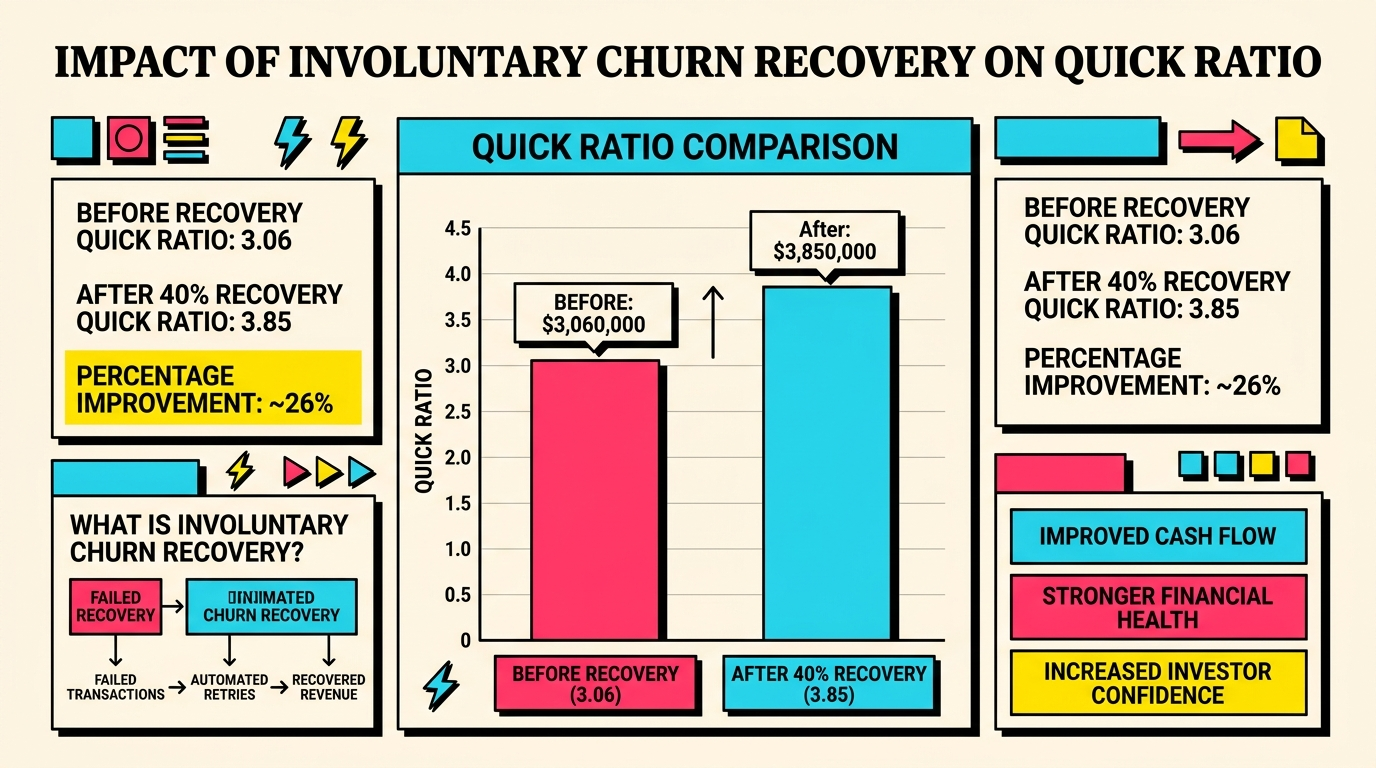
Here's where it gets interesting for payment-focused founders. Involuntary churn, the customers you lose because their payment failed, directly inflates the denominator of your quick ratio.
Consider a company with these monthly numbers:
- Churned MRR: $3,000 (of which $1,200 is involuntary)
- Contraction MRR: $500
Their denominator is $3,500. If they recovered even 60% of that involuntary churn ($720), their new denominator drops to $2,780. That alone improves the quick ratio from 3.06 to 3.85, assuming $10,700 in the numerator.
That's the difference between "decent but concerning" and "strong growth." And it came entirely from recovering payments that should have been collected anyway.
Involuntary churn is unique because it's not a product problem. The customer didn't choose to leave. Their card expired, hit a spending limit, or their bank flagged the charge. These are mechanical failures, not relationship failures.
The typical SaaS business loses 20-40% of its total churn to involuntary causes. For companies not actively managing payment recovery, that number skews higher. Every dollar of involuntary churn you prevent directly improves your SaaS quick ratio without requiring a single new customer.
Quick Ratio vs Other Metrics
The quick ratio doesn't replace other metrics. It complements them. Here's how it fits into the broader picture.
Quick Ratio vs Net Revenue Retention (NRR)
Net revenue retention measures how much revenue you keep and grow from existing customers over a period (typically annually). NRR above 100% means your existing base is growing.
The difference: NRR focuses exclusively on the existing cohort. Quick ratio includes new customer acquisition. NRR tells you if your product retains value. Quick ratio tells you if your overall growth engine is sustainable.
Use both. NRR diagnoses product-market fit. Quick ratio diagnoses growth efficiency.
Quick Ratio vs Gross Churn Rate
Gross churn rate tells you the percentage of revenue you're losing. Quick ratio tells you how efficiently you're replacing what you lose. A 5% gross churn rate sounds bad until you see you're replacing it at 20% growth. Context matters.
Quick Ratio vs LTV:CAC
LTV:CAC measures unit economics at the customer level. Quick ratio measures aggregate revenue momentum. You can have great LTV:CAC but a mediocre quick ratio if your acquisition volume is low relative to churn.
Five Strategies to Improve Your Quick Ratio
Improving your SaaS quick ratio means either increasing the numerator (new + expansion) or decreasing the denominator (churn + contraction). Here are five concrete strategies.
1. Fix Involuntary Churn First (Fastest ROI)
Payment recovery has the best effort-to-impact ratio of any quick ratio improvement strategy. You're not acquiring new customers or building new features. You're just collecting money that's already owed to you.
Start with the basics:
- Set up automatic retry logic with intelligent timing (not just Stripe's defaults)
- Send pre-dunning emails before cards expire
- Make the payment update flow frictionless (one-click links, not "log into your account")
- Monitor your decline codes to understand failure patterns
Most SaaS businesses can recover 30-50% of failed payments with proper dunning. At $1,200/month in involuntary churn, recovering 40% means $480/month back in your pocket, $5,760/year, with zero acquisition cost.
2. Build Expansion Revenue Into Your Pricing
If expansion MRR is low, your pricing model probably doesn't reward growth. Usage-based components, seat-based tiers, and feature gates that unlock at higher plans all create natural expansion paths.
The companies with the best quick ratios have expansion revenue that contributes 20-30% of their total new revenue each month. Design your pricing to grow with customer success, not despite it.
3. Reduce Time to Value for New Customers
New MRR only counts if those customers stick. If your onboarding is slow and customers churn in month 2, you're inflating the numerator temporarily while guaranteeing future denominator growth.
Focus on getting customers to their "aha moment" faster. Track activation metrics. Build guided onboarding flows. The faster customers see value, the less they churn, and the more your quick ratio benefits.
4. Implement Early Warning Systems for Contraction
Contraction MRR is predictable if you track engagement. Customers who stop using key features, reduce seat counts, or decrease login frequency are contraction risks.
Build a simple scoring model:
- Login frequency declining > 30% month-over-month
- Feature adoption below 40% after 90 days
- Support tickets increasing (frustration signal)
- Billing contact changed (often precedes cancellation)
Intervene before the downgrade. A proactive check-in email from a founder converts better than any automated retention flow.
5. Segment Your Quick Ratio by Cohort
The overall quick ratio is useful, but cohort analysis reveals where problems actually live. Calculate quick ratio for:
- Customer segment: Enterprise vs SMB vs self-serve
- Acquisition channel: Organic vs paid vs referral
- Geography: Different regions have different payment failure patterns
- Plan tier: Starter vs growth vs enterprise
You'll often find that one segment drags down the whole number. Fix that segment and the aggregate improves dramatically.
Building Quick Ratio Into Your Dashboard
If you're not tracking this metric already, here's how to get started with minimal effort.
Option A: Spreadsheet (5 Minutes)
Create four columns in a Google Sheet: New MRR, Expansion MRR, Churned MRR, Contraction MRR. Fill them monthly from Stripe exports. Add a formula column for quick ratio. Plot the trend.
This works for early-stage startups doing under $50K MRR. You can pull the numbers manually in 15 minutes once a month.
Option B: Stripe + Webhooks (30 Minutes)
If you've built a churn dashboard, add the quick ratio as a derived metric. You already have the raw data from subscription events. The calculation is simple division.
Option C: Dedicated Tools
ProfitWell, ChartMogul, and Baremetrics all calculate quick ratio natively. Connect your Stripe account and the metric appears automatically with historical data.
Common Quick Ratio Mistakes
A few pitfalls to avoid when calculating and interpreting this metric.
Mistake 1: Mixing Annual and Monthly Revenue
If you count a $12,000 annual plan as $12,000 of new MRR in the month it's signed, your quick ratio will be wildly inflated. Always normalize to monthly: that annual plan is $1,000/month of new MRR.
Mistake 2: Ignoring Reactivations
Customers who churn and come back are tricky. If you count them as "new MRR" in the numerator, you're double-counting (you already counted their loss in a prior month's denominator). Most tools handle this correctly, but spreadsheet trackers often don't.
Mistake 3: Not Separating Voluntary and Involuntary Churn
Your quick ratio is the same whether churn is voluntary or involuntary. But the fix is completely different. If 40% of your churned MRR is involuntary, you have a payment operations problem, not a product problem. Conflating them leads to wrong priorities.
Mistake 4: Benchmarking Across Stages
A seed-stage company with a quick ratio of 8.0 isn't healthier than a Series C company at 3.5. Stage and scale matter enormously. Compare your quick ratio to companies at similar ARR levels, not to industry headlines.
What Your Quick Ratio Is Really Telling You
The SaaS quick ratio isn't just a number. It's a diagnostic tool. Here's how to read the signal:
Quick ratio declining over 3+ months: Your growth is getting less efficient. Either churn is accelerating, acquisition is slowing, or both. Investigate immediately.
Quick ratio stable but below 3.0: You have a structural retention problem. Your product may not be delivering enough value, your pricing might be wrong, or you're attracting the wrong customers.
Quick ratio above 4.0 but volatile: Month-to-month swings suggest lumpy revenue (big annual deals, seasonal acquisition). Smooth it with a trailing 3-month average.
Quick ratio above 4.0 and stable: You're in good shape. Focus on maintaining it as you scale, because it naturally erodes as your customer base grows.
The Compounding Effect of a Better Quick Ratio
Small improvements to your quick ratio compound dramatically over time. Recovering $500/month in failed payments doesn't sound like much. But that $500 stays in your MRR base, generates expansion revenue, and avoids the acquisition cost of replacing that customer.
Over 12 months, $500/month in recovered involuntary churn translates to $6,000 in preserved ARR. If those retained customers expand at even 5% annually, it's $6,300. And since you didn't need to spend CAC to acquire a replacement, the true value is higher still.
This is why the best SaaS operators obsess over the denominator of the quick ratio, not just the numerator. Growth is expensive. Retention is (relatively) cheap.
Start Measuring Today
If you take one thing from this post, let it be this: calculate your quick ratio this week. Pull last month's numbers from Stripe, run the formula, and see where you stand. Then do it again next month. The trend will tell you more than any single snapshot.
And if you suspect involuntary churn is dragging your ratio down, run a free churn audit to see exactly how much revenue you're losing to failed payments. It takes two minutes, connects to your Stripe account read-only, and shows you the specific dollar amount you could recover.
Your MRR growth rate gets the headlines. Your quick ratio tells the real story.
Related Posts
Stripe Insufficient Funds Recovery: A Playbook for SaaS Teams
Stripe Do Not Honor Recovery: What SaaS Teams Should Do Next

7 Payment Recovery KPIs Every Stripe Team Should Track
How healthy is your Stripe account?
Get a free churn health report. Find pending cancellations, failed payments, and expiring cards putting your MRR at risk.
Run Free Audit